Adobe Commerce file permissions readiness check issues
Learn how to solve Adobe Commerce file permissions readiness check issues by ensuring that the required files and directories are writable by the web server user and the Adobe Commerce file system owner. Apply the appropriate chmod permissions for a one-user setup, or update group ownership with chown and configure shared group permissions for a two-user setup. If the file system owner cannot change the permissions, run the commands with root privileges.
Description description
Environment
Adobe Commerce is installed on a server, and the directories in the Adobe Commerce file system must be writable by the web server user and the Adobe Commerce file system owner, if applicable.
- One user means you log in to the Adobe Commerce server as the same user that runs the web server.
- Two users means you log in as one user and run the web server as a different user.
Issue/Symptoms
File permissions readiness check issues occur when the required Adobe Commerce directories don’t have the correct permissions.
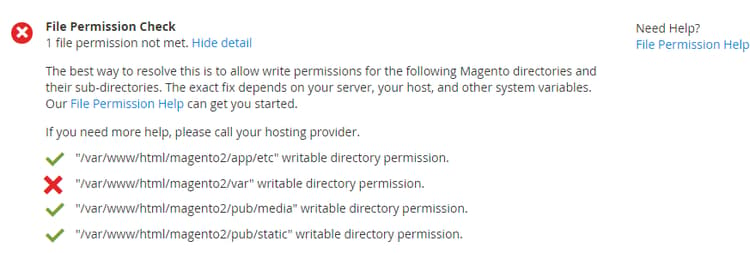
Resolution resolution
One-user resolution
If you have command-line access, enter the following command, assuming Adobe Commerce is installed in /var/www/html/magento2:
cd /var/www/html/magento2 && find var vendor pub/static pub/media app/etc -type f -exec chmod g+w {} + && find var vendor pub/static pub/media app/etc -type d -exec chmod g+w {} + && chmod u+x bin/magento
If you do not have command-line access, use an FTP client or file manager provided by your hosting provider to set permissions.
Two-user resolution
Assuming Adobe Commerce is installed in /var/www/html/magento2 and the web server group name is apache, enter:
cd /var/www/html/magento2 && find var vendor pub/static pub/media app/etc -type f -exec chmod g+w {} + && find var vendor pub/static pub/media app/etc -type d -exec chmod g+ws {} + && chown -R :apache . && chmod u+x bin/magento
If the permissions cannot be changed by the Adobe Commerce file system owner, run the following command as a user with root privileges:
cd /var/www/html/magento2 && sudo find var vendor pub/static pub/media app/etc -type f -exec chmod g+w {} + && sudo find var vendor pub/static pub/media app/etc -type d -exec chmod g+ws {} + && sudo chown -R :apache . && sudo chmod u+x bin/magento