Adobe Experience Manager: Configuration Manager stops in AEM Forms 6.5 LTS if the credential store isn’t configured
Configuration Manager stops on the Deploy AEM Forms EAR files screen during AEM Forms 6.5 LTS installation and displays the error JBOSS did not come online. This issue occurs when Configuration Manager runs without a configured database credential store. To resolve the issue, configure the database credential store before running Configuration Manager.
Description description
Environment
- Product: Adobe Experience Manager Forms, v 6.5
- Scenario: AEM Forms 6.5 LTS SP1 installation on JBoss EAP 8
Issue/Symptoms
- Configuration Manager stops on the Deploy AEM Forms EAR files screen
- Configuration Manager displays the error JBOSS did not come online
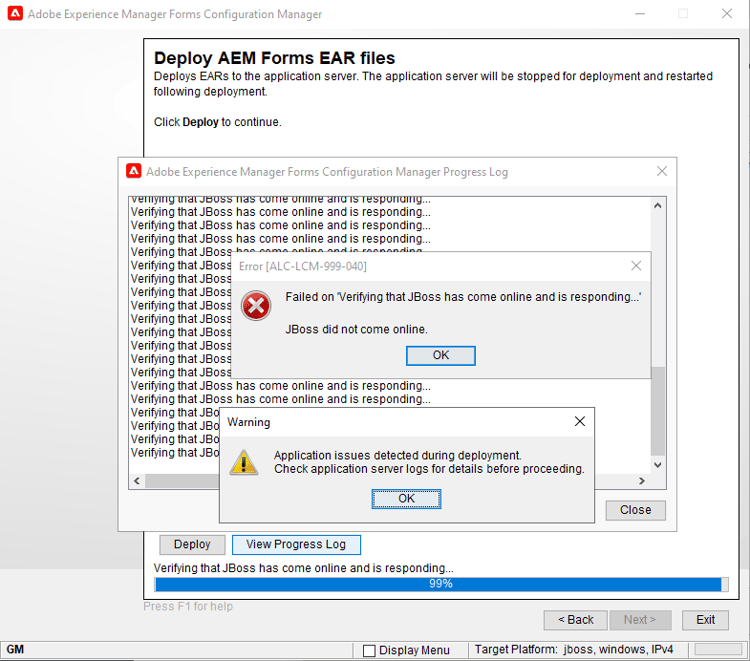
- The deployment process doesn’t proceed past the EAR files installation step
- JBoss server doesn’t start during Configuration Manager execution
Resolution resolution
AEM Forms 6.5 LTS uses a newer JBoss version that requires a configured database credential store before running Configuration Manager. Without this configuration, the deployment step doesn’t complete successfully.
-
Install AEM Forms 6.5 LTS using the full installer to ensure all required components are available.
-
Download the 6.5.1.LTS_Scripts creates a cred-store script package from Software Distribution.
-
Stop the AEM Forms instance and the JBoss server completely before creating the database credential store.
-
Create the database credential store and update the JBoss configuration file using the
create-elytron-cred-standalonescript. The example for the standalone configuration for the Windows server is as follows:-
Run the
create-elytron-cred-standalone.batscript.code language-none > cd c:\<SCRIPT_LOCATION> > create-elytron-cred-standalone.bat Enter JBOSS_HOME path (e.g. /opt/jboss): C:\Adobe\Adobe_Experience_Manager_Forms\jboss Enter configuration file name (e.g. lc_<b></b>*.xml): lc_turnkey.xml Enter credential store password: <database_credential_store_password> Confirm credential store password: <database_credential_store_password> Enter database password: <database_password> -
Add the password to the
\bin\standalone.conf.batfile for Java options.code language-none set "JAVA_OPTS=%JAVA_OPTS% -DCS_PASS=<database_credential_store_password>"On Linux, use the
.shscript instead of the .bat script and adjust the paths accordingly.
-
-
Start the JBoss server, then run Configuration Manager again to complete the deployment successfully.
Note: AEM Forms 6.5 LTS SP2 Turnkey configures the database credential store automatically, so you can skip the script download and credential store creation steps.