Adobe Experience Manager Forms: Database Initialization fails in Configuration Manager with AEM Forms 6.5 LTS SP1
Configuration Manager fails during the Database Initialization step after installing AEM Forms 6.5 LTS SP1. The process stops with error code ALC-TTN-011-003 and bootstrap or Jakarta Enterprise Beans invocation errors.
To resolve the issue, restore a backup taken before installation and install AEM Forms 6.5 LTS SP2 or a later version.
Description description
After installing AEM Forms 6.5 LTS SP1 (JBoss EAP) on Windows Server 2022 and running Configuration Manager, the process stops at the “Database initialization” step with error code ALC-TTN-011-003. As a result, subsequent steps aren’t executed, and the setup can’t be completed.
Environment
- Adobe Experience Manager Forms
- AEM Forms 6.5 LTS SP1 installation using JBoss EAP on Microsoft Windows
Issue/Symptoms
ALC-TTN-011-003: Bootstrapping failed for platform component [ UserManager] . The wrapped exception's message reads:
Failed to load default configuration. error:jakarta.ejb.EJBException: WFLYEJB0442: Unexpected Error
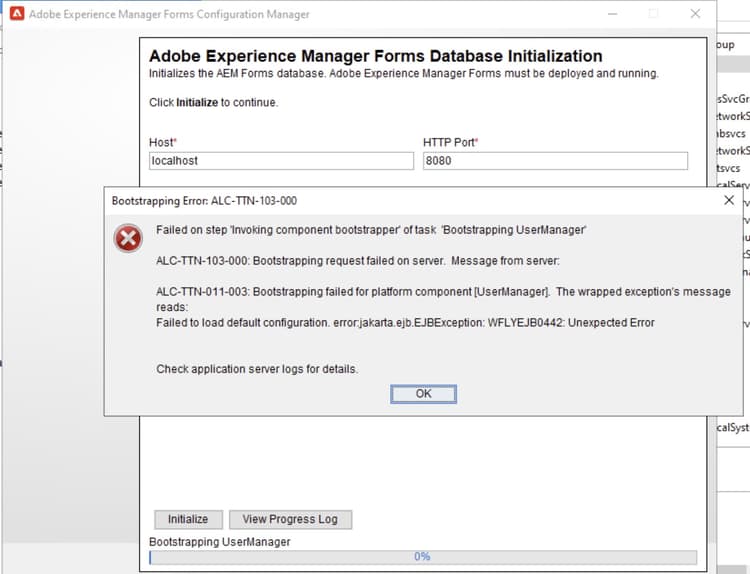
The following ERROR messages also appear in server.log.
Example:

ERROR [ org.jboss.as.ejb3.invocation]  (ServerService Thread Pool -- 169) WFLYEJB0034: Jakarta Enterprise Beans Invocation failed on component adobe_POFDataDictionaryLocalEJB for method public abstract com.adobe.pof.schema.POFObjectType com.adobe.pof.schema.POFDataDictionaryLocal.getObjectType(java.lang.String,java.lang.String,com.adobe.idp.Context) throws com.adobe.pof.POFException: jakarta.ejb.EJBException: java.sql.SQLSyntaxErrorException: Table 'adobe.omd_object_type' doesn't existat org.jboss.as.ejb3@8.0.8.GA-redhat-00001//org.jboss.as.ejb3.tx.CMTTxInterceptor.invokeInOurTx(CMTTxInterceptor.java:268)...at org.jboss.threads@2.4.0.Final-redhat-00001//org.jboss.threads.JBossThread.run(JBossThread.java:513)
Caused by: java.sql.SQLSyntaxErrorException: Table 'adobe.omd_object_type' doesn't existat deployment.adobe-livecycle-jboss.ear//com.adobe.pof.adapter.JDBCAdapter.loadObjectType(JDBCAdapter.java:4446)
- Configuration Manager stops at the Database Initialization step.
- Configuration Manager displays error code ALC-TTN-011-003.
- Server logs show bootstrap and Jakarta Enterprise Beans invocation errors.
- SQL errors appear during initialization.
Resolution resolution
This issue is fixed in AEM Forms 6.5 LTS SP2.
Follow these steps to resolve
- Restore the instance from a backup taken before AEM Forms 6.5 LTS SP1 installation.
- Install AEM Forms 6.5 LTS SP2 or a later version to apply the permanent fix.