Distribute your leads Round Robin or Randomly
Description description
Distributing leads to sales reps is easy. Marketo, however, only supports random distribution. This gives a pretty good approximation of the round robin technique.
Prerequisites:
-
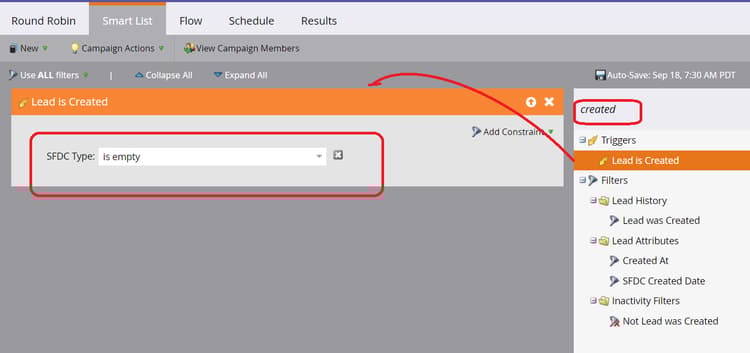
Go to the Smart List tab of the campaign you created, find and drag in the Lead is Created trigger. Tip: Use the trigger that logically would come right before you want to assign the lead to a rep.
-
I’ve added the constraint “SFDC Type is empty” so that records that already exist in Salesforce do not get re-assigned.
-
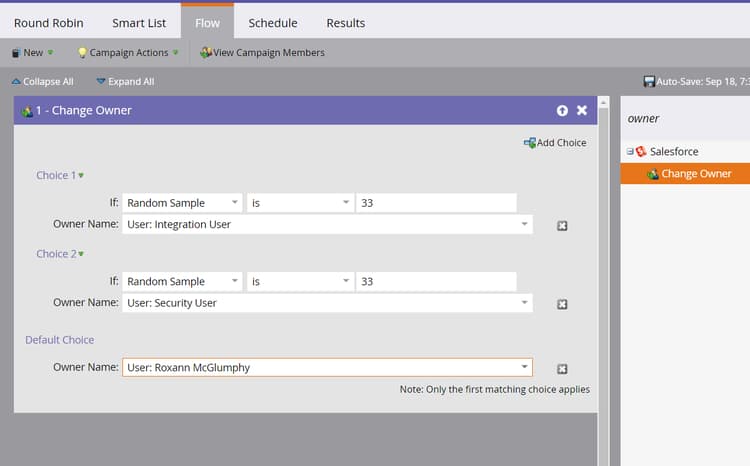
Go to the Flow tab, find and drag in the Change Owner flow step.
-
If you have 3 lead owners click on the Add Choice button 2 times. You always want the number of choices to equal the number of owners in the round robin minus one.This is because the last person goes in the Default slot.
-
Find and select Random Sample.
-
100% divided by 3 sales reps is 33%, enter “33”.
-
Find and select the first sales rep.
-
Repeat steps 4, 5 and 6 for every remaining choice. Be sure to fill out the default choice also.
-
Activate the campaign and it should now distribute leads randomly to your lead owners.
Resolution resolution
For technical assistance contact Marketo Engage Customer Support.