Error when creating a ditamap in AEM
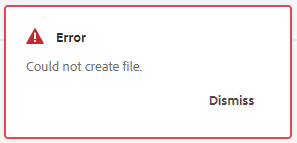
If you encounter an error message - Could not create file while creating a ditamap in Adobe Experience Manager (AEM), it is likely due to an invalid path assigned for the document states. The recommended path for this is /content/dam which is also the default path. Follow the steps given in this article to resolve the issue.
Description description
Environment
Adobe Experience Manager
Adobe Experience Manager Guides
Issue/Symptoms
When creating a ditamap, if the following error is shown on the screen even though the ditamap is successfully created:
The following errors are seen in the error.log:
[ sling-threadpool-d9e57073-a6fb-498c-acdc-5427d775fa27-(apache-sling-job-thread-pool)-31-DXML Post Processing Queue(com/adobe/dxml/postprocess)]  com.adobe.fmdita.uuid.concrete.VersionReferenceCache Error: Unable to find btree prop for ref GUID-fe90ee76-5aa9-4ea2-9e73-61e57af9f0ec.ditamap
javax.jcr.PathNotFoundException: GUID-fe90ee76-5aa9-4ea2-9e73-61e57af9f0ec not found on /var/dxml/btree/version-references-v2/630dc546-719b-4bb8-bdf5-643c44c1bbc7/bc0cdd2b-562c-4619-a8b7-042b21b8cd66/25cf3f9e-7492-4316-8aa6-2a2282308887
at org.apache.jackrabbit.oak.jcr.session.NodeImpl$11.perform(NodeImpl.java:671) [ org.apache.jackrabbit.oak-jcr:1.58.0.T20231123092841-619e1bd]
and
[ sling-threadpool-d9e57073-a6fb-498c-acdc-5427d775fa27-(apache-sling-job-thread-pool)-31-DXML Post Processing Queue(com/adobe/dxml/postprocess)]  com.adobe.fmdita.uuid.concrete.CORDefaultPostProcess Error: Using default document state Draft due to
javax.jcr.RepositoryException: Unable to fetch states profile for path /content/dam/Matt/alison_test.ditamap Please check whether a Profile has been assigned
at com.adobe.fmdita.profiles.states.ProfileService.getProfileByPath(ProfileService.java:96) [ com.adobe.fmdita.utils:2023.12.0]
at com.adobe.fmdita.uuid.concrete.CORDocstate.setdocstate(CORDocstate.java:37) [ com.adobe.fmdita.utils:2023.12.0]
at com.adobe.fmdita.uuid.concrete.CORDocstate.execute(CORDocstate.java:23) [ com.adobe.fmdita.utils:2023.12.0]
at com.adobe.fmdita.uuid.concrete.CORDefaultPostProcess.execute(CORDefaultPostProcess.java:1) [ com.adobe.fmdita.utils:2023.12.0]
Resolution resolution
To resolve the ditamap creation error message, follow these steps:
- Navigate to Tools
>Guides>Document States>Default Profile (or select the profile you are using) in the AEM interface. - Ensure that a valid path is assigned for the document states. The default and recommended path is
/content/dam. - If the path is missing or incorrect, add or correct the path to
/content/dam. - Save the changes and attempt to create a ditamap again to confirm that the error has been resolved.
recommendation-more-help
experience-cloud-kcs-help-kbarticles