Find the last modifier of the API Project using a Technical Account Email
This article explains how to find the last modifier of an API Project using the Technical Account Email ID. By following the steps outlined, you can identify the owner of a Technical Account Email responsible for significant API requests. This process involves using the Reporting Activity Manager UI to locate the Technical Account Email, then mapping it to the Linked IMS ID in Adobe Analytics, and finally searching for the API project in the API Project Management UI to discover the owner’s information.
Description description
Environment
Adobe Analytics
Issue/Symptoms
In the Reporting Activity Manager UI, your User ID (Technical Account Email) responsible for a significant number of API requests has been identified. However, you are uncertain about how to determine the owner of this Technical Account Email.
Resolution resolution
You can use the following workaround:
- From the Reporting Activity Manager UI, identify and copy the Technical Account Email ID responsible for the significant number of API requests.
-
- In Adobe Analytics, navigate to Admin
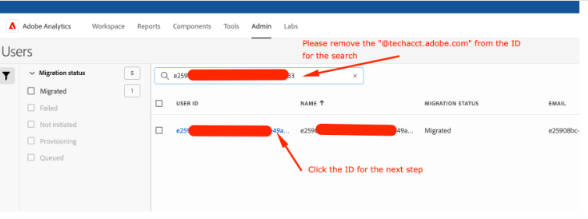
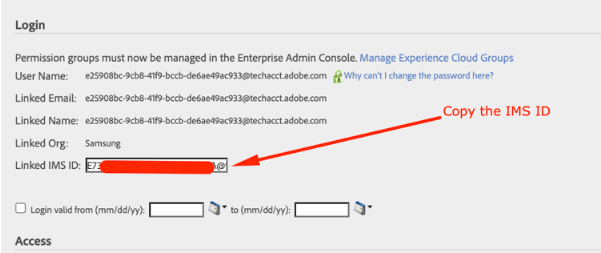
>Analytics users & assets UI. Paste the Technical Account Email ID you copied earlier in the search bar and locate the same to find the corresponding Linked IMS ID. -
- Copy this IMS ID.
-
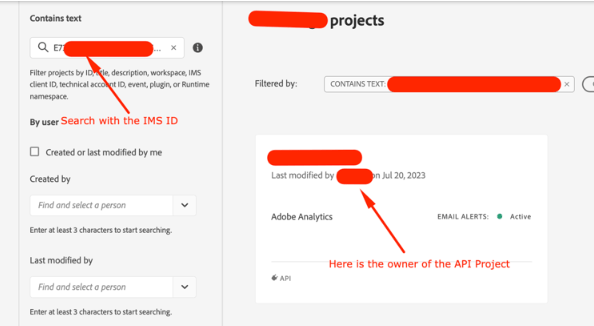
- Go to the API Project Management UI. Use the IMS ID you copied to search for the API project. You will then be able to see the owner’s information in the discovered API project.
-