Energizing Adobe Commerce with Adobe Experience Manager Assets and GenAI
Discover how Ankush Malhotra, Sr. Computer Scientist at Adobe, and Pablo Moreno, Sr. Software Engineer at Adobe, integrate Adobe Experience Manager Assets and GenAI with Adobe Express to enhance Adobe Commerce stores. Leverage on-brand approved image references, improve media content quality, and elevate e-commerce performance with this powerful combination.
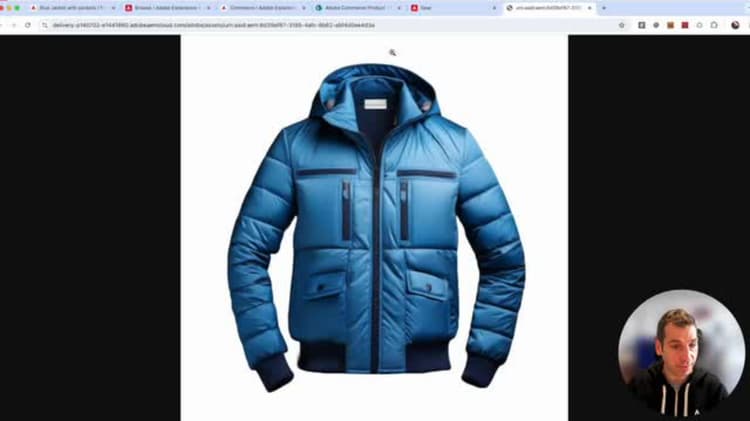
Hello, everyone. Welcome to the Dev Live session, Energizing Commerce with the EEM Assets in Gen AI. I am Ankush, Senior Developer with the EEM Assets Direct Media team, and my co-presenter, Pablo, is a Senior Developer from the Commerce team. Let’s quickly take a look at the agenda. We’ll cover why do we need this assets integration, a quick brief demo of how does the integration look in action, then some details about behind-the-scenes action, what is it needed to get this integration going, a brief overall summary, next step as to what are we planning in the immediate future, and finally, how can you be part of this VIP program. Moving along. So why do we need this integration brand consistency so that we get to use only approved assets in the storefront? If assets are being shared in an ad-hoc manner outside of the dam, then there’s always a risk that the brand side will end up using unapproved assets. You get to manage assets at a single place. You don’t have to download it from the dam every single time and then re-upload it to the Commerce. Asset governance. The assets integration enforces the different access restrictions on the asset as well as the expiry date. The assets which are passed, their expiry date are not available. And then obviously, assets or AEM assets can process very large files and create their web-optimized renditions, generate JPEG or PNG renditions from the camera raw files or have very web-optimized encodes from the very large-sized videos, and those are available for use in the Commerce storefront. Lastly, we get to add Commerce experience to the content supply chain storage. And without this assets integration, there’s a lot of manual effort spent in creating the variations, thereby failing to leverage AI or automation. One lacks the review and approval process that is so central to any dam, and this overall needs to have low operational efficiency. Let’s see now a real use case of the assets integration in action. In the following slide, you will see a video about how we can upload an image into AEM Assets, customize it using Adobe Express and later on get that image synchronized with Adobe Commerce. Let’s start by configuring the integration. So, you will find the configuration options under the Adobe Services section within the Settings configuration menu. Here you have AEM Assets integration, and in this page you will be able to configure, among other things, which AEM repository you want to sync with and the matching rule, by default the SKU value of a product, and also the asset selector AEM’s client ID, which is used to configure the page builder section, which I will show you in a few seconds. Within Content pages, we are going to create a new page, and I’m going to take advantage of that asset selector. So, here you can find a new option called AEM Assets, and within this option we have this asset selector, which goes directly into the AEM assets section, AEM Assets product, and allows us to pick up any of the assets from them. So, right now this image is remote, is not hosted in Adobe Commerce, is served and hosted in AEM Assets side. As you can see, the image is being rendered here, and now let’s take a look at the list of products that we have. And I’m going to create a new product. So, let’s put a name for our new jacket, let’s say a blue jacket with pockets, a value for the SKU field, which is the important one here, it is the field that will be used to match images for this product. Let’s put a price, select a category, I will use geo, and also the URL key is important, as we want to be able to link this product in our storefront. So, saving the product, and now let’s go to the store, see the list of products that we have, we only have one product, the white jacket, the blue jacket, this is still not there. There is no images, so let’s save the product. I’m going to copy the SKU just for the future, because I will need it later on. And let’s create a new asset in our AEM assets, our instance, as we will need this new image associated to the product. I’m going to copy an existing image, it’s this one, it’s automatically approved, because all the assets present in this Commerce folder are eligible for Adobe Commerce and automatically approved. This is something configurable, this is something that we recommend to set up, but it’s something that you can customize. And now the image has been added and processed, and I’m going to modify it, so let’s go to Adobe Express to edit this image. And as you may know, we can use AI functionalities within Adobe Express. In this case, I’m going to use the AI to modify this image, and I would like to define new pockets. I don’t like these ones, so I’m going to add new ones. So let’s put something here on the prompt.
I would like to say, yeah, this is the area that I want to modify. Left pocket, right pocket. Pocket. Okay, now let’s fill it here, the decks, I want. New pockets. Yeah, let’s say that I want the open on the top. Pocket. Okay, now it’s processing and it will show different variations based on the prompt that I’ve provided. And here we have new pockets. Okay, so we have three options. Let’s see all of them. Okay, nice pockets, but I’m going to pick the first one. Yes, okay, this one. Now save the image. Okay, new pockets, and show that it’s in the Commerce folder. And save again. Okay, the image is being processed and it will be available in a few seconds. Let me refresh the page. Yeah, our image is there. It’s processing but it’s fine. We can start working with it. So let me edit the properties and we will do two things here. So we have a new tab called Commerce and two fields. One that says that the image is eligible for Commerce and the other one that says the SKU, the role and the position for this image. So this information will be treated as metadata and will be used by the asset integration to associate this image with the desirate product, the blue jacket with pockets. So it will take one minute, two minutes maybe, to have the image available here in the Commerce. So it could be less. Let me refresh the page. And yeah, it is there. So the image arrived. Here you can see that the URL is no longer a hosted image path. So it’s a remote path served by IAM assets. So this is how we can send an image from IAM assets, edit it using AI, synchronize it with Commerce and later on have this image available here in the storefront.
So in the storefront will be the same as in Commerce. The image is not hosted in the storefront, is not hosted in Commerce, it will be hosted and served by IAM assets. Here you can see the URL pointing to the remote assets delivery API.
We have just seen how to customize product images using IAM assets. Now I would like to share with you another demo about how IAM assets gets fully integrated with Edge delivery. Let’s continue from where we left off before. This is our blue jacket and I’m going to add it to the cart. In the meantime, we will be seeing all the images related to this blue jacket, all of them being served by IAM assets, specifically by the assets delivery API, which will be catching and transforming our images based on our needs. Mini-cart, shipping cart, checkout, search box results. All of these images are being served by assets delivery API. So at the end our integration is reusing the existing droppings for PDP, cart and checkout, and also the widget for PLP to customize the media content, because these widgets and droppings are taking advantage of the Adobe Commerce GraphQL and also the catalog install from API GraphQL. Therefore, remember that any update on the blue jacket image will be synchronized not only with your Adobe Commerce, but also with your store phone, reducing the time to market for these images and unifying the image management in a single place. After these end-to-end demonstrations, let’s see what is going on behind the scenes and review the principal use cases to sync media files between IAM and IAM assets.
In the current scenario, Adobe Commerce is disconnected from IAM assets. We want to seamlessly synchronize our assets with our Commerce instance and display them in our storefront without extra effort. But this is not easily achievable. You can create a custom exception or build a system to move assets between the two platforms, but this requires considerable development work. And this is where assets integration comes into play. Assets integration follows an event-driven architecture using Adobe IAM events. As you can see, Assets Delivery API is written and it becomes the source of truth in regards to media files, and Adobe Commerce becomes the system of record, just storing asset URLs, as images will no longer be hosted in Commerce and only the asset URL is passed around. Assets integration listens for changes in the Assets Delivery layer, the hide box, identifies the products related to the updated assets and updates them accordingly. On the left side, when a product is created or updated, an event is triggered, which is managed by assets integration, fetching the latest assets and syncing them back to Commerce. So you can expect that within one or two minutes your assets will be visible in your storefront.
Let’s take a closer look to the storefront integration. For those already using EDS, the Edge Delivery storefront, there is nothing new except because the source of the images is no longer Adobe Commerce. When a product gets updated in Commerce, it is exported by one of the indexers to the Catalog storefront service, which handles product updates and exposes its own API for storefront consumption. For now, assets integration is compatible with PVP, Checkout and Card Drop-ins, and PVP widget as well. That means that both GraphQL APIs, the ones used by EDS to display product-related content, can now work with IAM asset images. But as I mentioned in the previous slide, only asset URLs are passed around. Therefore, when EDS renders an image, it will be served by Assets Delivery API, leveraging caching and building functions such as precising, cropping and much more, available out of the box with IAM assets. Now, let’s take a deeper look about how Adobe Commerce handles assets updates. There is a PHP extension in place that extends the existing REST and GraphQL APIs to expose the new endpoints to allow incoming asset updates, which can be installed using Composer. By default, and in order to avoid over-cleaning the Commerce instance, all the assets updates will be processed in an async way. Using the GravitonQ as the recommended queue system, and an event consumer attached to it, consuming messages progressively. This extension uses REST API to ingest an asset URL, ending the journey in the e-commerce database, using existing tables but also leveraging some specific details into its own tables to hold specific details for IAM assets. Of course, an asset could be removed as well from a product, which follows the same strategy as an asset update. In regards of the outbound communications, all the Commerce GraphQL endpoints have been adapted to expose the new media references, as we are no longer exporting a relative path to an image, and instead we are exporting a full URL pointing to our image in IAM assets. Now, another option available with this integration is the capability to customise how the assets are matched with a product. By default, and this is the recommended matching rule, all the assets are matched with the product using the product sku. But then there might be more complex scenarios where you might need to take into account several other matching options, like attributes, categories, customer profile, seasonable variations, etc. And here is where App Builder comes into the rescue, as it has been defined as the preferred method to extend and customise the asset rule engine. App Builder will allow any developer to build and develop or even publish in the marketplace an application written in JavaScript or TypeScript, so they can define their own matching rules. The App Builder application must contain two runtimes accessible from the asset rule engine. Asset to product will be used when the events are triggered by IAM assets, having an asset ID as an input and expecting a list of the related disk values. On the other hand, product to asset runtime will be used by the events triggered by Adobe Commerce, having a product sku as their input value and returning the list of asset IDs associated to the product. So in summary, asset rule engine will take care of all the connectivity between the Adobe Commerce and IAM assets leveraging the event-driven communication with the custom App Builder application. Here are the requirements. The package must be installed using Composer, and at this moment, only allowed match IDs accounts are authorized to download the PHP extension. As we are in beta and running under a VIP program, we want to ensure that we can offer the best possible support to those installing and using our integration. Note that, as I mentioned in the slides where we saw the architecture, to work under an event-driven system, RabbitMQ service must be enabled, and other VIP events as well. Once the package is included in your Composer JSON file and the services have been added to the proper config files, Magento App and Magento M-YAMLs, you will be ready to deploy and start configuring the integration in the Admin panel. Within the Admin panel, some of you might have these services already configured if you are already using other Adobe services, but in case not, here is the list of things that will require configuration. Adobe ID Events, Services Connector using your Magento Access Keys, Opening the new external media endpoint so we can perform remote updates, and finally configuring the IAM asset repository, being used by this extension, as well as the matching holds. So let’s see what it takes to set up this integration in IAM assets. I must mention, Direct Media License is a prerequisite to getting this integration going. Once you have the Direct Media License, you must log a support ticket to have Direct Media with OpenAPI enabled on your IAM Cloud service environment. This enablement is specific to every environment, so any environment that you want to integrate with Adobe Commerce must get enabled for Direct Media with OpenAPI. Then there is the public repository, Asset Commerce, which is essential to getting this integration going. You must merge this codebase into your own custom code and then install it via Cloud Manager Code Deployment Pipeline. Once you run the deployment pipeline, what it essentially does is it brings about this product data metadata field. After the pipeline is run, if you would go into your author instance and go to the metadata editor page of an asset, you will see this product SKUs component. So, to summarize, we saw how to configure this integration in Adobe Commerce and IAM assets, how we used Adobe Express in creating new variants of our product image. Once that is done, any approved commerce assets that carry product metadata will automatically be linked to products in commerce leveraging Adobe IOH events. Finally, those products were used in storefront powered by edge delivery services, thereby completing the entire life cycle of creation and consumption of the assets. Before ending this presentation, I would like to take a quick look to the next steps and explain what’s coming up in the following months in regards of the IAM assets. Here you can see two things. Looking at the bottom, there is a timeline we have been following in the last months about the different extension releases, adding support for new functionalities on each one of them. On the top, you can find the next three major features in the roadmap for 2025. First, adding compatibility for additional media types like PDF files or 3D files. Second, personalization at scale will allow commerce to target specific image variations to the customers based on their preferences and shopping experience. And finally, the down metadata enrichment will generate metadata cross-pollination between Adobe Commerce and IAM assets, using the integration data generated in commerce in relation to the images synced and bringing this data into IAM assets. Now, if you enjoyed this presentation and you see potential in this integration and the possibilities that it might bring to you, allow me share with you how you can join the VIP program and start using this integration. Just a couple of points. We expect some commitment during the development phase. Even though there is no commitment to bring to production this integration, we want to ensure that both parts learn from each other to find the best suitable integration for you. Also, this is a journey that we start and end together. And we will walk you not only during the onboarding phase, but also during the way to test integration and to complete its production loan. So just scan the square code or click on the link and our VIP program, our VIP team will review your request.
Community Discussion
Continue the conversation in the Adobe Developers Live Community discussion.
Key takeaways
- Purpose of Integration The integration aims to ensure brand consistency by using only approved assets, manage assets efficiently, enforce access restrictions, and handle large files for web optimization.
- Demo Overview A demo was provided showing how to upload, customize, and synchronize images between IAM assets and Adobe Commerce.
- Configuration Configuration options include selecting the IAM repository, setting SKU values, and using the asset selector image client ID.
- Asset Management The integration allows for remote hosting of images, which are served by IAM assets rather than Adobe Commerce.
- Customization Adobe Express can be used to edit images, including AI functionalities for modifications.
- Metadata and Synchronization Metadata fields like SKU and image roles are used to associate images with products, and updates are synchronized within 1-2 minutes.
- Event-Driven Architecture The integration uses Adobe IO events and an event-driven architecture to synchronize assets between IAM assets and Adobe Commerce.
- Compatibility The integration is compatible with PBB checkout, Control Pins, and B2B widgets, leveraging GraphQL APIs.
- Customization Options Developers can customize the asset matching rules using AI Builder applications.
- Setup Requirements Requires a running media license, support ticket for dynamic media with open API, and merging the public repository asset commerce code base.
- Future Roadmap Upcoming features include support for additional media types, personalization at scale, and metadata cross-pollination between Adobe Commerce and IAM assets.
- VIP Program Interested parties can join the VIP program for early access and support during the development and testing phases.