Journey Agent: Overview and User Guide
Introduction to Journey Agent in Adobe Journey Optimizer
Journey Agent enables Journey Optimizer users to create, analyze, and optimize marketing journeys using a natural language interface. With Journey Agent, practitioners can quickly build journeys, detect and resolve schedule or audience conflicts, analyze performance and drop-off points, and identify top-performing journeys to replicate for future campaigns. It empowers practitioners to make data-driven decisions, improve customer engagement, and streamline journey orchestration.
Journey Agent consists of four main jobs to be done:
- Journey Create: Build and configure marketing journeys through natural language prompts
- Channel Content Create: Generate, edit, and manage channel-specific content (email, push, SMS) for journeys using AI-powered content generation
- Journey Analyze: Analyze journeys, detect issues, uncover insights, and optimize customer engagement
In addition, Journey Simulation is a Journey Optimizer feature that includes Journey Simulate, an in-product, non-conversational AI capability with three sub-capabilities:
- Generating simulated users
- Generating event values
- Quick simulation
Journey Create: Use cases, AI capabilities and User guide journey-create
Overview
Journey Create enables Journey Optimizer users to build and configure marketing journeys using a natural language interface. With Journey Create, practitioners can quickly create journeys by describing their requirements in conversational prompts. The agent streamlines journey creation, allowing marketers to focus on strategy rather than technical configuration.
For more information, see Journey Create in the Adobe Journey Optimizer documentation.
Use cases
Key use cases for Journey Create
Journey Create offers capabilities that can be leveraged to accelerate marketing execution:
-
Event-triggered journey creation
- Create journeys that activate based on specific customer events.
- Design automated responses to customer actions in real-time.
- Build personalized communication flows based on customer behavior.
-
Audience-targeted journey creation
- Build journeys targeting specific audience segments.
- Design multi-step communication sequences with strategic timing.
-
Business-event triggered journey creation
- Create journeys that activate based on a particular business event and target a specified audience (e.g. product back in stock or game score change)
- Build personalized communication flows based on customer behavior.
-
Audience qualification journey creation
- Create journeys that activate as profiles enter or exit an audience segment definition.
- Build personalized communication flows based on customer behavior.
-
Conditional journey flows
- Create decision branches based on customer attributes.
- Design split paths that adapt to customer preferences.
-
Create journey from image
- Upload a reference image and ask the agent to create a journey using the image as reference.
- The agent extracts an editable prompt from the reference image.
For each of these use cases, the agent translates natural language requirements into structured journey configurations.
In scope and out of scope AI capabilities
In scope
The following capabilities are supported by Journey Create:
- Natural language journey creation: Allows users to describe journey flow in conversational language.
- Event-based and audience-based journeys: Supports both trigger-based and scheduled journey types, also business event and audience qualification.
- Conditional logic: Handles decision splits and branching based on customer attributes.
- Multi-channel messaging: Supports push notifications, email, and SMS channels.
- Journey scheduling: Configures start dates and timing for scheduled journeys.
Out of scope
The following functionalities are currently not supported:
- Advanced journey analytics
- Cross-journey orchestration
- A/B testing configuration
- InAudience expression generation
- Dataset lookup nodes
- Wave sending settings
- Schedule recurrence options
- Namespace selection for audiences
- Custom Action field mapping
- Complex data transformations
Sample prompts
Common prompts for journey creation
Here are examples of valuable prompts users can leverage to create journeys.
Event-triggered journey prompts
Store visit journey:
“Create a journey that starts when a user enters my store location. Send a push notification to welcome users to the store. Wait 2 days and check to see if the user has a valid email address. If the user has a valid email address, send an email survey to ask about their store experience. If the user does not have a valid email address, send a push notification to prompt for registration.”
Post-purchase journey:
“Create a journey that starts when a customer makes a purchase online. Send a push notification to thank them for their purchase. Next, check to see if they are loyalty members. If the user is a loyalty rewards member, send a second push notification with a 10% discount code. If the user is not a loyalty rewards member, send a push inviting them to sign up for the loyalty program. Wait 2 days and send a follow-up push with a survey about their purchase experience.”
Event-based promotion:
“Create a journey triggered when the game score reaches 50. Send an SMS message to loyalty reward members saying that they are eligible for a free slice of pizza from the partner sponsor.”
Audience-targeted journey prompts
Seasonal campaign:
“I want to create a journey targeting an audience of day hikers. I want to send an email alerting this audience to my upcoming holiday sale that includes a variety of hiking essentials. Wait 3 days after sending the first email and send a second email that has a 15% coupon with free shipping. Wait 1 week and then send a 3rd email message to show our new sleeping bag and tent collection. Schedule the journey to start on 12/20.”
Loyalty appreciation:
“Build a loyalty appreciation journey for SUV owners, including a thank you push notification with a free carwash offer and a follow-up push notification reminder if the first notification is not interacted with within 1 day.”
Open-ended prompts
For users starting without a specific journey in mind:
- “I’d like to create a journey”
- “Help me create a journey”
- “Create me a journey”
The agent will provide guidance and examples to help you define your journey requirements.
Best practices
Prompting best practices
To maximize the effectiveness of Journey Create, follow these best practices:
- Be Specific: Provide clear details about your journey goals, target audience, and desired actions. Include information about channels, timing, and conditions.
- Specify Timing: Clearly indicate wait periods between actions and when the journey should start.
- Define Conditions: When using conditional logic, explain the criteria for each branch path.
- Include Channels: Specify which communication channels you want to use (push, email, SMS).
- Mention Scheduling: For scheduled journeys, provide the desired start date and time.
- Custom Actions: If you are using custom actions in your workflow you need to specify that you are using a custom action along with the exact name of the custom action. Example:
When a user enters my store location send a welcome message using custom action ExternalPush. Wait 2 days and then send a follow up message using custom action ExternalEmail with a survey on their visit. - Validate Expressions: Make sure to check and validate any expressions that Journey Agent creates to ensure that the correct fields and values are used.
Setup best practices
- Define Clear Objectives: Before creating journeys, establish clear goals (improving retention, driving conversions, increasing engagement).
- Prepare Audiences: Ensure your target audiences are already created and properly segmented.
- Plan Message Content: Have your messaging strategy defined before journey creation.
- Consider Customer Experience: Design journey flows that respect customer preferences and avoid over-communication.
Channel Content Create: Use Cases, AI Capabilities and User Guide channel-content-create
Overview
Channel Content Create enables Journey Optimizer users to generate, edit, and manage channel-specific content for journeys using AI-powered content generation.
For more information, see Channel Content Create in the Adobe Journey Optimizer documentation.
Use cases
Key use cases for Channel Content Create
-
Channel-specific content generation: Generate content for email, push notifications, SMS, and other channels using natural language prompts.
-
Template-based content creation: Browse and select from available templates with preview capabilities.
-
Multi-channel content management: Generate and manage content for multiple channels within the same journey workflow.
-
In-context content editing: Open generated content in Content Designer for editing and refinement.
-
Content refinement and iteration: Regenerate content with different tones or styles using the Regenerate action.
-
Journey canvas integration: Select journeys from inventory and view associated channels.
In scope and out of scope AI capabilities
In scope
The following capabilities are supported by Channel Content Create:
- AI-powered content generation: Generate content for email, push, SMS, and other channels using natural language prompts.
- Template management: Browse and select from available templates with preview capabilities.
- In-context editing: Open generated content in Content Designer for editing and refinement.
- Content regeneration: Regenerate content with different tones, styles, or messaging using the Regenerate action.
- Multi-channel support: Generate and manage content for multiple channels within the same journey workflow.
- Journey inventory access: Select journeys from inventory and view associated channels.
Out of scope
The following functionalities are currently not supported:
- Brand alignment and content quality checks
- Insert content nodes directly into journey canvas
- Template import
Sample prompts
Content generation
“Generate email content for my welcome journey. Create a welcome email for new customers with a friendly tone and include a 10% discount offer.”
“Add content for channel email for my welcome journey.”
“Generate a push notification for my store visit journey. Create a welcome message that encourages customers to check in and receive a special offer.”
“Generate SMS content for my event-triggered journey. Create a short message notifying customers about a flash sale with a call-to-action.”
Template selection
“Show me available email templates for my seasonal campaign journey.”
“Select a template for my email that has a modern, clean design.”
Content editing and refinement
“Open the email content in Content Designer so I can customize the design.”
“Regenerate the push notification content with a more casual tone.”
“Update the email content to include a promotional code.”
Best practices
Prompting best practices
- Be Specific: Provide clear details about the content type, tone, target audience, and key messaging.
- Specify Channel: Clearly indicate which channel you are creating content for (email, push, SMS).
- Define Tone: Specify the desired tone (friendly, formal, casual, urgent).
- Iterate and Refine: Use the regenerate action to refine content until it meets your requirements.
Journey Analyze: Use Cases, AI Capabilities and User Guide journey-analyze
Overview
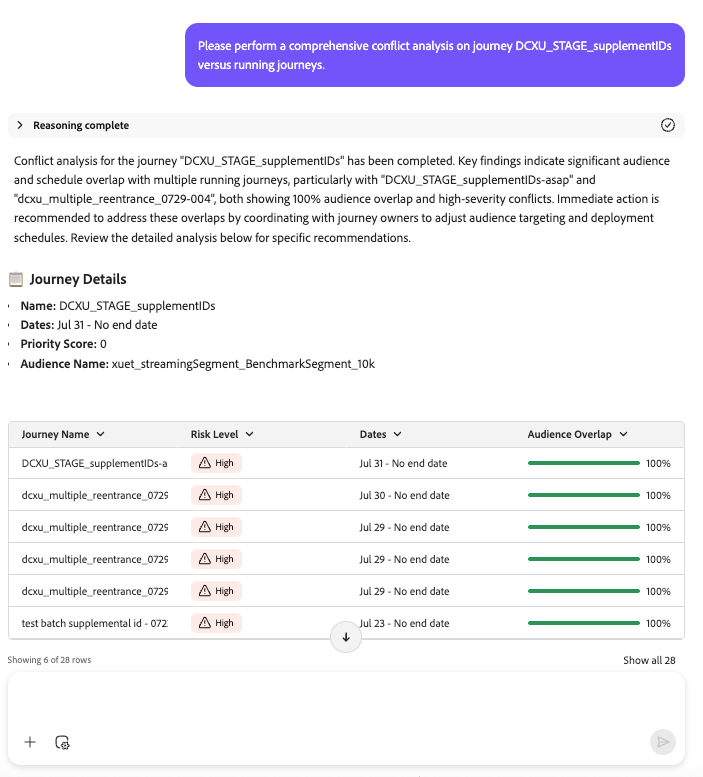
Journey Analyze enables Journey Optimizer users to analyze and optimize journeys using a natural language interface. With Journey Analyze, practitioners can quickly identify and resolve schedule and audience conflicts, detect points of user abandonment in a journey, and surface insights or recommendations to improve performance.
Learn more and discover the agent at a glance in this overview.
For more information, see Journey Analyze in the Adobe Journey Optimizer documentation.
Use Cases
Key Use Cases for Journey Analyze
Journey Analyze offers a range of functionalities that can be leveraged to optimize marketing efforts:
-
Journey Fallout Analysis
- Identify where and why customers drop off during a journey.
- Detect patterns in customer behavior leading to disengagement.
- Use insights to refine journey design and improve retention.
-
Journey Audience Overlap Analysis
- Analyze audience overlap across multiple journeys.
- Prevent audience fatigue caused by over-targeting.
- Optimize segmentation to ensure balanced engagement.
-
Journey Schedule Overlap Analysis
- Detect timing conflicts between scheduled journeys targeting the same audience.
- Avoid over-communication and improve scheduling efficiency.
- Maximize audience impact by ensuring journeys run at optimal times.
-
Operational insights
- Prompt-based Journey Insights – Surface operational insights about journeys , i.e. “show me all live journeys.”
-
Journey Custom Action Error Analysis
- Identify when custom actions are failing or error rates spike within a journey.
- Diagnose root causes before failures cascade into broader journey disruption.
- Use specific remediation steps to restore custom action reliability quickly.
-
Analyze Journey Anomalies
- Detect unexpected spikes, drops, or flatlines in a journey’s entry, exit, or message-send counts compared to historical baselines, including when the question is phrased around the number of profiles entering, exiting, or completing the journey.
- Confirm whether a flagged change is a genuine anomaly using a deterministic statistical check, rather than relying on the raw anomaly flag alone.
- Run bounded, read-only diagnostics against journey-execution data to identify a likely root cause, surfacing what each check looked for and found alongside the recommendation.
- Investigate anomaly alerts that reference a specific journey version and timestamp.
For each of these analyses, the agent not only detects issues but also provides actionable recommendations to resolve them.
In Scope and Out of Scope AI Capabilities
In Scope
The following capabilities are supported by Journey Analyze:
- Reactive Queries: Allows users to ask specific questions about journey performance, audience usage, and scheduling conflicts.
- Integration with Other Agents: Collaborates with Audience Agent and Data Insights Agent for deeper analysis.
- Agent response structuration: reasoning (explain the logic), analysis summary (highlight key points), issue details (describe the problem), and recommendation (propose next steps).
- Custom action error analysis: Detect and diagnose custom action failures and error spikes within a journey.
- Anomaly detection: Detect and confirm statistically significant spikes, drops, or flatlines in a journey’s entry, exit, or send counts, and surface a likely root cause.
Out of Scope
The following functionalities are currently not supported:
- Automated Journey Creation
- Channels overlap
- Journey entry analysis
- Technical issue analysis
- Fatigue analysis
Sample Prompts / Example Prompts
Common Prompts for Journey Analysis
Here are examples of valuable prompts users can leverage to explore, monitor, and troubleshoot their journeys.
Journey Lifecycle Questions
- “When was [Journey Name] published?”
- “When was [Journey Name] stopped?”
- “List all journeys currently in test mode”
Journey Resource Questions
- “How many live journeys do I have?”
- “Give me a list of all scheduled recurring journeys and their expected run times.”
Audience and Journey Insights
- “Which audiences are used in more than X journeys?”
- “List all journeys using the [audience name] audience.”
Fallout analysis
- “I want to analyze the fallout by node for journey Fourth of July Campaign.”
- “Perform a fallout analysis for journey Fourth of July Campaign.”
- “What is profile loss over the course of journey Fourth of July Campaign?”
- “Show where users are dropping off in journey Fourth of July Campaign.”
Conflict Analysis Prompts
Use these prompts to analyze potential conflicts between journeys, including scheduling and audience overlaps:
- “Can you do a comprehensive analysis of conflicts for our journey [Journey Name] with conflict type (scheduling/audience) information with live/running journeys?”
- “Please do a scheduling conflict analysis for journey [Journey Name] with conflict type information.”
- “Please do an audience overlap analysis for journey [Journey Name] with conflict type information.”
- “Are there any scheduling conflicts for journey [Journey Name]?”
- “Show me audience overlap conflicts for journey [Journey Name].”
- “Analyze all conflicts for journey [Journey Name] with other live journeys.”
- “What are the current conflicts for journey [Journey Name]?”
- “Check if journey [Journey Name] has audience conflicts with other journeys.”
- “Check for scheduling conflicts involving journey [Journey Name].”
- “I want to know about all journey conflicts for [Journey Name].”
- “Do any live journeys conflict with [Journey Name] by schedule or audience?”
- “Identify conflict types for journey [Journey Name] compared to running journeys.”
- “Show overlapping audiences for journey [Journey Name] and other journeys.”
- “Highlight scheduling overlaps between journey [Journey Name] and live journeys.”
- “Is journey [Journey Name] running in conflict with any other journey?”
- “Please detect and list conflicts for [Journey Name].”
- “Report all types of conflicts for journey [Journey Name].”
- “Give me a conflict breakdown (scheduling and audience) for [Journey Name].”
- “Does [Journey Name] have any conflicts that may impact performance?”
- “Are there any active conflicts affecting [Journey Name]?”
- “List journeys in conflict with [Journey Name] by schedule or audience.”
- “Has journey [Journey Name] triggered any conflict alerts?”
- “Find potential audience conflicts for journey [Journey Name].”
- “Analyze conflict risk for journey [Journey Name].”
- “Provide conflict diagnostics for [Journey Name].”
Custom action error analysis
- “Why are custom actions failing in journey [Journey Name]?”
- “What is the error rate for custom action [Custom Action Name] in journey [Journey Name]?”
- “Show me the root cause of custom action failures in journey [Journey Name].”
- “Are there any custom action errors affecting journey [Journey Name] right now?”
Journey anomaly analysis
- “Why did entries drop for my Welcome journey yesterday?”
- “Did exits spike for the Cart Abandonment journey this week?”
- “Sends look low for the Renewal Reminder journey today — what happened?”
- “Why was there a sudden drop in the number of profiles entering my Member Anniversary Thank You journey in the last 30 days?”
- “Fewer profiles than usual are completing my Renewal Reminder journey this month — why?”
- “An anomaly alert was triggered for journey [Journey Version ID] at [timestamp] — investigate.”
Best Practices
Prompting Best Practices
To maximize the effectiveness of Journey Analyze, follow these best practices:
- Be Specific: Use clear and concise prompts to get targeted insights. For example, instead of asking “What are my journeys?”, specify “List all journeys created in the last month.”
- Combine Insights: Integrate insights from Audience Agent and Data Insights Agent for a holistic view of journey performance.
- Iterative Refinement: Use fallout and overlap analysis to iteratively refine journey design and scheduling.
Setup Best Practices
- Define Clear Objectives: Before analyzing journeys, establish clear goals (e.g., improving retention, increasing conversions).
- Monitor Regularly: Schedule regular reviews of journey performance to identify trends and anomalies.
- Optimize Segmentation: Ensure audience segmentation is balanced to avoid fatigue and maximize engagement.
Journey Simulate: Use Cases, AI Capabilities and User Guide journey-simulate
Overview
Journey Simulation is available to all Journey Optimizer customers. Journey Simulate, the in-product agentic AI capability within Journey Simulation, is available to customers that are a part of the Agent Orchestrator Explorer program and requires at least one of the following permissions:
-
Simulate journeys: Run simulation workflows from the journey canvas.
-
Publish journeys: Publish journeys, including flows that use simulation before go-live.
-
Approve and Publish journeys: Approve and publish journeys when your organization uses approval workflows.
To use AI in Simulation (Quick simulation, generating simulated users with AI, Generate event values), users require Generate Content permission from the AI Assistant capability.
Journey Simulation is a Journey Optimizer feature that enables Journey Optimizer users to safely test and validate marketing journeys before activation. Within Journey Simulation, Journey Simulate is an in-product agentic AI capability, not a conversational one, that automates and assists the testing process directly from the journey canvas.
Journey Simulate includes three capabilities:
- Generating simulated users
- Generating event values
- Quick simulation.
Together, they bridge the gap between journey creation and activation, building confidence in journey logic and reducing the risk of post-launch errors.
Use cases
Key use cases for Journey Simulate
Journey Simulate offers three capabilities that can be leveraged to reduce testing time and improve journey quality before go-live:
Generating simulated users
- Generate simulated users automatically based on journey paths and required attributes.
- Create simulated users that cover all branches and conditions in a journey, including execution addresses (email, push, SMS).
- Update simulated user attributes on demand to refine test scenarios.
- Ensure all journey branches are covered by assigning the right simulated user to each path.
Generating event values
- Generate values for events used in a journey to drive test execution through specific paths.
- Define event attribute values that trigger the desired conditions and branches during simulation.
Quick simulation
- Start journey simulation and trigger test executions for all simulated users needed to test all paths of a journey, in a single interaction.
- Visualize how simulated users flow through a journey, step by step, including branching paths and conditional logic.
- Identify which simulated user flows through which path, and why, with detailed node-by-node traversal.
- Review simulation reporting at the end of a run in the Journey Optimizer UI to validate outcomes before activation.
In scope AI capabilities and limitations
In scope
The following capabilities are supported by the Journey Simulation feature:
- Simulated user management: View, edit, and update simulated user attributes, including execution addresses and personalization data.
- Simulation control: Start and stop journey simulation directly through the Journey Simulation in-product experience.
- Test execution: Trigger test executions for one or multiple simulated users.
- Journey flow visualization: View step-by-step traversal of simulated users through journey nodes, including branching, splits, and user status.
- Simulation reporting: View reporting at the end of a simulation run in the Journey Optimizer UI.
- Multi-user testing: Run and visualize tests for multiple simulated users simultaneously, covering all journey branches.
In addition to this, the following capabilities are supported by the Journey Simulate AI capability:
- Simulated user generation: Create simulated users based on journey paths, existing test profiles, or specified attributes.
- Event value generation: Generate and assign event attribute values to drive test execution through specific journey paths.
- Quick simulation: Run a full end-to-end simulation with minimal intervention. This AI capability automatically generates simulated users, event values, and pre-filled test settings, then executes the journey and surfaces results for review.
Limitations
Simulation may not support every activity, channel, or integration that Test mode or a live journey supports, and behavior may change as the capability matures.
➡️ Learn more about Simulation limitations in the Journey Optimizer documentation.
See also
- Agent Orchestrator, the agentic layer that powers Journey Agent and other Experience Platform Agents.
- Journey Optimizer tools in CX Coworker Gateway, a read-only MCP surface for campaign and channel configuration review.
- Create journeys from natural language and Create, edit, and manage loyalty challenges, Coworker Chat use cases that build on Journey Create.
- Product Support Agent, for troubleshooting Journey Optimizer issues surfaced through AI Assistant.