Improve product discovery with Adobe Commerce Live Search

Sandra Gonzalez Mangana
Senior Product Manager
Help shoppers find the products they need with search performance insights and semantic search.
Having the right products in your catalog is only part of the shopping experience. Shoppers also need to be able to find those products using the words, phrases, and questions they naturally use.
Adobe Commerce Live Search provides search performance insights that can help you spot discovery problems and refine the experience. Use those insights to investigate where shoppers have difficulty—not just whether search returns results.
Look for signals in search performance
In the Live Search Performance workspace, review metrics such as unique searches, zero-result searches, popular results, click-through rate, conversion rate, and average click position. Use them to identify trends and decide which queries or products need attention. Performance
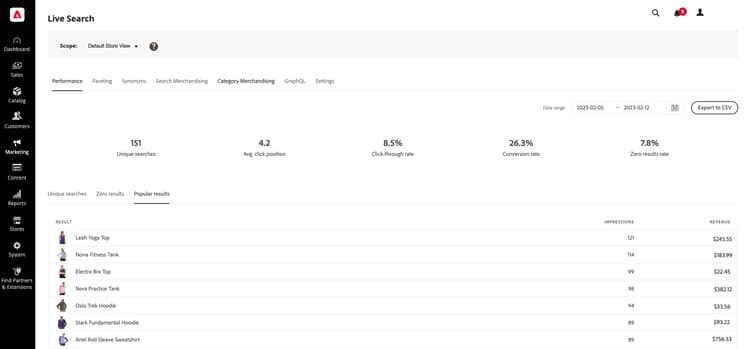
The Live Search Performance workspace shows the metrics to review. The values shown are sample data.
Consider these signals:
- Zero-result searches: Queries with no results may point to gaps in your catalog, product information, or search setup. Aim to keep zero-result searches below 5%. A rate above this threshold is a signal worth investigating.
- Low click-through or weak click position: Shoppers may be seeing results that do not match their needs, or relevant products may not be prominent enough. To ensure engagement, aim for at least 50% of searches to result in a product click.
- Low conversion from search: Review whether search is helping shoppers move from a query to a purchase. Aim for a conversion rate above 3%.
Treat these as a benchmark and diagnostic signals, not universal pass-or-fail. Performance varies by industry, catalog complexity, customer behavior, and how each metric is measured. Establish a baseline for your store and compare performance over time. Results can vary with your catalog, shoppers, and how you measure outcomes.
Match shopper intent, not just exact words
Shoppers do not always describe products using the terminology in your catalog. Someone searching for “comfortable shoes for standing all day,” for example, may be interested in products described as “cushioned walking sneakers.”
Semantic search uses meaning and context alongside keyword matching, helping connect natural-language queries to relevant products even when the query does not match catalog wording exactly. Live Search combines keyword and semantic matching in one search experience. Semantic Search
Semantic matching can help with exploratory searches, but relevance still depends on the products and information available in your catalog. For searches involving an exact model, specification, or compatibility requirement, check that the results remain precise.
Check semantic search for your deployment
The setup depends on the Adobe Commerce product you use:
- Adobe Commerce on cloud infrastructure or on-premises: Live Search semantic search is available for Adobe Commerce 2.4.4 and later. In the Admin, go to Marketing > SEO & Search > Live Search, open Settings, enable semantic search, and save. It supports English catalogs. Settings—Semantic search
- Adobe Commerce as a Cloud Service: The system enables semantic search by default. It supports English catalogs. Semantic Search
- Adobe Commerce Optimizer: The system enables semantic search by default. You can optionally tune controls such as semantic boost and the similarity threshold. The settings also include fuzzy-search options. Semantic Search · Settings—Optional tuning
Turn search insights into action
Use a continuous review cycle to improve product discovery:
- Find queries to investigate. Review zero-result searches, popular queries, and searches with low engagement.
- Check what the shopper is asking for. Determine whether the query points to a missing product, a wording mismatch, or unclear product data.
- Improve product information. Make product attributes and descriptions accurate and useful for the terms shoppers use. For Live Search, Adobe recommends setting up the appropriate searchable attributes and weights and ensuring the attribute data is relevant. Live Search Best Practices
- Refine the search experience. Where appropriate, use search rules, synonyms, and facets to help shoppers find and narrow down relevant results. Live Search Best Practices
- Review results and repeat. Monitor the same queries and performance signals after making changes, then adjust based on what shoppers do.
Make every search count
A search query is a signal of what a shopper wants. By pairing search performance insights with relevant product information and the right search capabilities, you can make it easier for shoppers to discover products that meet their needs.
Learn more
- What is Live Search?
- Live Search Best Practices
- Semantic Search for Adobe Commerce on cloud infrastructure
- Semantic Search for Adobe Commerce Optimizer