Recommendation Types
Adobe Commerce provides a large set of recommendations that you can deploy to various pages on your site. All recommendation types are data-driven. Behavioral data, product attribute data, and metrics power them. For easy reference, recommendation types are grouped as follows:
As a best practice, Adobe recommends the following guidelines when using recommendations:
-
Diversify your recommendation types. Customers start ignoring recommendations if they suggest the same products over and over again.
-
Do not deploy the same recommendations to your cart page and order confirmation page. Consider using
Most Added to Cartfor the cart page andBought This, Bought Thatfor the order confirmation page. -
Maintain your site configuration. Do not deploy more than three recommendation units on the same page.
-
If your store sells clothing, the
More like thisrecommendation can suggest gender-specific products that do not match the gender of the product being viewed. Consider using this recommendation type only for non-clothing categories.
Data requirements and behavior
Product Recommendations is a data-driven system that relies on behavioral data collected from your storefront. The quality and quantity of recommendations depend on the amount of event data available.
What happens with insufficient data
When there is not enough event data to generate recommendations, the system can:
- Return empty results for the recommendation unit.
- Trigger backup recommendations, such as showing
Most viewedproducts when personalized recommendations are not yet available. - Display fewer products than configured in the recommendation unit.
Personalized personalized
These recommendation types recommend products based on the specific shopper’s behavioral history on your site. For example, if a shopper previously browsed or purchased a jacket on your site, these recommendations continue from their previous activity and recommend other jackets or similar products.
Where used:
- Home page
- Category
- Page Builder
Suggested labels:
- Just for you
- Recommended for you
- Inspired by your shopping trends
Where used:
- Home page
- Category
- Product detail
- Cart
- Confirmation
Suggested labels:
- Recently viewed
- Take another look
Cross-sells and up-sells crossup
These recommendation types are social-proof driven to help shoppers find what others liked. They are also product-driven to help them find other similar products. The recommended products often complement the selected product.
Page context for recommendations
Cross-sell and up-sell recommendation types use the context of the page where the recommendation unit appears. That context tells the system which product or products to use when finding related items:
- Product detail page — Uses the SKU of the product the shopper is viewing.
- Cart page — Uses the SKUs of products in the shopper’s cart.
- Order confirmation page — Uses the SKUs from the purchase the shopper completed.
The same recommendation type can produce different results depending on where you deploy it. For example, Viewed this, viewed that on a product detail page uses the viewed product as context. On the cart page, it uses cart contents. On the order confirmation page, it uses the completed order.
Where used:
- Product detail
- Cart
- Confirmation
Suggested labels:
- Customers who viewed this product also viewed (PDP)
Where used:
- Product detail
- Cart
- Confirmation
Suggested labels:
- Customers who viewed this ultimately bought
- Customers ultimately purchased
- What do others buy after viewing this product?
Where used:
- Product detail
- Cart
- Confirmation
Suggested labels:
- Get everything that you need
- Don’t forget these
- Frequently bought together
Where used:
- Product detail
- Cart
- Confirmation
Suggested labels:
- More products like this
- Similar to this
Popularity popularity
These recommendation types recommend products that are the most popular or trending within the last seven days.
Where used:
- Home page
- Category
- Product detail
- Cart
- Confirmation
- Page Builder
Suggested labels:
- Most popular
- Trending
- Popular right now
- Recently popular
- Popular products inspired by this product (PDP)
- Top sellers
Where used:
- Home page
- Category
- Product detail
- Cart
- Confirmation
- Page Builder
Suggested labels:
- Most popular
- Trending
- Popular right now
- Recently popular
- Popular products inspired by this product (PDP)
- Top sellers
Where used:
- Home page
- Category
- Product detail
- Cart
- Confirmation
- Page Builder
Suggested labels:
- Most popular
- Trending
- Popular right now
- Recently popular
- Popular products inspired by this product (PDP)
- Top sellers
Adobe AI aggregates browsing and purchase data across your site to determine and rank which products are the most recently popular with your shoppers. Because Trending analyzes recent product momentum, it is an effective recommendation type for catalogs that have a high turnover. If your catalog is more static, it might not be as useful unless the shopping patterns of your audience are highly variable.
When used on the home page, Trending recommends products that are recently popular across the entire site. Trending does not display products that are consistently popular, but rather those that have recently become popular. For example, if you have an email marketing campaign promoting certain products, the popularity increase generated by the email increases the likelihood that the promoted products classify as trending.
Where used:
- Home page
- Category
- Product detail
- Cart
- Confirmation
- Page Builder
Suggested labels:
- Trending
- Trending now
- Recently trending
- Hot products
- Trending related products (PDP)
High performing highperf
These recommendation types recommend top performing products based on success criteria like add-to-cart or conversion rates.
Where used:
- Home page
- Category
- Product detail
- Cart
- Confirmation
Suggested labels:
-Top sellers
- Popular products
- You might be interested in
Where used:
- Home page
- Category
- Product detail
- Cart
- Confirmation
Suggested labels:
- Top sellers
- Popular products
- You might be interested in
Visual similarity visualsim
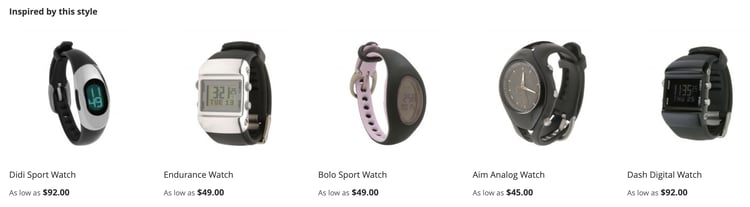
The Visual similarity recommendation type recommends similar looking products to the product being viewed. This recommendation type is most useful where images and visual aspects of the products are important parts of the shopping experience.
How it works
The Visual similarity recommendation type offers recommendations for other products in your catalog that have a visual similarity to the imagery currently being viewed. Visual similarity includes aspects such as:
- Color
- Shape
- Size
- Texture
- Material
- Style
Adobe AI uses AI to process and analyze the imagery in your catalog and build attributes used to determine visual similarities.
Special considerations
- If you are testing this recommendation type in a non-production environment, make sure your image URLs are publicly accessible.
- Currently, product images must be 10 MB or less in size.
- The optional Fastly Image Optimization module can apply Fastly Image Optimization parameters to Product Recommendations image URLs. See Add Fastly Image Optimization support for details.
Enable Visual similarity recommendation type
-
On the Admin sidebar, go to Marketing > Promotions > Product Recommendations to display the Product Recommendations dashboard.
-
Click Settings (gear icon) to display the Settings page.
-
In the Visual Recommendations section, select to Enable Visual Recommendations.
-
Click Save changes when you are finished.
The Create New Recommendation page now displays Visual similarity as a selectable recommendation type when the page type is Product Detail.
After you enable visual recommendations, Adobe AI initiates the image processing. How long it takes depends on the size of your catalog.
Where used
- Product detail
Suggested storefront labels
- You may also like
- We found other products you might like
- Inspired by this style
Example
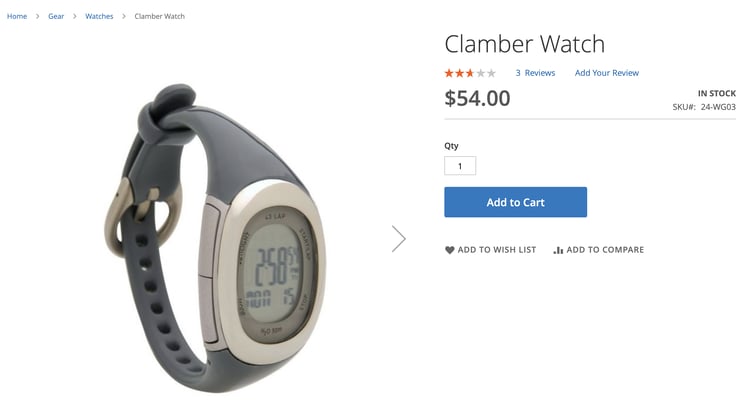
The following image shows the product detail page for the Clamber Watch:
The following shows the Visual similarity recommendation unit for Clamber Watch: