Cookie law compliance
Cookies are small files that are saved to the computer of each visitor to your site, and used as temporary holding places for information. Information that is saved in cookies is used to personalize the shopping experience, link visitors to their shopping carts, measure traffic patterns, and improve the effectiveness of promotions. To keep pace with legislation in many countries regarding the use of cookies, Adobe Commerce and Magento Open Source offer merchants a choice of methods to obtain customer consent. For a list of the default cookies in Adobe Commerce and Magento Open Source, the Cookie Reference.
Cookie restriction mode
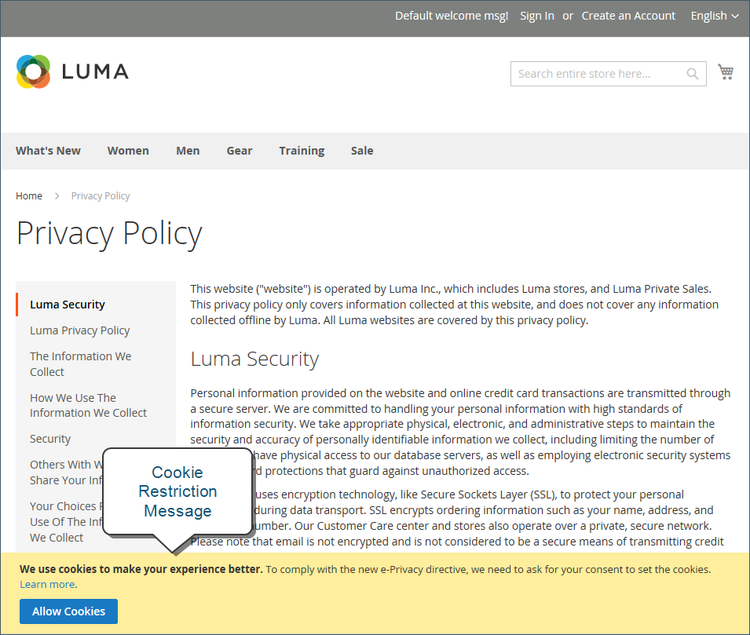
When cookie restriction mode is enabled, visitors to your store are notified that cookies are required for full-featured operations. Depending on your theme, the message might appear above the header, below the footer, or somewhere else on the page. The message links to your privacy policy for more information, and encourages visitors to click the Allow button to grant consent. After consent is granted, the message disappears.
Your privacy policy should include the name of your store and contact information, and explain the purpose of each cookie that is used by your store. To learn more, see Cookie Reference.
404 Page Not Found.
Step 1: Enable cookie restriction mode
-
On the Admin sidebar, go to Stores > Settings > Configuration.
-
In the left navigation panel under General, choose Web.
-
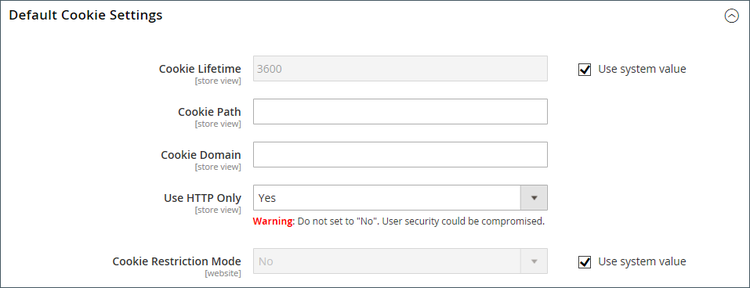
Expand the Default Cookie Settings section and do the following:
-
Enter the Cookie Lifetime in seconds.
-
If you want to make cookies available to other folders, enter the Cookie Path. To make the cookies available anywhere in the site, enter a forward slash (
/). This value can contain only the cookie path, and cannot contain any other cookie parameters. -
To make the cookies available to a subdomain, enter the subdomain name in the Cookie Domain field (
subdomain.yourdomain.com). To make cookies available to all subdomains, enter the domain name preceded by a period (.yourdomain.com). This value can contain only the cookie domain, and cannot contain any other cookie parameters. -
To prevent scripting languages, such as JavaScript, from gaining access to cookies, make sure that Use HTTP Only is set to
Yes. -
Set Cookie Restriction Mode to
Yes.If necessary, clear the checkbox and click OK to confirm scope switching.
-
-
When complete, click Save Config.
-
When prompted to update the cache, click the Cache Management link in the system message and refresh each invalid cache.
Step 2: Update your privacy policy
Update your privacy policy so that it reflects the information that your company collects and how it is used.
Default cookies
The default cookies in Adobe Commerce and Magento Open Source are classified as Exempt/Non-Exempt to help merchants meet the requirements of privacy regulations such as the GDPR. Merchants should use this information as a guide, and consult with legal advisors to update their Privacy and Cookie Policies as part of a comprehensive privacy regulation compliance strategy.
The following cookies are used by Commerce “out of the box” for on-premise and cloud installations. These cookies may be required by functionality that is explicitly requested by the customer. To learn more about the lifetime of session cookies, see Session Lifetime.
Some of these cookies may provide configuration options, including enable/disable, as needed.
Requested functionality cookies (exempt)
add_to_cart
guest-viewlogin_redirectmage-banners-cache-storage
mage-messagesproduct_data_storagerecently_compared_productrecently_compared_product_previousrecently_viewed_productrecently_viewed_product_previousremove_from_cart
stfX-Magento-Varyform_keymage-cache-sessidmage-cache-storagemage-cache-storage-section-invalidationmage-cache-timeoutpersistent_shopping_cartprivate_content_versionsection_data_idsstorePHPSESSIDadminloggedOutReasonCodesection_data_cleanlangs_fids_vi cookie is unavailable due to third-party cookie restrictions. Being used only in an administrative area of a store. Not applicable to shoppers. To maintain system stability, do not disable this cookie.s_ccapt.sidapt.uids_sqpagebuilder_modal_dismissedpagebuilder_template_apply_confirmaccordion-{VARIABLE}-{VARIABLE}Product Recommendations cookies
mg_dnt: Allows you to restrict Adobe Commerce data collection if you have custom code to manage cookie consent on your site.user_allowed_save_cookie: Used for cookie restriction mode.authentication_flag: Indicates if a shopper has signed in or signed out. This cookie is updated at the same time as thedataservices_customer_idcookie.dataservices_customer_id: Indicates if a shopper has signed in or signed out. This cookie contains the customer’s unique ID in the system.dataservices_customer_group: Indicates a customer’s group. This cookie is stored as sha1 checksum of the customer’s group ID.dataservices_cart_id: Identifies a shopper’s cart actions. This cookie contains the customer’s unique cart ID in the system.dataservices_product_context: Identifies a shopper’s product interactions. This cookie contains the customer’s unique quote ID in the system.
Product Recommendations local storage data
The following data is saved to local storage for stores using the Luma theme when Live Search or Product Recommendations is installed:
ds-cart: Stores cart information for Luma-specific functionalityds-cart-order: Stores order information for cart functionalityds-purchase-history: Tracks customer purchase historyds-view-history-time-decay: Stores product view history with time-based decayds-logged-in: Indicates customer login status. This data only exists when the customer is logged in and is stored even when cookie restriction mode is enabled. This is the only data that Commerce stores in local storage when cookie restriction mode is enabled, regardless of user consent status.
Additional cookies
mg: Set by Snowplow JavaScript tracker. More information can be found in the Snowplow documentation.com.adobe.alloy.getTld: Given the current web page’s hostname, this is the top-most domain that is not a “public suffix” as outlined in https://publicsuffix.org. Essentially, this is the top-most domain that can accept cookies. This cookie is part of the Alloy Web SDK.aep-segments-membership: Contains audience information, such as which segment a shopper belongs to.