Price books
Price books define product prices for a catalog source across customer tiers and markets. They support a hierarchy of parent and child price books.

Key concepts
If no parent is defined during price book creation (through the API), a new fallback price book is created.
not enforced at ingestion time.
If currency is not specified during fallback price book creation (through the API) the currency defaults to USD.
Price book implementation
When using Adobe Commerce as a Cloud Service with the composable catalog data model (CCDM), price books are mapped from catalog and pricing data. They are not manually created.
At a high level, the mapping is:
- Store view → Catalog source—Store-view product data, including localized attributes, maps to a catalog source.
- Website → Price book or price books—Website pricing maps to the applicable price book or books.
- Customer-group pricing → Price book entries—Customer-group pricing maps to the relevant price entries.
Maintain the source catalog, website, and pricing configuration in the Adobe Commerce configuration, then assign the mapped price books in the relevant catalog view by configuring available price books. If no price books are assigned, the catalog view uses the default price book.
A catalog view uses the available price books configuration with its catalog data and policies to determine the merchandising experience, including the prices returned for products.
Checkout pricing
Price books support the merchandising and storefront catalog experience. Commerce Core continues to handle cart and checkout. A price available only in CCDM does not automatically become the price used by checkout.
Keep prices consistent with the Commerce Core configuration, and test displayed prices, add-to-cart, promotions, and checkout as part of implementation validation.
View price books
After the catalog data sync completes, view the available price books and their IDs in the Catalog views workspace.
-
Go to Store setup, and click Catalog views.
-
Click Create catalog view.
-
Review the available price books in the Price Books section of the catalog view configuration.
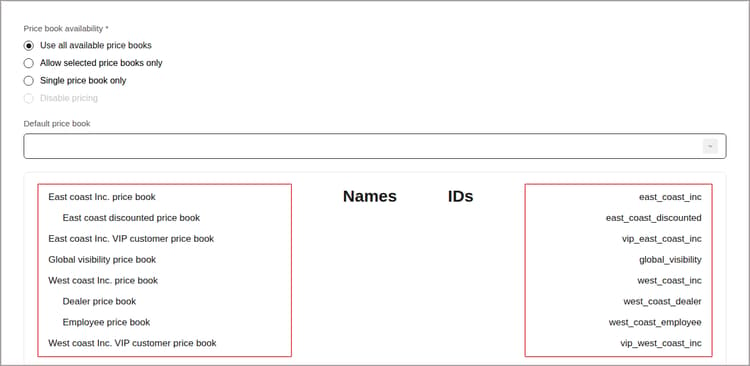
Configure price book availability
Associate mapped price books with catalog views by configuring available price books in the Catalog Views workspace in the Commerce Admin.
-
From the Catalog views workspace, select the catalog view you want to configure.
-
In the Price Books section, select the price books available to stores backed by the catalog view.