Create a filter creating-a-filter
The filters available in Adobe Campaign are defined via filtering conditions which are created using the same operating mode as when building queries in the Query editor.
The Administration > Configuration > Predefined filters node contains all the default filters. Some of them are used in lists and overviews. Learn more about built-in predefined filters.
For example, the list of operators can be filtered by Active accounts:

The matching filter contains the query on the Account disabled value of the Operators schema:
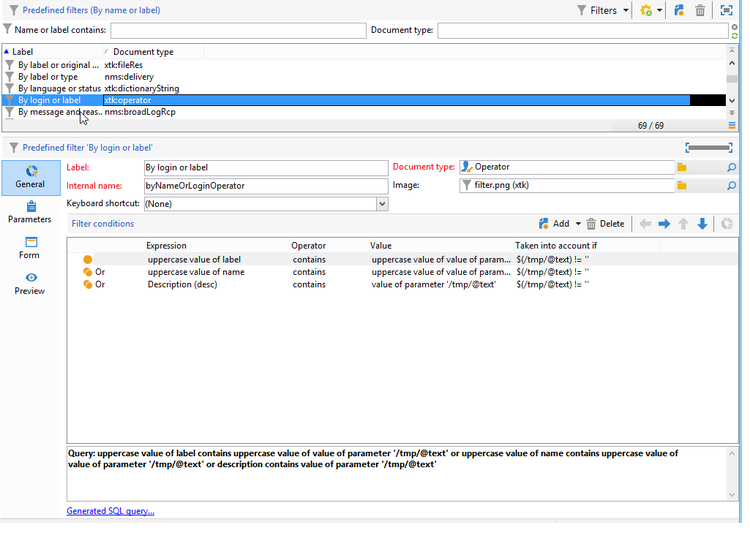
For the same list, the By login or label filter lets you filter the data on the list based on the value entered in the filter field:

It is built as follows:

To match the filtering conditions, the operator account must check one of the following conditions:
- Its label contains the characters entered in the input field,
- The operator name contains the characters entered in the input field,
- The content of the description area contains the characters entered in the input field.
The Taken into account if column lets you define the application criteria for these filtering conditions. Here, the $(/tmp/@text) characters represent the content of the input field linked to the filter:
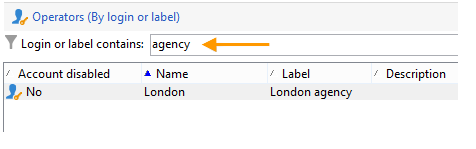
Here, $(/tmp/@text)=‘agency’
The $(/tmp/@text)!=‘’ expression applies each condition when the input field isn’t empty.