Best practices for configuring categories, topics, prompts, and other brands to track
This section describes best practices for deciding how you want to set up your categories, topics, prompts, and other brands to track. In addition, it includes information on the Industry Prompt Library, which Adobe developed with extensive research with industry experts.
This configuration is a vital first step. What you decide now determines how information is tailored to your business context. Any changes to categories in the future reset historical data.
The Brands Management dashboard is where you define how your brand is monitored and analyzed within the LLM optimizer platform.
Here you can customize categories (such as business units or product lines), track other brands, and add brand mention aliases to capture all variations of your brand across prompts. This setup ensures the platform tailors insights to your business context, enabling accurate visibility, traffic, and opportunity analysis.
By default, each organization starts with one active brand and additional suggested brands to choose from.

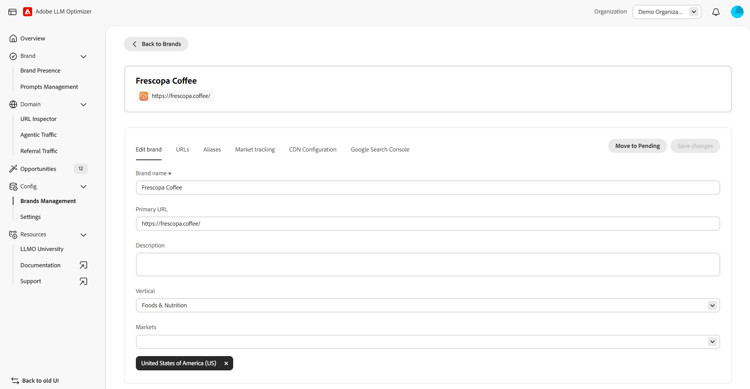
To set up topics and prompts for a specific brand, use the Prompt Library dashboard.

Industry Prompt Library
To help get started with prompts and topics, Adobe has created an Industry Prompt Library developed through extensive research with industry experts and analysis of AI search behavior across 6,000+ customers. This library identifies the most relevant topics and prompts based on industry-specific trends, validated business objectives, and real-world customer search patterns.
To use the Industry Prompt Library:
- Navigate to the Prompt Library dashboard.
- Select Download Prompt Library to download the library file from Adobe Brand Visibility.
- Review suggested Topics and Prompts for your brand’s industry on the respective tab and choose the options that are most relevant.
- Review Customer Journey Stage column to view prompt options across the customer lifecycle (for example, discovery to conversion to retention). Early stage/top of funnel prompts are high priority but also consider later stage options to promote retention, enable customer support, and so on.
- Modify topics or prompts as needed to best support your goals and objectives before uploading your topics and prompts to Adobe Brand Visibility (for example, add your brand/product name, add on-brand terminology). Prompts can be added to Adobe Brand Visibility manually or via bulk upload using the provided .csv template.
Prompt Library research foundation
The Industry Prompt Library was developed through a comprehensive research initiative combining:
- Customer intelligence: Analysis of AI search behavior and preferences across 6,000+ customers
- Industry expertise: Perspectives from experts in Auto, Financial Services, Healthcare, Telecom, and Travel sectors.
- Data-driven insights: Identification of high-impact topics and query patterns that drive customer engagement and conversion.
Top topics searched by customers across industries:
- Auto: Troubleshooting auto issues, comparing vehicles and financing/leasing
- Financial Services: Researching financial products
- Healthcare: Looking up symptoms or health issues, comparing treatment options, and understanding lab results or medical terms
- Telecom: Comparing plans, contract terms and promotions, and checking service in local area
- AirlineTravel: Preparing for a trip, and researching and booking travel
Customer trends on AI search and prompt behavior in LLM tools:
- Customers prefer to ask questions vs. use keywords while using LLM search tools.
- They primarily use LLM search tools for early-stage research and discovery.
- Customers tend to mention a specific brand or product name in their prompts.
Best practices for categories
Categories let you organize your content into strategic business units or logical groupings. They are the “where it belongs” bucket and the top-level organizational structure for your content.
When deciding how to set categories up, you need to consider your goals and who needs to act on what you are reporting.
Here’s an overview of the types of approaches you could take and when you would choose a particular approach:
How to decide how you set up categories is based on one question: Who needs to act on the report?
- If you are a business leader, pick the SBU approach.
- If you are a web/content owner, pick the URL_DIR approach.
- If you are a merchandising/offers manager, pick the Product/Service category approach.

- Pick one approach and stick to it.
- You can only have one Category model per account/brand. Do not mix SBU and URL_DIR at the same time.
Example:
Best practices for topics
Topics help you understand the user intent - they show you what the user wants. They let you group prompts with similar user intent. Think of it as clustering relevant prompts together.
When deciding on topics, you want to create a short, flat list (6-12 maximum). For example:
- Products/Services
- How-to (setup/usage)
- Troubleshooting (errors/issues)
- Comparison (X vs Y; “best … for …”)
- Reviews and Ratings
- Pricing and Availability
- Policy and Warranty
- Support Contact
- Corporate/News (if you truly need this)

When creating the list, consider the following:
- Can someone understand the topic in 5 seconds from the prompt text? If not, rename/simplify.
- Will a different team own the fix for different topics? If yes, you picked useful topics.
Some additional helpful hints:
- Use knowledge of your business or site to define topics that align with your brand’s strategic goals
- Consider how your brand compares to other brands within specific topics.
- Keep topics intent-based, not organizational.
- Do not add categories/filters for brand/non-brand/geographic as you can filter specifically for this in the Brand Presence dashboard.
- Topics are spread out across several categories. You cannot define unique topics to each category.
- A single prompt can exist in several topics or categories.
Best practices for prompts
Prompts identify the specific questions or queries that customers are asking, which can impact your business. They are the actual questions or queries that users input into LLMs.
Be sure to review and update prompts regularly to ensure they align with customer needs and business goals.
Best practices for prompts:
- Group similar prompts together based on what people are asking.
- Focus on the prompts that are most important to your customers.
- Check if your brand has a good chance of being mentioned for certain prompts.
- You can use tools like Adobe Brand Visibility and Google Search Console with regex filters to identify common question structures (for example, “how,” “what,” “when,” “where”) and find out what prompts people are using to visit your site.
- To find out what prompts are relevant to your site/brand, you can use on-site search data, FAQs in search engine results pages, or even ask LLM chatbots directly what questions customers might ask about your brand.
Best practices for tracking other brands
Tracking other brands let you monitor visibility and mentions in LLM responses for prompts and topics that are important to your business.
Other brands to track is available in Brands Management > Market tracking and lets you add others including competitors to track their visibility for specific prompts and topics.
With other brands to track, you can see how often other brands are mentioned alongside your brand in different regions and categories and compare their visibility to your own.
Learn More
- Brands Management is where you configure your categories and other brands to track.
- Prompt Library is where you configure your topics and prompts.
- Adobe Brand Visibility best practices describes best practices around LLM Optimization