AI Visibility ai-visibility
AI Visibility helps you understand how brands appear across AI-powered search and discovery experiences. As more people rely on AI assistants and AI-generated search results to research, compare and decide, the way your brand shows up in those answers has become a distinct, measurable channel - separate from traditional organic search rankings. AI Visibility gives you a clear window into that channel.
Powered by Semrush Enterprise AIO, AI Visibility uses Semrush’s AI data set, including a database of more than 289M prompts, to provide immediate insight into how brands are represented in AI-generated responses. This allows you to evaluate visibility, discover relevant prompts and topics, and compare performance across brands without first configuring a custom prompt strategy. There is nothing to set up: you get a baseline the moment you open the section and you can later promote the most relevant topics and prompts into your own monitored prompt set.
AI Visibility currently supports analysis across ChatGPT, Google AI Overviews, Google AI Mode, and Gemini. You can filter by AI engine and market to focus on the segments that matter to you and in Visibility Overview you can also set the reporting period to see how visibility changes over time.
At a glance at-a-glance
Use AI Visibility to:
- Understand how brands appear in AI-generated responses.
- Establish an immediate AI visibility baseline - no prompt configuration required.
- Discover prompts and topics driving AI search conversations in your market.
- Compare visibility across your brand and other players in the market.
- Identify gaps and opportunities in AI-powered discovery and act on them by adding the most relevant topics and prompts to the prompts you actively monitor.
Sections in AI Visibility sections
The AI Visibility category includes three sections:
- Visibility Overview - Benchmark how your brand appears across AI-powered search: track AI visibility, mentions, monthly audience, and cited pages, along with how they trend over time.
- Prompt Research - Discover the prompts, questions and topics that shape AI visibility in your market and see which brands and domains already appear for them.
- Market Comparison - Compare your brand’s AI visibility against other players and pinpoint where competitors are stronger.
Visibility Overview visibility-overview
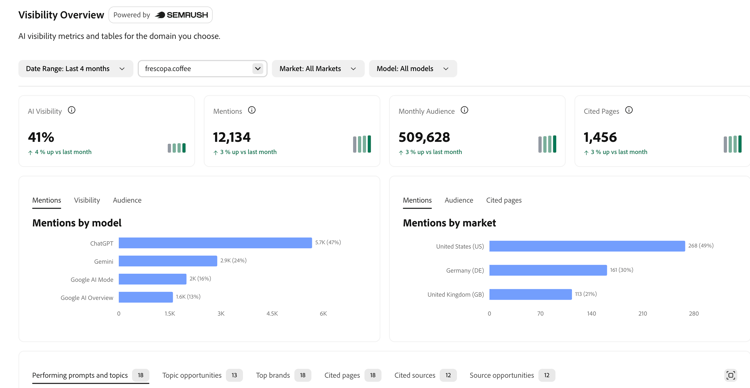
Visibility Overview provides a high-level view of how brands appear across AI-powered search experiences.
Use Visibility Overview to benchmark overall AI visibility, mentions, monthly audience, and cited pages - along with how they trend over time - across your brand and other market players. The prompts behind Visibility Overview come from Semrush’s prompt database, so you get immediate visibility insights without waiting for a custom prompt set to be created or executed.
Use Visibility Overview to answer questions such as:
- How visible is my brand in AI-generated responses?
- Which other players are appearing more often?
- How is visibility changing over time?
- Where are competitors mentioned or cited when my brand is not?
Beyond the headline numbers, Visibility Overview lets you drill into the specific topics, prompts, brands, and sources behind your score. As such, you can establish a baseline and find what is most worth acting on.
Choosing what you see visibility-overview-filters
A filter bar at the top of the page controls the entire view:
- Domain - the brand or website you want to analyze. Defaults to your primary brand; you can switch to any domain including a competitor’s.
- Market - the country or region to analyze. Choose a specific market or view worldwide.
- Platform - limit the view to a single AI engine, or see all engines combined.
- Reporting period - the date range for the metrics and trends. The available range adapts to the data available for the selected market.

Key metrics visibility-overview-key-metrics
Four cards at the top summarize performance for the selected domain, market, and period. Each card includes a small trend line showing movement over time.

Breakdowns by model and market visibility-overview-breakdowns
Below the key metrics, two charts break the numbers down:
- By model - compare Mentions, Visibility, or Audience across each AI engine, so you can see where your brand is strong or weak (for example, strong in ChatGPT but weak in Google AI Overviews).
- By market - compare Mentions, Audience, or Cited pages across your top markets, with smaller markets grouped as “Other.”
When you filter to a single engine or a single market, the matching breakdown is hidden, since there is nothing left to compare.

Explore the detail visibility-overview-explore-detail
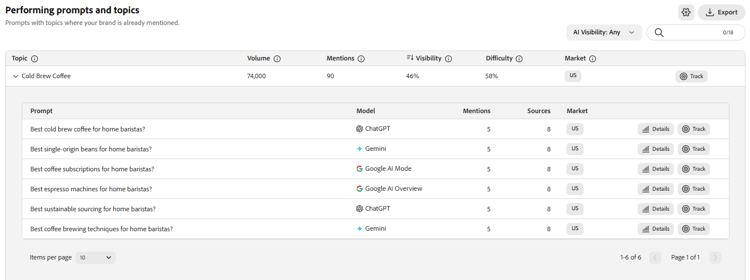
The lower part of the page is a set of tabs, each a searchable, sortable table. Together they answer “what is driving my visibility, and where are the opportunities?”
Each table lets you search, sort, choose which columns to display, expand to full screen and export the results to CSV.
Take action on what you find visibility-overview-take-action
The Performing prompts and topics and Topic opportunities tabs let you act directly on individual topics and prompts:
- Details - opens the full AI answer behind a prompt: the response text, whether your brand was mentioned, which brands were mentioned, whether your site was cited and the source URLs behind the answer.
- Track - adds a topic or prompt into the prompts you actively monitor so a promising discovery in AI Visibility becomes part of your ongoing prompt strategy.
Prompt Research prompt-research
Prompt Research helps you discover the prompts, questions, and topics that influence AI visibility.
Use Prompt Research to explore AI search demand, identify relevant prompts for your business, and understand which brands and domains are currently appearing in those AI conversations. Instead of starting from your own domain, you start from a topic: enter it, and Prompt Research surfaces the related topics, the prompts people ask and the brands and sources that already appear in AI answers for them.

Use Prompt Research to answer questions such as:
- What prompts are relevant to my market?
- What topics are people asking AI systems about?
- Which prompts should I consider adding to my prompt strategy?
- Which brands or domains are already visible for those prompts?
Getting started: enter a topic prompt-research-getting-started
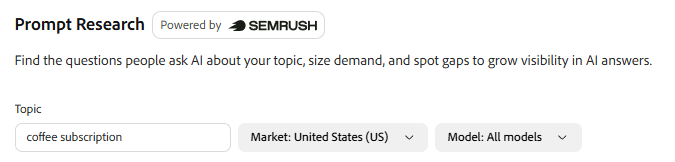
Prompt Research is topic-driven so the page stays empty until you tell it what to analyze. Type a subject into the Topic field in the filter bar - for example, a product category, a service or a question theme - and press Enter. Results load for that topic, and your most recent topic is remembered, so it reappears the next time you open the section.
Choosing what you see prompt-research-filters
Two filters refine the results:
- Market - the country or region to analyze. Prompt Research is always scoped to a single market, so choose the one that matches your audience.
- Platform - narrow the results to a specific AI engine, or view all engines combined.
There is no date-range or domain filter here: Prompt Research is about a topic in a market, not a single site over time.
Summary metrics prompt-research-summary-metrics
A row of cards at the top sizes the demand and competition around your topic, each with a short trend line:
Below the cards, a Related topics intent breakdown shows how the related topics split across search intent categories - Informational, Task, Navigational, Commercial, and Transactional - so you can tell whether people are learning, comparing, or ready to act.

Explore the results prompt-research-explore-results
Results are organized into three tabs. Each is a searchable, sortable table that you can export to CSV.
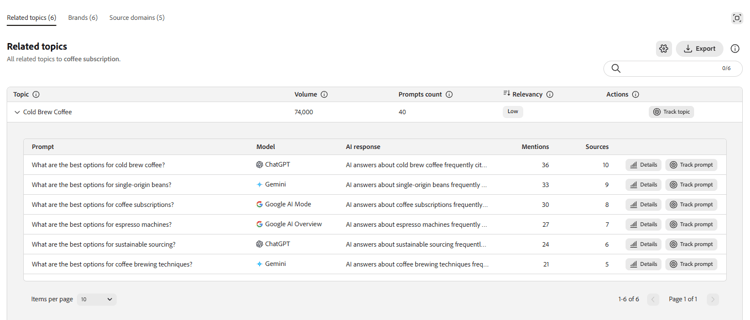
Relevancy rates how closely a related topic matches the topic you searched - shown as Best, High, Medium, or Low - so you can focus on the most relevant topics first.
Take action on what you find prompt-research-take-action
From the Related topics tab, you can act on what you discover:
- Details - opens the AI responses and citations behind a prompt, so you can see exactly how AI engines answer it and which sources they draw on.
- Track - adds a topic (all of its prompts) or a single prompt into the prompts you actively monitor in LLM Optimizer, turning a research finding into part of your ongoing prompt strategy.
Market Comparison market-comparison
Market Comparison helps you compare AI visibility across brands.
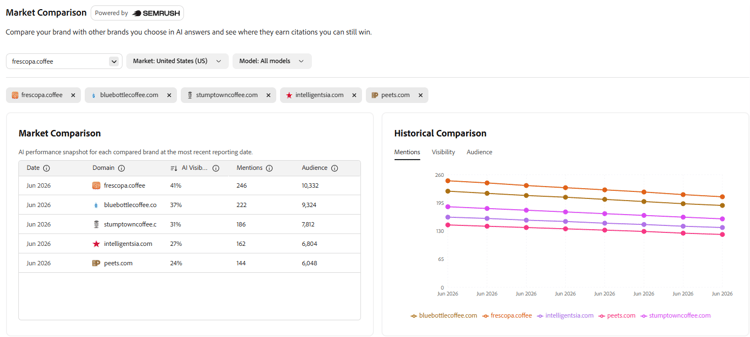
Use Market Comparison to understand how your brand performs relative to other brands, where other players have stronger visibility, and which prompts or topics may represent competitive gaps. It puts your brand side by side with the other brands you choose, then shows exactly where those brands earn mentions and citations that your brand doesn’t.
Use Market Comparison to answer questions such as:
- How does my brand compare to other players in AI-generated responses?
- Which other brands have stronger visibility?
- Where is my brand underrepresented?
- Which topics or prompts are driving other brands’ visibility?
Getting started: choose the brands to compare market-comparison-getting-started
Market Comparison starts from your brand and a set of brands to compare against:
- Your brand is taken from the Domain filter and is set for you automatically.
- Up to four other brands are added automatically, so results appear without any manual setup.
- You can change the line-up at any time - add or remove brands as pills, up to five brands in total (including your own). Your own brand always stays in the comparison.
Choosing what you see market-comparison-filters
Two more filters refine the comparison:
- Market - the country or region to analyze. Market Comparison is always scoped to a single market, so choose the one that matches your audience.
- Platform - narrow the comparison to a specific AI engine, or view all engines combined.
There is no date filter - Market Comparison always shows the most recent data available.
Compare your brand against others market-comparison-compare
Two views put the brands side by side:
- Market Comparison table - a snapshot with one row per brand, showing each brand’s AI Visibility, Mentions, and Audience for the most recent reporting date.
- Historical Comparison chart - the same measures over time, with one line per brand, so you can see who is gaining or losing ground. Switch between Mentions, Visibility and Audience.
Find the gaps market-comparison-gaps
Below the comparison, a gap analysis shows exactly where other brands appear in AI answers and where your brand does or doesn’t. You can view gaps by Topics or by Source domains, and filter each by gap type:
Topics lists each topic with its search Volume, your brand’s Visibility and Mentions, the topic Difficulty, the Total competitor mentions, and a Mentions by brand breakdown showing how many times each brand is mentioned for that topic (your brand highlighted). Expand any topic to see the individual prompts behind it - including the AI engine, how many brands were mentioned, and the cited sources.
Source domains lists the third-party sites cited in AI answers, with the number of Pages cited, the Responses that cited them, Your mentions when that site was cited, and the site’s estimated Organic traffic.
Each gap table lets you search, sort, expand to full screen, and export the results to CSV.
Take action on what you find market-comparison-take-action
From the Topics gap view, you can act on what you discover:
- Details - opens the AI responses and citations behind a prompt, so you can see how AI engines answer it and which sources they cite.
- Track - adds a topic (all of its prompts) or a single prompt into the prompts you actively monitor in LLM Optimizer, turning a competitive gap into part of your ongoing prompt strategy.
For additional information about the underlying AI visibility methodology and data sources, see the Semrush Enterprise AIO product overview.