Import API collection
Objective
In this step, you import the API collection, which contains all the various requests you need to make throughout the bootcamp. These API requests are reliant on the environment file you just imported.
Import request collection
-
Download the AJO Bootcamp (Labs).postman_collection.json file:
Download File — AJO Bootcamp (Labs).postman_collection.json
-
As before, click on the Import button.
-
Paste the local URL of the AJO Bootcamp (Labs).postman_collection.json file into the import modal text box or drop it into the import dialog box. This triggers an automatic import.
-
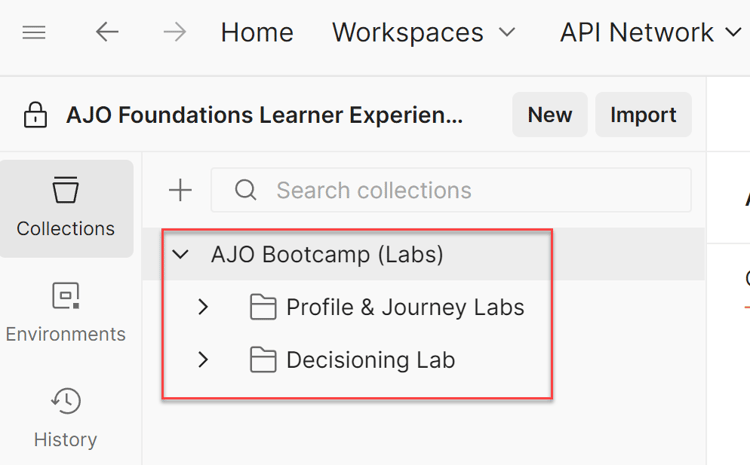
After the import process is complete, click on Collections in the left navbar, expand the AJO Bootcamp (Labs) folder, and you see the newly imported collection
Validate environment variables
The collection you imported contains all the API calls you need for labs throughout the bootcamp. Each lab is organized into a specific folder with its own set of requests.
Details about each folder appear below:
- Profile & Journey Labs - Contains a set of requests for sending a Web Event and an event that simulates a shipping confirmation.
- Decisioning Labs - Contains requests for 3 visitors that mimic the top and bottom page calls that would typically be found on an AEP Web SDK-tagged site.
To ensure that the environment and collection are functioning correctly together, follow these steps.
-
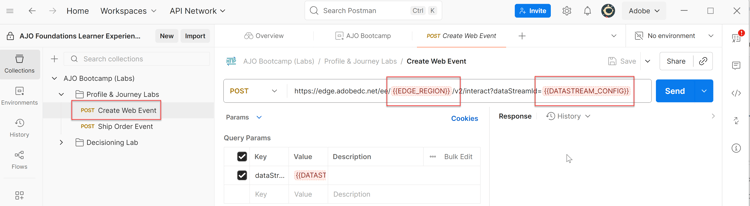
If necessary, click on Collections in the left rail and then expand the Profile & Journey Labs folder.
-
Click on the Create Web Event request, and you see that environment variables are red
-
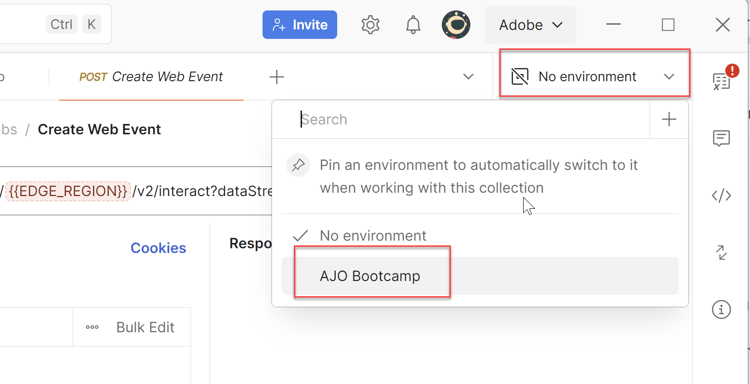
Click on the Environment Dropdown in the upper-right corner and choose the AJO Bootcamp environment.
-
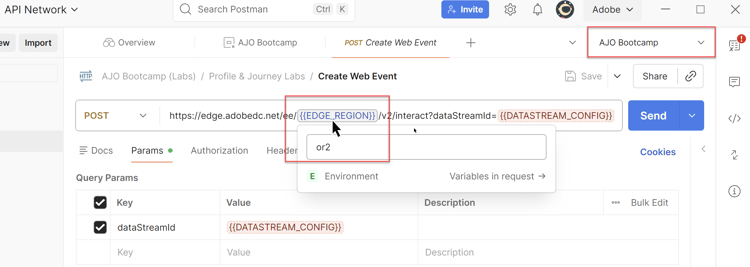
With the proper environment selected, you see that the EDGE_REGION variable now turns a lighter blue color. This indicates that the variable now has a value for the selected environment. The DATASTREAM_CONFIG variable stays red because you haven’t created the datastream yet, so you don’t have a value for that environment variable yet. Hovering over the EDGE_REGION shows you what the value of the environment value is.
Recap
You now have the Environment and Collection files imported and know how to use them.