Validate Profile Snapshot
Learning objective
Confirm that the profile does not yet appear in the Profile Snapshot dataset.
Use the Profile Snapshot dataset
-
In the left nav under the Data Management section click on Datasets and then click on the Browse tab found on the top rail
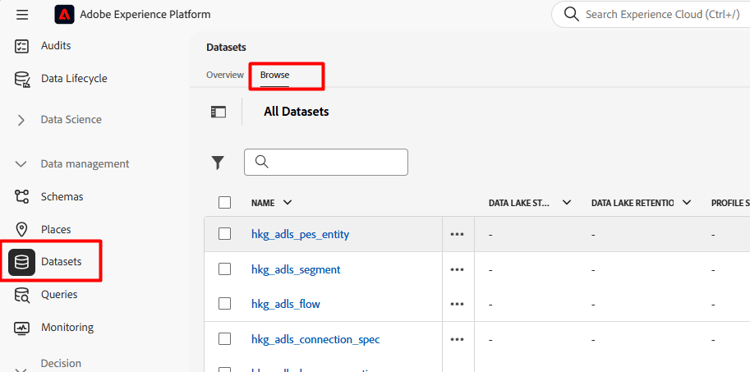
-
In the search box type
profile, then click on the row with title “Profile-Snapshot…”. and in the right rail copy the table name and paste it somewhere you can reference in the next step.note NOTE You may have to clear any filters if you don’t see the “Profile-Snapshot…” dataset. 
-
Navigate back to the Query editor and copy & paste the below SQL into the editor
code language-sql select identityMap, segmentID, segmentMembershipUps[segmentID] ['lastQualificationTime'], segmentMembershipUps[segmentID] ['status'], current_timestamp from ( select identityMap, explode (map_keys (segmentMembership['ups'])) as segmentID, segmentMembership['ups'] as segmentMembershipUps from where map_keys (segmentMembership['ups']) is not null limit 100 ) --where identityMap['email'][0].id = 'henry.creel@emailsim.io' limit 50 -
Update the table name and email address as outlined below:
- Table name: on line 14 copy & paste the table name you have for the Profile Snapshot table between the
fromandwhere - Email address: for now, on line 19 type in the same email address you used to send in your Web Event (we used henry.creel@emailsim.io, unless you changed it).
- At the moment, we have commented this out (leave it that way). When the query runs and you look for henry, you don’t find him.

- Table name: on line 14 copy & paste the table name you have for the Profile Snapshot table between the
-
Run the query by clicking on the arrow in the top left
-
The Results are as below (but if you look for henry, you don’t find him)

Recap
Understand that snapshot datasets update on a scheduled batch process rather than immediately.