Send an Edge web event
Learning objective
Send a simulated web event to the Adobe Edge Network using the API.
To simulate a web page being loaded and sent to the AEP Edge, you send in a Postman call to the Datastream you created.
This sends in an event with no OAuth Token. Ensure you have Postman open on your machine to perform this lab.
Lab expectations
-
Experience Event to hit the Edge
-
Datastream configuration
-
Datastream configuration to use AEP Service
- Edge Audience to run
- Send Event to the Hub
-
Postman Response to include Edge Audience (but no attributes)
-
Profile Store to receive event and add an Event Profile Fragment
-
Identity Store to add a relationship
-
Dataset to receive data and store in Data Lake
Update Postman environment variable
Before you can execute the API request you need to add the datastream ID to the Postman variable environment. Start by gathering the following values:
Gather the Datastream ID
- You should already have the Datastream ID
- In the left rail click on Datastreams (under the Data Collection heading)
- Select your Datastream and copy the Datastream ID value

Navigate to the call
- Postman Left Sidebar ->
Collections - Collection ->
AJO Bootcamp (Labs) - Folder ->
Profile & Journey Labs - API Request ->
Create Web Event
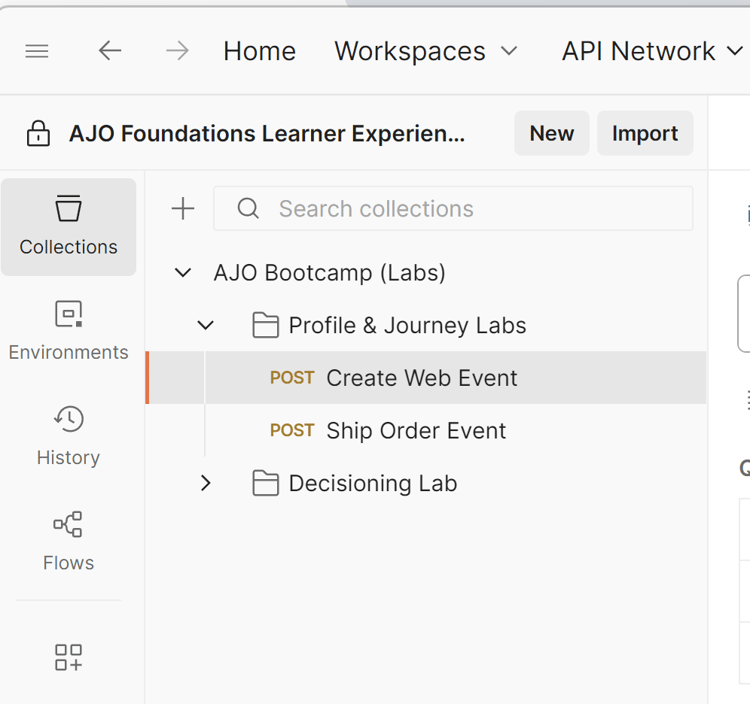
Update DATASTREAM_CONFIG variable
-
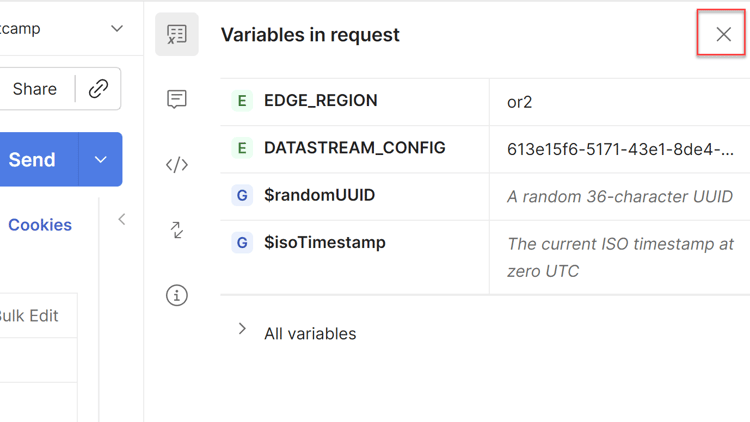
Click on Variables in Request in the top right

-
Update the DATASTREAM_CONFIG Value with the datastream ID from the first step on the page.

-
Save your update (ctrl+s or command+s)
-
Click the ‘X’ in the upper right corner of the environment sidebar to close the sidebar
-
The Create Web Event request is now ready to send since all of the variables are now blue and have a value in the environment.

Execute the API
Execute your request by clicking the Send button.
Response looks something like this:

What you see coming back in the response are these core things:
- A 200 OK response means the data was successfully sent and accepted by the Edge Network
Recap
The event has been successfully sent to and accepted by the Edge Network