Brand alignment
Purpose: Learn how to use Adobe Journey Optimizer’s Brand Alignment feature to evaluate email content, identify guideline violations, and apply AI‑powered recommendations to improve brand compliance.
Learning objectives
By the end of this module, you will be able to:
- Access and interpret the Brand Alignment panel.
- Evaluate email content against brand guidelines.
- Identify issues flagged by AI.
- Apply suggestions to improve brand alignment.
- Re-evaluate scores to track improvements.
Introduction
Adobe Journey Optimizer includes an AI-driven Brand Alignment Score that checks your content against the published brand guidelines for Connection 5G.
This ensures:
- Tone, style, and messaging match your brand
- Legal requirements are met
- Images follow visual rules
- Content creators stay consistent at scale
This module teaches you to run the evaluation, interpret results, and improve your content using AI.
Open brand alignment panel
-
Open the email you created in the previous modules.
-
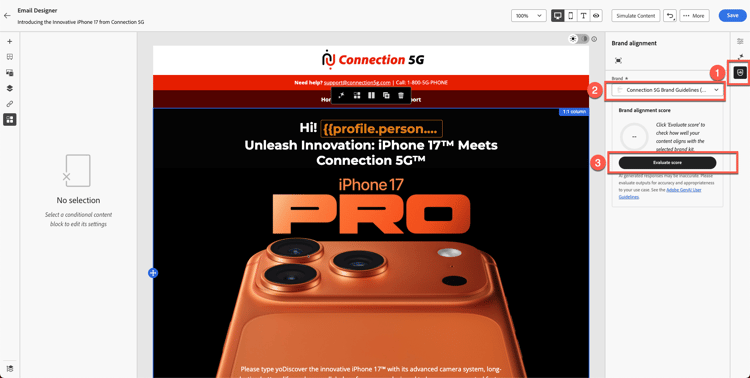
Locate the Brand Alignment tab in the right rail or the % icon in the sidebar.
-
Click to open the panel.
-
Ensure the correct brand is applied:
- Connection 5G (default).
-
Click Evaluate Score.
Interpret the Brand Score and feedback: After a moment, you see the Brand Compliance Score for your content. This score may be presented as a rating (e.g. High, Medium, or Low) or a percentage, along with a color indicator (green, yellow, red) and the time of evaluation. A High score means your content strongly aligns with the brand guidelines, whereas a medium or low score indicates moderate or poor alignment.
Review the detailed feedback provided in the panel for each category of guidelines.
The feedback is typically organized by guideline categories (such as tone, style, imagery, etc.), showing which rules passed and which might need attention.
Take note of any specific messages or highlights – for example, the panel might say certain words or phrases don’t match the prescribed tone, or an image doesn’t meet a visual standard. This is your cue on what to improve.

Review the alignment score
After evaluation, AJO displays:
- Brand Alignment Score
- Rating (High / Medium / Low)
- Colour indicator (Green / Yellow / Red)
- Timestamp
- Guideline categories (Tone, Style, Imagery, etc.)
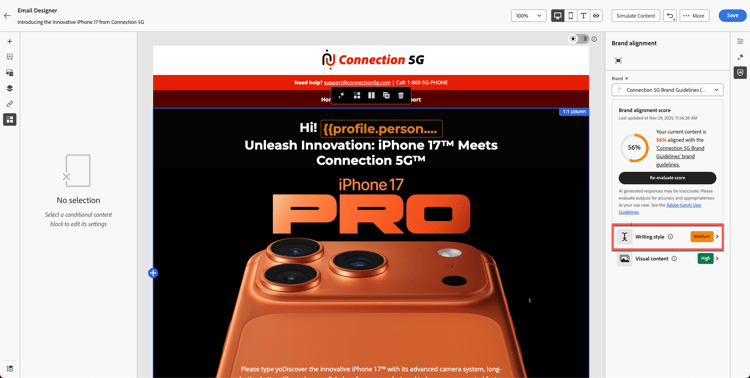
Interpret the results to understand how closely your email matches Connection 5G guidelines.
Examine detailed feedback
-
Scroll through the guideline categories.
-
Look for warnings or red indicators.
-
Click each flagged guideline to open detailed AI feedback.
-
Review suggestions, such as:
- Tone mismatch
- Incorrect phrasing
- Prohibited words
- Missing trademark usage
- Image style violations
Apply AI recommendations
-
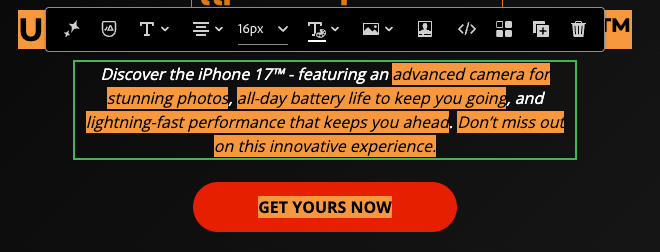
Click into flagged text blocks or images within the email.
-
Use the paragraph you pasted in the previous exercise, as shown below.
-
Use the suggested modifications provided by AI. Click on the icon as shown below.

-
Click on the Fix with AI button as shown below.

-
You see suggested changes highlighted in green, and removed text shown in red with strikethrough, as illustrated below. You also notice that the score has been updated (in this case, it is 80%). Click the Apply button for the changes to take effect.

-
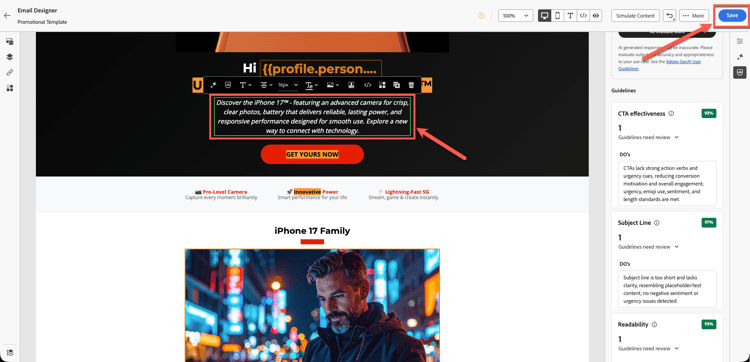
Changes are applied with new text.
-
Review all highlighted areas and make the necessary updates to correct the content, either using AI or by editing manually. Ensure that all required changes are completed before proceeding.
-
Save changes.
Re-evaluate the brand score
-
Make changes to all locations to fix the content using AI or manually.
-
Return to the Brand Alignment panel.
-
Click Re-evaluate Score.
-
Compare the new score to the previous one.

For example:
- Original score: 56%
- Updated score: 90%
This indicates your updates successfully aligned the email with brand standards.
-
Click Save to finalise your email.

Recap
In this module, you learned to:
- Evaluate an email using the Brand Alignment Score
- Interpret category-level feedback
- Identify writing, tone, and layout issues
- Apply AI-recommended corrections
- Improve brand consistency across your communication
Your content is now validated and ready for testing in the next module - Test the email.