Fork the result
Objective
This step is simple in that all you want to do is add a Fork activity such that you can duplicate the result to do two different things with it in future steps:
- Save the audience for others to use for advertising or cross-channel purposes
- Send SMS messages to the individual lines.
Create the Fork
-
On the workflow canvas, click the + icon after Build Audience activity and select the Fork Activity

-
Update the names of each transition in the fork by clicking on the transition and then assigning the names as outlined below:
- Top -->
Save Audience - Bottom -->
SMS

When done your canvas should now look like so…
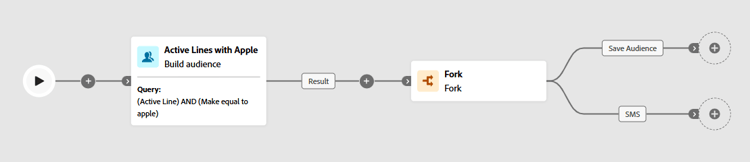
note NOTE A fork activity essentially is just duplicating the result from the previous activity into two independent branches - Top -->
-
Click Save on the top of the workflow canvas.

Recap
Welp, you created a Fork of the result (i.e. duplicate the result) which allows you to clearly dictate a branch to process a Save Audience whereas the other one can be used for SMS sending.