Automate with APIs
Introduction
To see how you can automate deployments using APIs you execute a folder of APIs that creates the following objects:
- Customer Account and Plan [Lookup] schema(s)
- Field groups that compose the schemas above
- Identity descriptors required for profile
- Relationship and reference descriptors required for creating the relationships between Customer Account and Plan [Lookup]
- Two datasets matching each schema created
Execute the folder
-
In Postman navigate to the Automation with APIs folder within the XDM Schema Lab folder

-
Click on the Automation with APIs folder and in the workspace click on the Run button
note NOTE The run button is in the upper right of your Postman workspace 
-
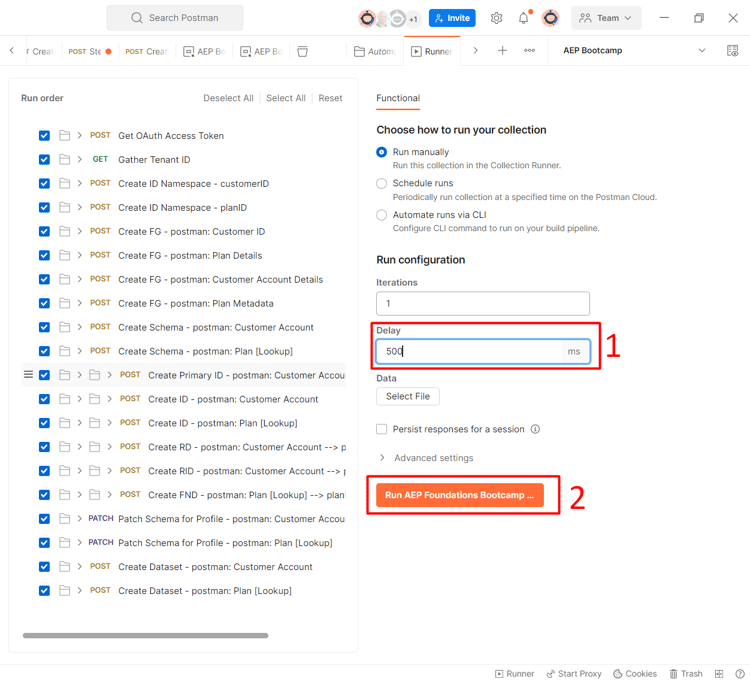
A new window appears that shows all the API calls in the folder. Set the Delay to 500ms and then click on the Run button.
-
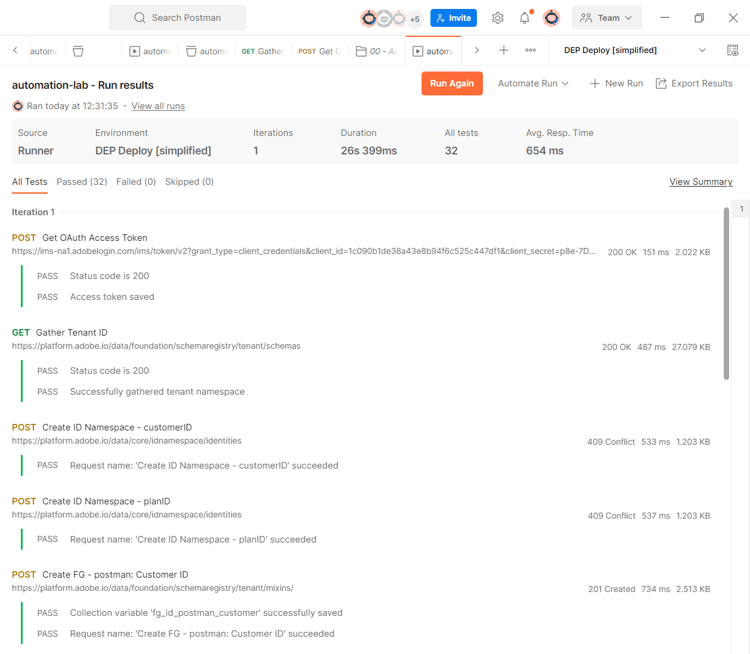
You see the API calls start to execute in order, and when complete you see 32 passed tests.
-
Go to the Experience Platform UI and you see two schemas and two datasets created and enabled for profile with the prefix of postman:

