Get Plan Schema ID
List all tenant schemas
- Click on the
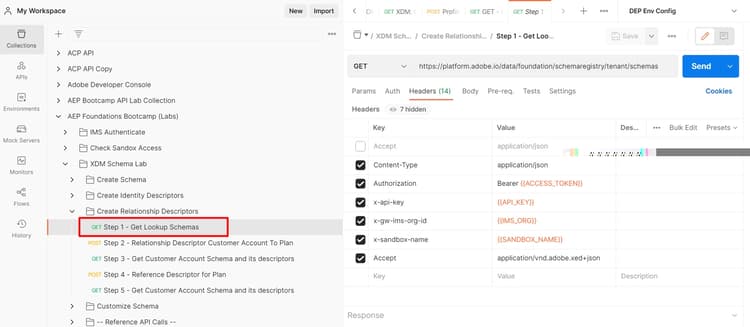
Step 1 - Get Lookup SchemasAPI request in theXDM Schema Lab -> Create Relationship Descriptorsfolder - Execute the API by clicking the
Sendbutton
NOTE
This GET call fetches all the schemas that exist within the “tenant” part of the schema registry (i.e. custom created schemas). We only need to search for the Plan schema so we can relate it to the Customer Account schema.
Identify the plan schema
- Search for the
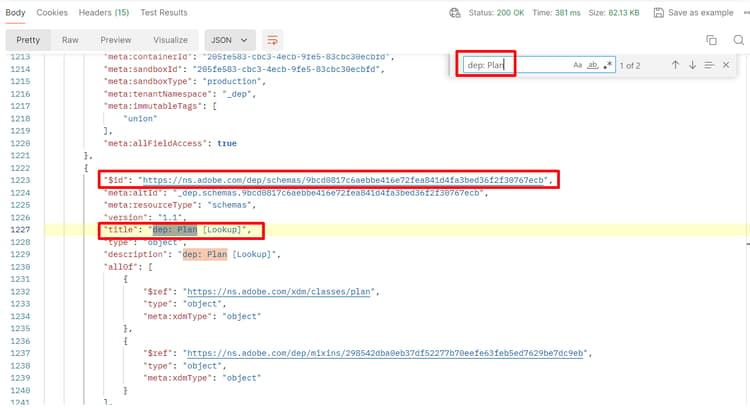
dep: Plan [Lookup]schema in the calls response - Copy the
$idof the schema and save it somewhere for future reference
NOTE
This schema should be pre-deployed in your sandbox already
WARNING
Do not continue until you have saved
$id of the schema somewhere. It will be required later to create the Relationship Descriptorrecommendation-more-help
blueprints-learn-help-blueprints