Get Standard Field Groups
NOTE
“Field Group” was previously referred to as a “Mixin” so these terms may be used interchangeably throughout the API requests and guide.
Request XDM standard field groups
- Click on
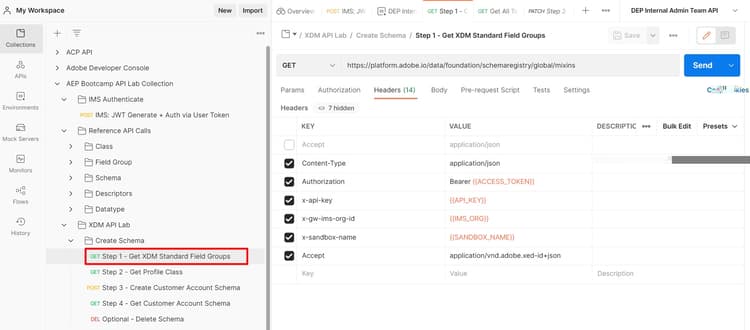
Step 1 - Get XDM Standard Field GroupsAPI call in theXDM Schema Lab -> Create Schemafolder - Execute the call by clicking the
Sendbutton
Request
NOTE
Note the use of
global value in the requests URL below:https://platform.adobe.io/data/foundation/schemaregistry/global/mixins
global is used to request only XDM standard components (field group/mixin in this case). There are two types of owners in the Experience Platform XDM registry: Adobe and Tenant (i.e. custom).- Adobe created objects always use the word
globalin any XDM listing or lookup requests - Tenant created objects (i.e custom) always use the word
tenantin any XDM listing or lookup call
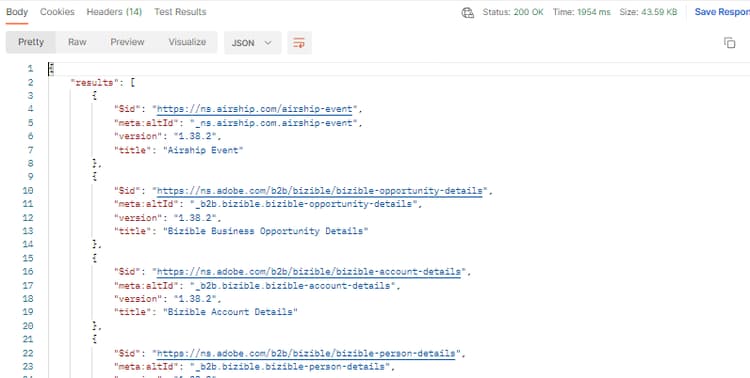
Response
Identify required XDM standard field groups
A schema is always composed of one or more field groups and a class. For the Connection 5G Individual Profile schema, find the standard XDM field groups required for the schema.
- Demographic Details
- Personal Contact Details
- Consent and Preference Details
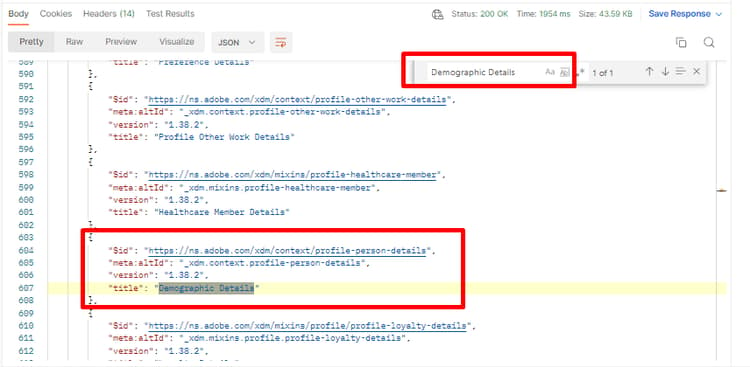
- Search for the
Demographic Detailsfield group in the call’s response - Copy the
$idof the field group and save it somewhere for future reference - Repeat steps 1 & 2 for the other two field groups listed above
WARNING
Do not continue until you have saved all three (3)
$ids somewhere. They will be required later to create the Customer Account schemarecommendation-more-help
blueprints-learn-help-blueprints