Profile & identity APIs
Profile Entity API
Knowing how to utilize the profile APIs is critical when it comes to working with the Real-Time Customer Profile. It unlocks the ability for fast triage and debug while also exposing you to endless possibilities around system integrations from call centers to kiosks.
One of the most important APIs is the Profile Entity API. This API allows you to lookup an individual profile (just like you saw in the UI) but uses params to dictate whether you want to see the attributes or events of the profile.
Below is the entire spec for the GET method for the Profile Entity API
API overview
Below is the minimum information needed to call the Profile Entity API.
GET https://platform.adobe.io/data/core/ups/access/entities
Required query parameter
Send this parameter with every request. Its value depends on whether you’re looking up a profile’s attributes or its events:
schema.name_xdm.context.profileschema.namerelatedSchema.name=_xdm.context.profile to scope the events to a profile._xdm.context.experienceeventIdentifying the entity to look up
Most requests use entityId and entityIdNS to identify the entity by any known identity value — such as an email address, CRM ID, or loyalty ID — rather than requiring you to already know its XID. An XID is a base64-encoded identifier that Identity Service generates and assigns internally to represent an identity, consolidating its namespace and ID value into a single compact token (see Native XID for details):
entityIdentityIdNS.depeche.mode@dep.comentityIdNSentityId belongs to (for example, email, crmid, ECID). Required whenever entityId isn’t already an XID.emailentityIdNS=email, entityId=depeche.mode@dep.com) rather than its XID.Required headers
Every request also needs these headers:
x-gw-ims-org-id<your IMS org>x-api-key<your API key>AuthorizationBearer <your token>startTime, endTime, property, orderby, limit), field selection, and merge policy overrides.x-sandbox-name is correctly set to the appropriate sandbox.x-sandbox-name set in your environment fileEntity Lookup (attributes)
To get a feel for the Entity Lookup API you use the Depeche Mode profile from the previous lab.
-
Open up Postman and navigate to the Profile Lab folder
-
Click on the Entity Lookup (attributes) request to open it
-
Execute the call by clicking the Send button
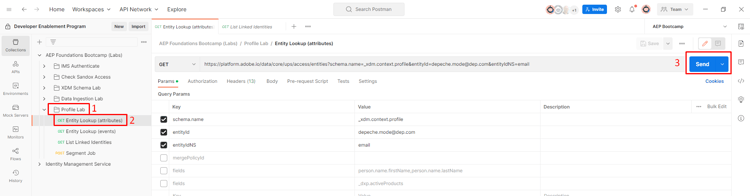
A successful request should respond with a
200 OKand you should see a result that contains all the attributes for the Depeche Mode profile.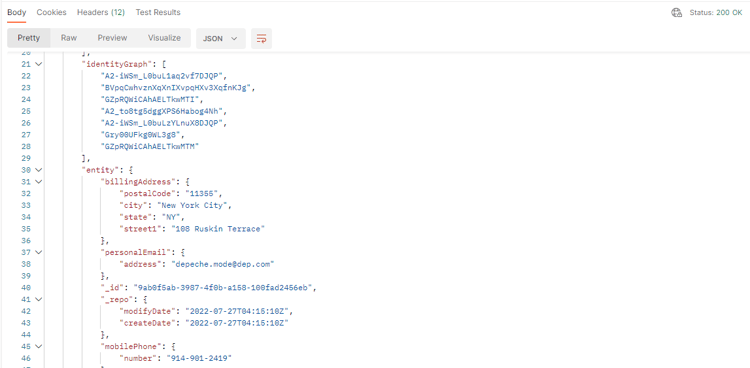
note NOTE By default if no merge policy is specified in a profile entity request it uses the default merge policy in the sandbox With the Entity API there are a number of query parameters that you can utilize to change what is returned in response.
-
In the Entity Lookup (attributes) request click on the Params option for the request
-
Check the box next to Key named fields
-
Execute the request by clicking the Send button
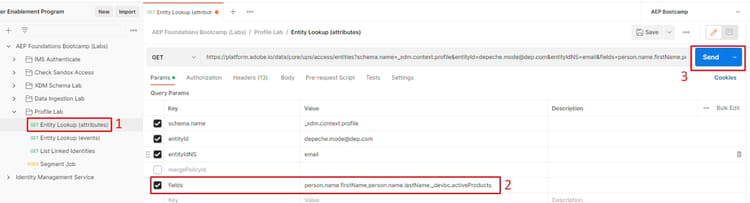
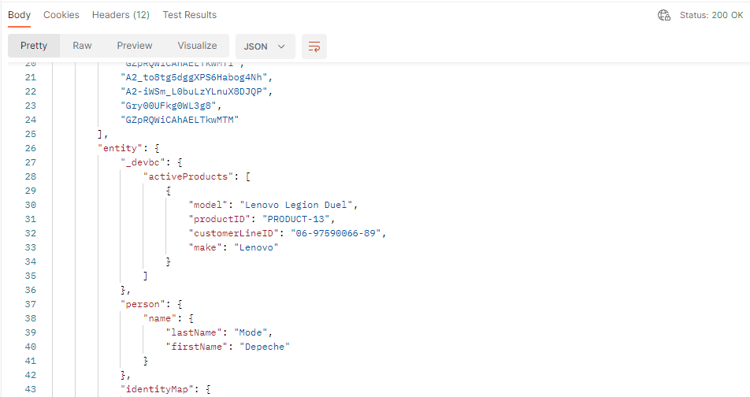
mergePolicyId. You can find the value for this utilizing other APIs or looking up the ID using the UI.A successful request should respond with a 200 OK and you should see only the fields specified in the param filter you just enabled: First Name, Last Name and an array of Active Products.
Entity Lookup (events)
To look up the events of a profile you use the same exact Profile Entity API. The only difference is you have to tell the profile service that you want to change which class type to use in the response.
- Click on the Entity Lookup (events) request to open it
- Execute the call by clicking the Send button
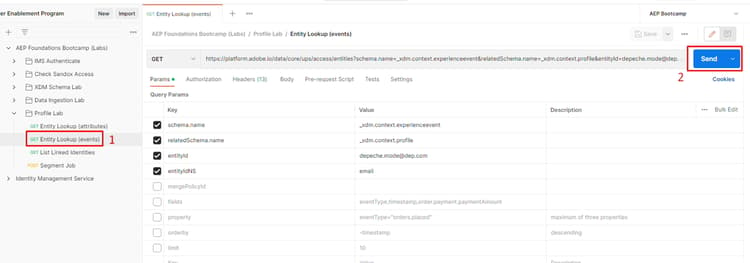
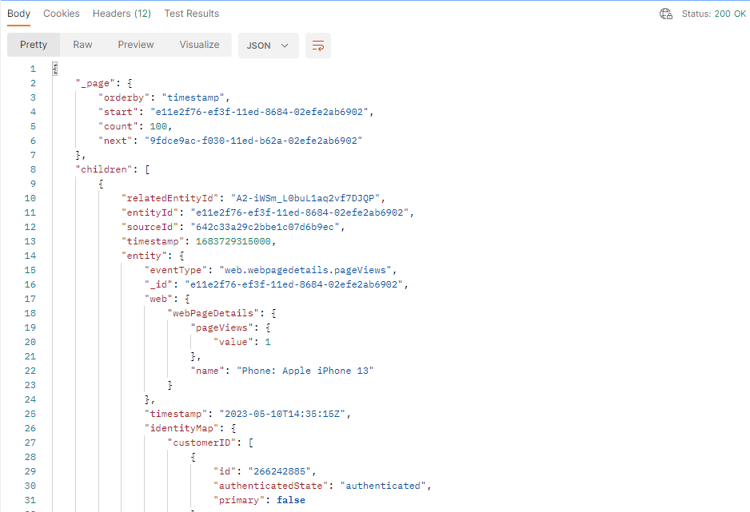
A successful request should respond with a 200 OK and you should see a result that contains all the events for the Depeche Mode profile.
Just like when looking up profile attributes the Entity API has even more query parameters that can be utilized to change what is returned in response.
You can try a few of them by enabling them in the Params section and executing the request. Try it out and see how it works!
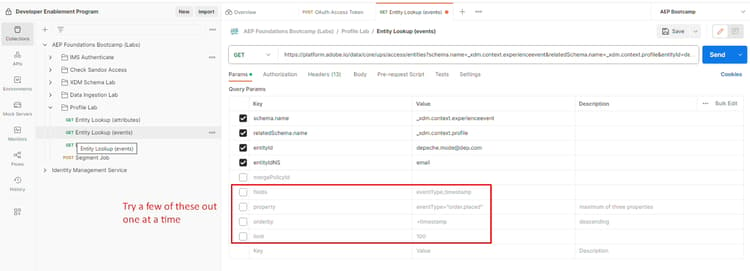
Sample Query Param Definitions
Identity Service Cluster API
At some point you may have a question about what identities are part of a specific profile’s identity cluster within the identity graph. This API allows you to pass a single identity namespace/value and in response you receive the full identity cluster for that profile.
Try it yourself:
- Click on the List Linked Identities request to open it
- Execute the call by clicking the Send button
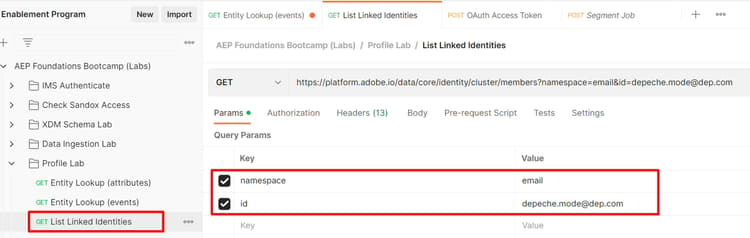
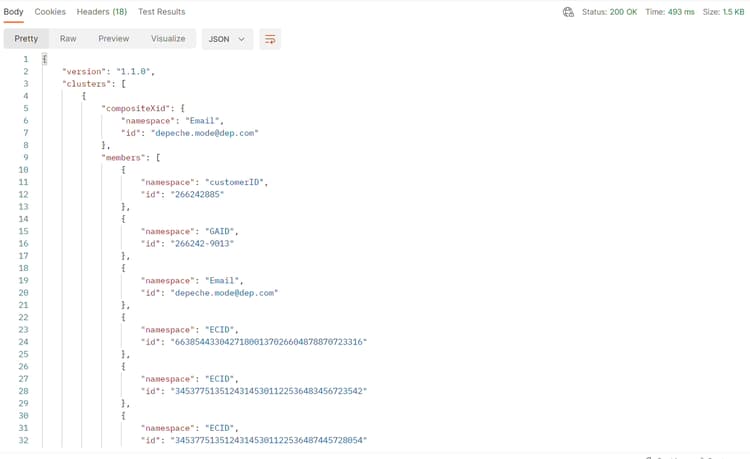
A successful response should look like the below screenshot