API collection
Postman API collection file
Download File — AEP Foundations Bootcamp (Labs).postman_collection.json
Import API collection
- Open the
Postman API Collection Filefrom above in your browser by clicking on the file - Copy the URL of the file to your clipboard
- Launch Postman on your local machine and click on the
Importbutton within your workspace - Paste the URL of the
Postman API Collection Fileinto the import modal text box on the overlay. This should trigger an automatic import
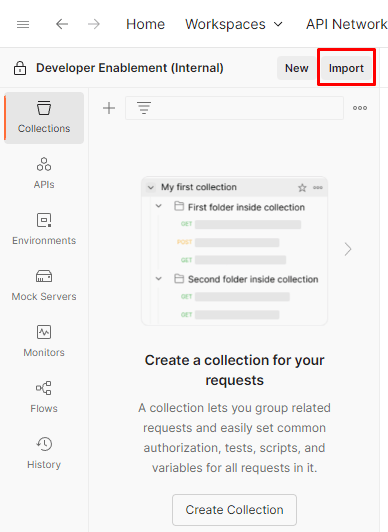
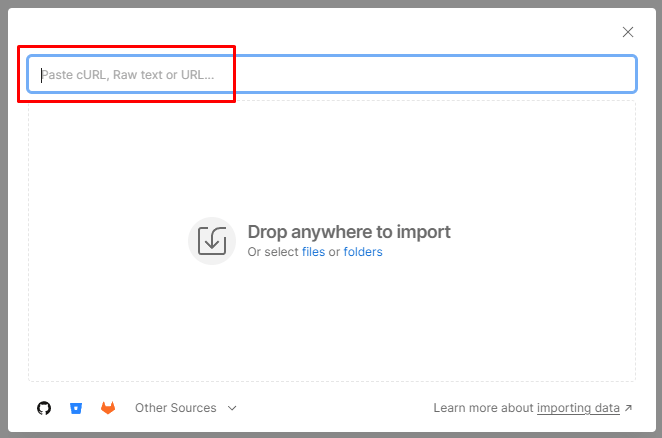
You should now see a collection populated under the left sidebar’s Collections tab called AEP Foundations Bootcamp
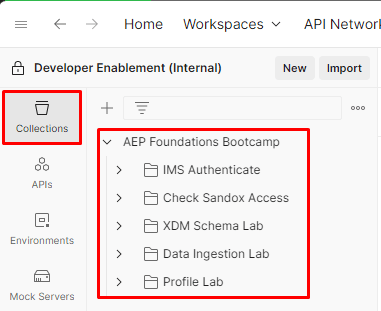
AEP Foundations Bootcamp collection overview
The API collection you imported contains all the necessary API calls you will need for labs throughout the bootcamp. Each lab is organized into a specific folder with its own set of APIs. Please be aware of this as you work through labs this week.
Details about each folder can be found below:
- IMS Authenticate - contains a single request to generate an access_token which is required when working with any of the Adobe Experience Platform APIs
- XDM Schema Lab - contains a set of requests for creating the XDM components necessary for building and configuring a schema for the Real-Time Customer Profile
- Data Ingestion Lab - contains a set of requests for streaming data into the Experience Platform
- Profile Lab - contains a set of requests for viewing the Real-Time Customer Profile’s traits and behaviors
TIP
Congratulations! You have successfully imported the bootcamp’s Postman Collection
recommendation-more-help
blueprints-learn-help-blueprints