Access token
API security overview
To establish a secure API connection to an Adobe product Adobe provides the creation of an OAuth server-to-server credential. To do so you must first create a developer project within the Adobe Developer Console. In order to have access to the Developer Console you must have been assigned Developer Rights within the Adobe Admin Console. Once you have these rights you can create developer projects utilizing the various Adobe product related APIs. This is where the OAuth Server-to-Server credential comes into play. To generate an access token you must pass a certain set of claims to Adobe’s Identity Management Service (IMS). For OAuth server-to-server credentials an example call would look like so:
curl -X POST 'https://ims-na1.adobelogin.com/ims/token/v3?client_id={CLIENT_ID}' \
  -H 'Content-Type: application/x-www-form-urlencoded' \
  -d 'client_secret={CLIENT_SECRET}&grant_type=client_credentials&scope={SCOPE}'
Adobe Experience Platform + Adobe IMS
Every request to any Adobe service must include the access token in the Authorization header along with the Client Secret that was generated during the developer project creation. Additionally, the Experience Platform and its associated applications require two other header params are present on each request.
x-gw-ims-org-id- this param specifies theIMS Orgthat the request belongs to and ensures the processing of the requests resolves to the appropriate SaaS environmentx-sandbox-name- this param specifies which sandbox to process the request in within the Experience Platform
Now that you understand a little bit about how Adobe secures its APIs and what is required to work with them, use them now.
x-sandbox-name param does not fail the request as you might expect. Instead it defaults the request to process into the default sandbox that is automatically provisioned with any Experience Platform environmentaccess_token. This is what you uploaded in the previous steps of the labAuthenticate with Postman
- Launch Postman and navigate to the directory titled
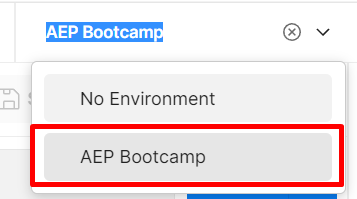
IMS Authenticateand open the request by clicking on it - Next in the upper right corner of Postman you see an environment drop-down. Select the
AEP Bootcampenvironment from the drop-down - Now execute the call by clicking the “Send” button
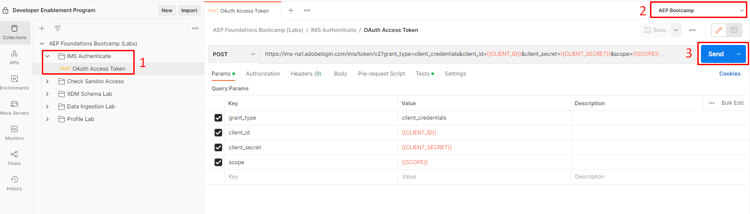
A successful response should look like this:
200 OK Successful Authentication
Successful Response
{
    "token_type": "bearer",
    "access_token": "<value>",
    "expires_in": 86399979
}
token_type - always will be of type bearer
access_token - proves authorization and required in the authorization header of all API calls
expires_in - milliseconds until the access token expires (24hrs expiration period today)
Common errors
Invalid token
This occurs when the private_key in your environment file is malformed or no longer valid. If you see this ensure you have copied the entire key, including the line breaks
Example:
-----BEGIN PRIVATE KEY-----
some uber long varchar set is here
-----END PRIVATE KEY-----
400 invalid_token
Invalid IMS_ORG
This error occurs when you forget to set your postman environment from the drop-down