Part 2 - Key fields
Lecture
In this video you will learn how to identify the primary identity, person identities, and relationship identities on each table, plus the required _id, timestamp, and event type fields for experience events.
Lab details
Identity fields
- Person identity – Used to uniquely identify a person. They are only used in Primary Entity tables. There must be at least one of these but there can be more than one.
- Relationship identity (i.e. non-person) – Used to describe relationships from the Primary Entity tables of the Real-Time Customer Profile to an associated supporting entity class (i.e. Lookups).
- Primary identity – Can be either a person identity or relationship (non-person) identity that is being used as a storage key and required for any schema being used by the Real-Time Customer Profile. For Primary Entity tables the identity also uniquely identifies a person. When specified for XDM Profile schemas and lookup schemas this field will determine whether a new record is created or an existing record is updated. There must be exactly one of these.
Required fields (XDM Experience Event only)
- _id - used by the Real-Time Customer Profile in conjunction with the Primary Identity to create a unique storage key for the event. Required to prevent accidental duplication of event data within Profile Service
- Timestamp – all events happen at a specific time and therefore every event requires a timestamp
Not required but highly encouraged:
- Event Type – describes the high-level behavior of the event data (i.e. purchase, reservation booked, etc.)
General rules
- Bridge Table Rule #2 - in situations where a bridge table exists between a “P” or “E” parent (i.e. parent table) and an “L” table treat the bridge table as part of the parent table
- Always validate that identities are unique to a single person at this stage to avoid rework during data ingestion
- For Experience Event schemas, the Primary Identity is what uniquely identifies that behavior to a single person.
- For lookup tables, the primary key (PK) from the relational model will always be the non-person Primary Identity
For each table from the Connection 5G Warehouse ERD and streaming ERD that you have labeled as either a “P”, “E” or “L”, you now perform the steps below to identify the primary identities, person identities, relationship identities and any required fields for the given schema classes.
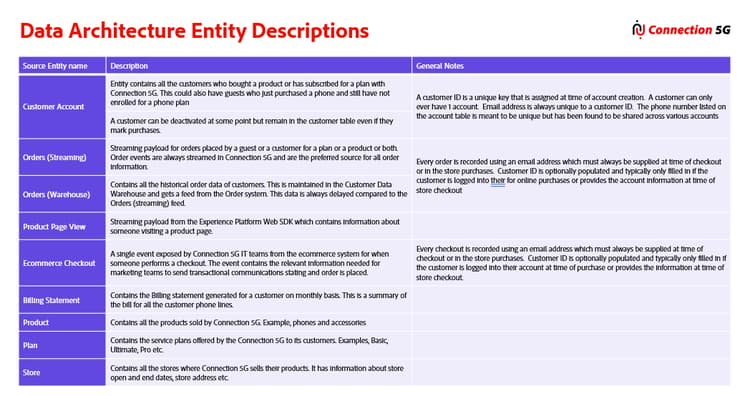
Step 1 – Label key fields in the XDM Individual Profile tables
Perform the below steps to identify the key fields within the Customer Account table:
- Identify the field that will be used as the Primary Identity and label it with a
PI - Identify all other Person Identities and label them with an
I - Identify any Relationship Identities and label them with a
R
Step 2 – Label key fields in the XDM Experience Event tables
Perform the same set of tasks you did in Step 1 but now for the XDM Experience Event tables:
- Identify the field in each table that will be the Primary Identity and label it with a
PI - Identify all other Person Identities in each table and label them with an
I - Identify all Relationship Identities and label them with a
R
In addition to the labels above also label the following:
- Identify or create the unique event id for each XDM Experience Event table and label it with a
_id - Identify the event’s timestamp for each table and label it with an
T - Identify or create the Event Type for each table and label it with an
ET
Step 3 – Label key fields in the Lookup tables
Identify in each lookup table the field that will be Primary Identity and label it with a PI
Review
The below video reviews the key fields identified across the Connection 5G tables, including why a concatenated field was needed as the unique event ID for mutable order records.