Fix passthrough mappings
Drop specific mappings
Some of the source data that you have needs to be handled using calculated fields. To address these, drop them from the mappings and re-validate the mappings.
-
Drop the following source data from the mappings:
- birth_date
- source
- sms_optIn
-
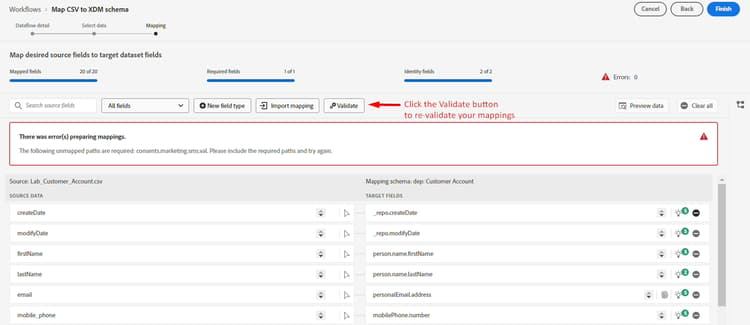
Re-validate the mappings by clicking on the validate button
Wrong mapping examples
While AI/ML recommendations are helpful they are sometimes wrong. If you inspect your recommendations you may find these type of errors that you need to fix
Duplicate mappings
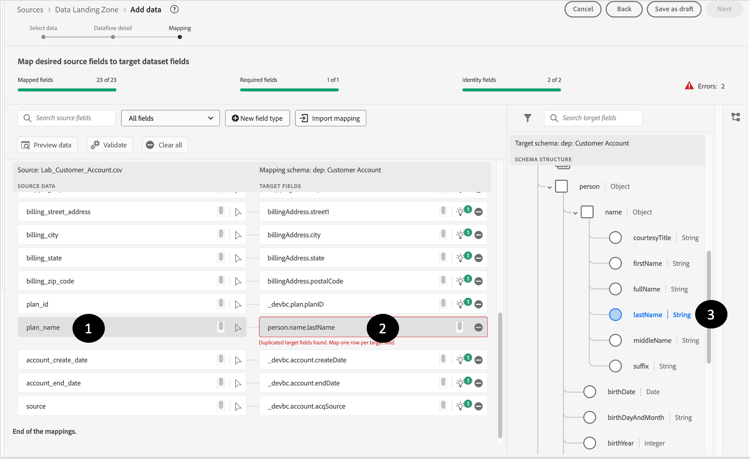
In this scenario you see that the AI/ML recommender mapped two different source fields to the same target field person.name.lastName


Bad mappings
This mapping looks right but upon closer inspection email is not the same as emailFormat

And this one where email_optIn is incorrectly mapping to the wrong consent object

Fixing passthrough mappings
To fix passthrough mappings that are incorrectly pointing to the wrong target field, perform the following steps.
Example
- Start with an invalid mapping and click on the target field box. For example, in the mapping below, the field person.name.lastName is not mapped correctly and is mapped to planName
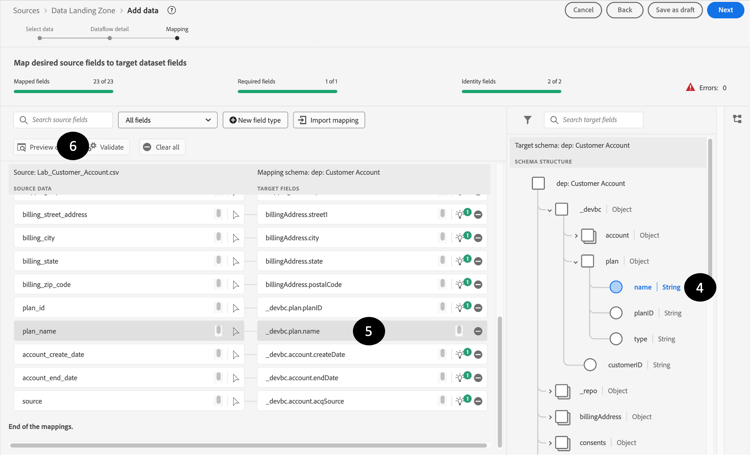
- In the target schema panel that opens on the right, choose the appropriate target field and select _devbc.plan.name
- The target field should now be updated in the target field box
- After you fix each such error, you should press the Validate button so that you can make sure you are reducing these kinds of errors and not introducing new ones.