Experience League Courses: Content Authoring Guidelines
Courses on Experience League
Before you begin working with courses on Experience League, you will need access to specific systems and should ensure that the course you wish to build doesn’t overlap with existing courses or those in development. The CX Enterprise product enablement team is a good team to contact to determine what exists and/or is currently in development, email/slack Sean Schnoor to reach the CX Enterprise product enablement team.
Regarding system level access and any net-new course authoring team requests, start with Kelsey Taylor (ktaylor@adobe.com)
Overview of Courses
Courses are structured, multi-module learning experiences designed to help Adobe DX users build skills through guided, sequenced instruction. A Course provides progression, modular learning, interactive steps, and comprehension checks.
A Course consists of the following,
- 2 or more modules
- Each module containing 2 or more steps
- Each module ending with a 3–5 question quiz that must be passed before progressing
Courses support multiple content formats (text, images, videos, interactive components) and are optimized for high-value, self-paced learning.
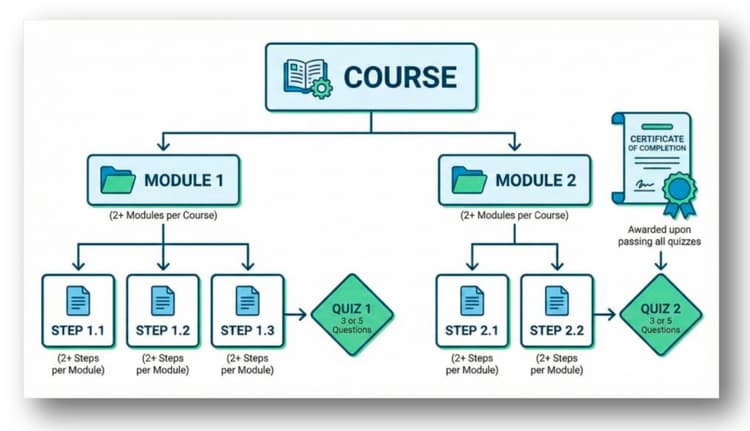
Course versus other content types
When to use a course
- Teach a workflow or capability that requires multiple stages of learning
- Provide hands-on progression with checkpoints to verify comprehension
- Deliver structured guidance and skill development that builds on itself
- Onboard users to a product or solution in a repeatable, outcomes-based way
- Consolidate related concepts into a single learning path
When to use other content types
- A single walkthrough or single-topic tutorial (use Tutorials)
- Long-form strategic content or thought leadership (use Perspectives)
- Product documentation or reference information (use Docs)
- A quick how-to video or single micro-learning use case (consider Tutorial or Playlist)
Authoring guidelines and requirements
Required course-level fields
Module-level requirements
Each module must include:
Step-level requirements (main authoring focus in Universal Editor)
A Step is the instructional core of your course and may include paragraphs, headings, images,
videos, and learning components.
Use this standardized narrative structure:
Step writing formula
- Objective: Orient the step within the module and state what the user will accomplish
- Context: Briefly explain why this task is important
- Key Info / Focus: Point out what the user should pay close attention to
- Conclusion paragraph: Prepare the user for what’s next
Step best practices
- Steps should cover one concept or feature
- Use short paragraphs and scannable formatting
- Use consistent sentence case
- Include visuals where helpful
- Keep tone clear, instructional, and neutral
Video requirements
See these articles for tips,
- optimize your recording environment - record a video
- quick tips to edit a video
- easily upload a video.
While all of the above links will provide you all of the details, be aware of these basics,
- 16:9 aspect ratio
- Resolution ≥ 1920 × 1080
- Upload videos using the Experience League video uploader
- MPC auto-generates captions and translated voiceovers for videos less than 40 minutes
Quiz requirements
Included at the end of every module. Each quiz is comprised of,
- 3 or 5 questions
- Multiple choice and/or multi-select (text only)
- Passing thresholds are 2 out of 3 correct / 4 out of 5 correct
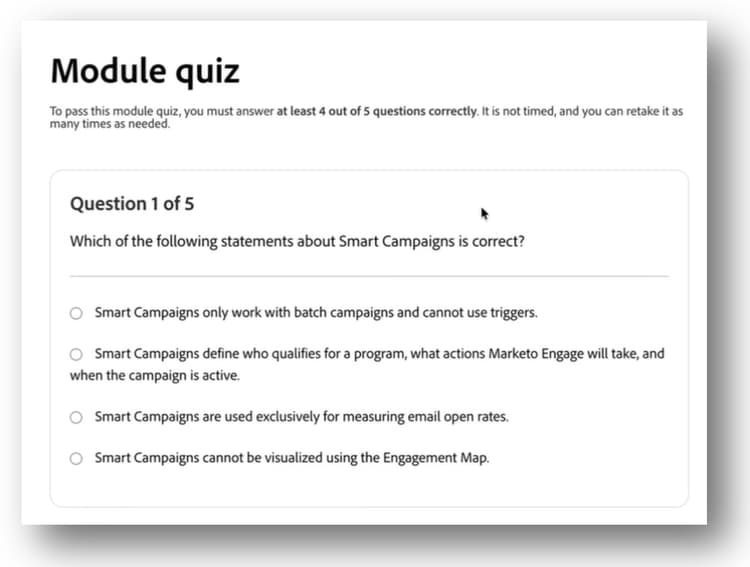
Supported learning components
Steps support common UE authoring elements, including 3 levels of headings, columns, images, videos, numbered and bullet lists.
In addition to common UE authoring elements; Columns, Images, Videos, Lists and Headings, the list below contains additional custom learning
components that are supported when authoring course content:
-
Tabs
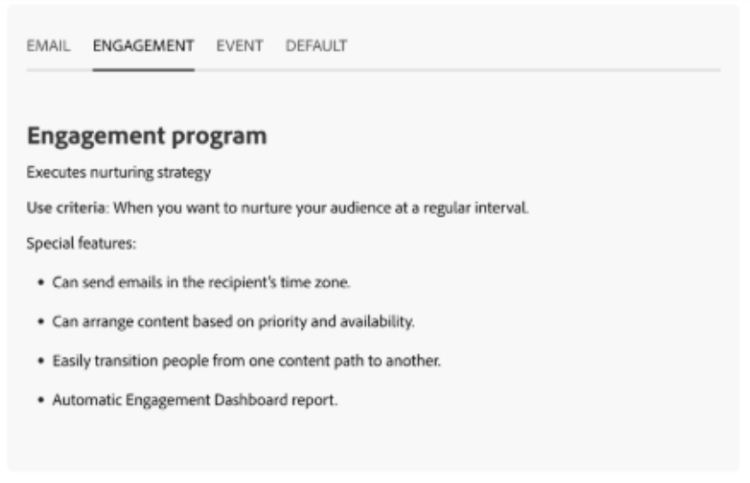
-
Section backgrounds
-
Drill-ins
-
Accordions
-
Flip cards
Governance requirements
Plan
Authors must:
- Validate that a Course is the appropriate format
- Confirm product accuracy with SMEs
- Avoid duplicate learning paths
- Plan modules, steps, and objectives
- Follow taxonomy, metadata, and tagging standards
Create
Authors are responsible for:
- Drafting steps and modules
- Creating or sourcing videos and images
- Following style, accessibility, and formatting requirements
- Applying metadata and SEO/GEO best practices
Governance focus:
- Version control
- Template compliance
- Structured authoring standards
- Avoid unapproved product names or trademarked references
Review & approval
Course content must be reviewed for:
- Accuracy
- Consistency with Course standards
- Accessibility and UI compliance
- Metadata completeness
- SEO and GEO compliance (if applicable)
Review participants may include:
- Product SMEs
- Content governance leads
- ExL Platform PMs (for structural questions)
Publish
Once approved:
- Authors or UE-approved publishers build in Universal Editor
- Modules, steps, and quizzes are assembled
- All assets uploaded to DAM
- Governance committee performs final QA
Publishing notes:
- Ensure proper image naming conventions within UE DAM structure
- Ensure Course submitted for translation workflow
Update (add a step)
You can add a step to a course by copying and pasting an existing step, then edit the step.
- See how in Update a course.
Measurement
Courses are currently measured using:
- Adobe Analytics
- Qualtrics surveys
Maintenance & archival
Courses should be reviewed at least annually for:
- Product changes
- Feature deprecations
- Updated workflows
- Accuracy and relevance
- Video replacements as needed
If a course is no longer valid:
- Reach out to Experience League Governance team for process to redirect or unpublish
Additional authoring resources
These internal references support Course creation:
Questions? Who to contact:
- Experience League Platform Technical Authoring & UE Support: Jacob Hammons (jhammons@adobe.com)
- Experience League Content Governance & Insights: Alyssa McGruder (mcgruder@adobe.com)
- Net-new Course authoring team requests: Kelsey Taylor (ktaylor@adobe.com)
Course Authoring Checklist
A practical checklist to ensure every Course meets Experience League standards.
1. Validate the content type
Before drafting, confirm that a Course is the right format:
- The topic requires sequenced learning with multiple modules
- Users need to progress through multi-step instruction
- A quiz is needed to confirm comprehension
- This is not better suited for a Tutorial, Perspective, Playlist, or Documentation
2. Plan the Course structure
- Define the learning objectives (what users should be able to do at the end)
- Outline modules (must include 2+ modules)
- Outline steps (2+ steps per module)
- Identify where videos, images, or interactive components will be used
- Confirm SME alignment and content accuracy
3. Prepare Course metadata
For the Course-level page:
- Page title (sentence case, H1)
- Page description (200–350 characters)
- Estimated time (rounded hours)
- Role(s) (Leader, User, Admin, Developer)
- Level (Beginner, Intermediate, Expert)
- Product(s) (select from ExL taxonomy)
- Meta title (< 60 characters, title case)
- Meta description (< 200 words, starts with verb)
- What you’ll learn (bulleted list)
- Module list (numbered)
4. Build each module
Every module must include:
-
Module title (sentence case)
-
Ordered list of steps
-
Key takeaways (bulleted summary)
-
Quiz with 3 or 5 questions
- Questions reviewed for clarity and accuracy
- Answer key stored in shared quiz reference file (if applicable)
5. Write each step
Each step must:
-
Follow the 4 part structure:
- Objective
- Context
- Key information
- What’s next
-
Cover one concept
-
Use short paragraphs and plain language
-
Use consistent sentence case
-
Align UI language to product interface (e.g., “Open the Preferences panel…”)
-
Include visuals where appropriate
-
Final paragraph transitions smoothly to the next step
6. Add videos (if applicable)
- 16:9 aspect ratio
- 1920×1080 resolution minimum
- Uploaded to MPC using the correct workflow
- Captions and AI-generated translations will be applied automatically
- File name & location follows ExL DAM standards
7. Use supported learning components
Only the following components are allowed in Courses:
- Text
- Images
- Videos
- Columns
- Tabs
- Section backgrounds
- Drill-in components
- Accordions
- Flip cards
Confirm that: - Each component follows UE best practices
- Text is placed in text components for translation compatibility
8. Accessibility & quality checks
- All images include alt text
- No copyrighted/trademark references (unless approved)
- No idioms, slang, or culturally specific expressions
- Visuals are clear and readable
- Steps and module structure are consistent
9. Pre-publish review
Before sending for governance review:
- Content fully drafted in Universal Editor
- All metadata is complete
- Links verified
- Steps and modules render properly on mobile + desktop
- DAM assets organized in correct folders
- Quizzes tested for logic + accuracy
- SME review completed
10. Governance review process
- Submitted to the Experience League governance reviewers
- Feedback incorporated
- Page meets SEO/GEO, tagging, and taxonomy standards
- Final approval received from governance committee
11. Publish & validate
After approval:
- Page published to Production
- Verify page displays correctly in all locales
- Check search visibility and card rendering
- Confirm all quizzes function in the published version
- Request translations through the Jira workflow (if applicable)
12. Measure performance
Once live:
- Confirm analytics tracking is functioning
- Monitor:
- Starts
- Module completions
- Course completions
- Video engagement
- Review performance quarterly using ExL AA dashboards
13. Maintain & update
At least once per year:
- Review course for product changes
- Update screenshots, videos, steps, quizzes
- Work with Governance Committee to re-publish updates