Navigate the brand portal
Learning scenario
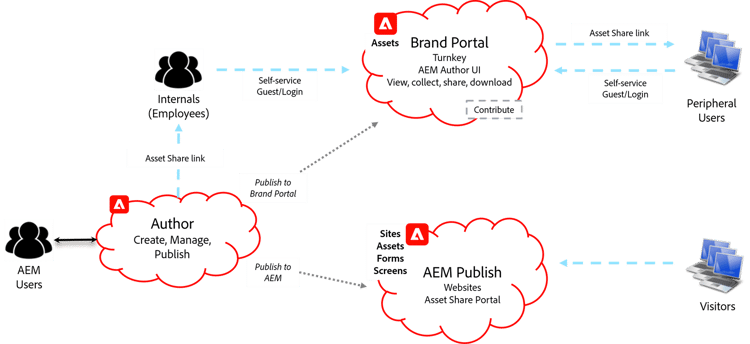
The Brand Portal is a ready-to-operate tool already configured with AEM. It is a turnkey cloud solution to share approved creative assets securely with internal users, partners, and external agencies. It can also be used to acquire assets from external agencies. Brand Portal offers authenticated or guest access.
Demo 5.4: navigate through the brand portal user interface
In this demonstration, the instructor will show you how to navigate through the Brand Portal user interface.
Now that you've learned about navigating the Brand Portal, let's learn about distributing assets to external partners using the Brand Portal.
Learning scenario
The WKND company shares branding assets with its peripheral marketing agencies to promote the WKND brand across all marketing collateral that is created externally. The DAM administrator typically provides these assets to external companies using Adobe’s Brand Portal but has requested that you, as the digital librarian, take responsibility going forward. The DAM administrator has informed you that all assets used externally must have Digital Rights Management (DRM) information applied using the WKND DRM Profile before publishing the assets.
You need to apply DRM information to all assets that will be shared with the peripheral agencies, publish the assets to Brand Portal, verify whether the assets are uploaded to Brand Portal for the peripheral agencies, and ensure they can download the assets for their use.
Distribute assets to external partners using brand portal
This hands-on activity shows you how to distribute assets to external partners using Brand Portal. If you need step-by-step instructions, please refer to Activity 5.4: Distribute Assets to External Partners Using Brand Portal in the activity guide.
Task 1: apply standard metadata to a folder of assets, and task 2: reprocess assets
In this activity, your instructor shows you how to distribute assets to external partners using Brand Portal.
Task 3: publish the assets to brand portal
In this activity, your instructor shows you how to publish the assets to brand portal.
In the next step, you will review the key takeaways for this module.