Scenario for learning activities
Adobe Experience Manager (AEM) provides tools to efficiently create and deliver digital experiences to many marketing and publishing channels. To use the consoles of AEM, you must first understand the basic AEM user interface.
Learning scenario
WKND, a global online publishing and adventures company, bought AEM Sites to host their primary website, WKND, and AEM Assets to manage all digital assets specific to the WKND website.
The website has been live for over a year and several departments across the company are impressed by how the website development team has organized and maintained the assets. The director of marketing heard the praise and has decided to expand the use of the Digital Asset Manager (DAM) to be the single source repository of all corporate assets along with the following requirements:
- All teams must be able to access a WKND shared folder for corporate assets to use according to their business needs.
- All teams must be able to use Dynamic Media for rendition management at scale and share the renditions using URLs and embed codes with peripheral users, both inside and outside the company.
- All teams must be able to publish digital assets to the Brand Portal so external digital agencies can access approved assets.
In a global organization like WKND, adoption of software at this scale is not a matter of authority; rather, it requires enablement and a change of habit for everyday asset users. To drive this shift, the marketing manager has requested the current DAM administrator to enable a group of volunteers from each department to become digital librarians for Experience Manager Assets. The digital librarians can later enable casual users of the DAM in their respective departments.
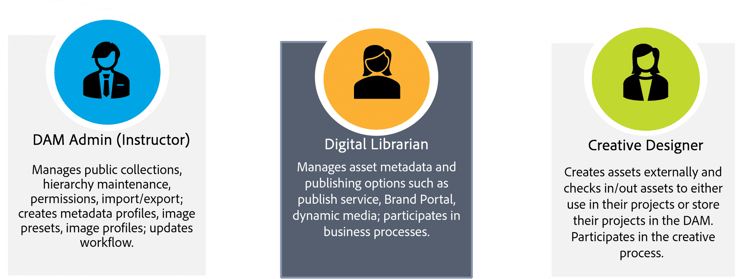
The DAM administrator (your course instructor) has been working very closely with the partner to make sure you and your team are successful in managing and delivering assets. In this scenario, you are a member of the Ski team who has volunteered to become a Digital Librarian in WKND.
Throughout this course, you will encounter two different types of users:
Casual users: Everyday users that have access to Experience Manager assets and use it for a central repository.
Peripheral users: Internal or external audiences who need assets but don't have access to Experience Manager.
Now that you understand the learning scenario, let's proceed to the course overview.