Reuse content in a tabs container
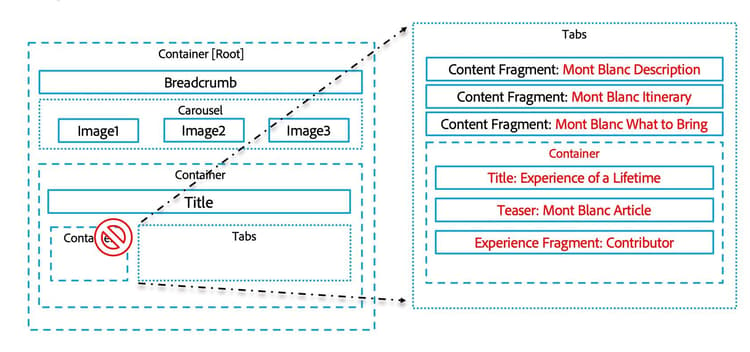
Wireframe of Reusing Images
Let's review the wire frame to get the high-level picture. You will be working at the bottom of our Mont Blanc ski page. Towards the bottom, there's a container and a tab component side by side. You are going to delete the container and use Layout mode to expand the tabs. Then in the tabs, you'll set up four tabs: a Content Fragment with the Mont Blanc description, a content fragment with a Mont Blanc itinerary, and a content frame with a Mont Blanc "what to bring" list. All of these are different elements from the same Content Fragment. The fourth tab will be a container with a title, a teaser, and an Experience Fragment.
Reuse content in a tabs container
In this activity, your instructor shows you how to review content in a Tabs container.
In the next lesson, you'll learn how to work with workflows.