Demo 2.1: site manager creates parent page
Page structure as wireframe
Wireframes are a common way to express page design and structure before building the page. Understanding the wireframe will help you to visualize the page structure of the webpage used in this lesson.
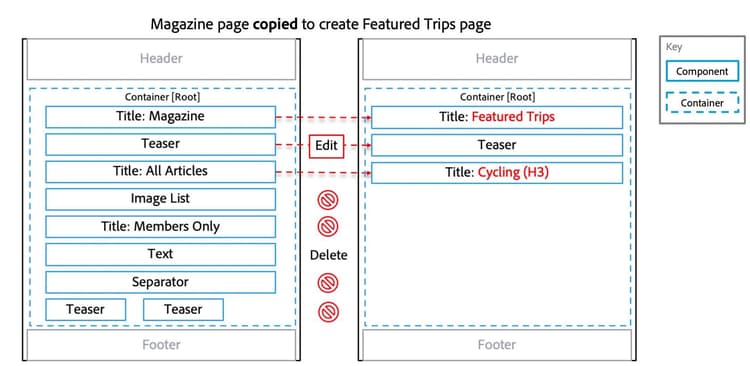
This wireframe shows how the parent page Featured Trips is created by copying the Magazine page and modifying the components.
The Magazine page is created from the content page template. It has a very simple structure: a header at the top, a footer at the bottom, and a container in the middle.
Most of the components will be removed from the copied Magazine page. A few components, such as Title and Teaser components, will then be edited to create the parent page Featured Trips, as shown in the wireframe.
Demonstration 2.1: site manager creates parent page
This video demonstrates how to create a parent page in AEM.
In the next lesson, you'll learn how to edit components on a page.