Module 6 overview
AEM's built-in Multi Site Manager and translation tools simplify localizing your content. Multi Site Manager (MSM) and its Live Copy features enable you to use the same site content in multiple locations. Translation lets you automate the translation of page content to create and maintain multilingual websites.
In this module, as a Content Author you will learn how to:
-
Understand Blueprints and Live Copies.
-
Roll out pages to Live Copies for synchronizing from the Blueprint to the Live Copy.
-
Make local changes to a site.
-
Set up a translation project to manage the translation of AEM content.
-
Add pages to a translation.
The pages you’ve been editing are called the English Blueprint. A Blueprint is the source of page content that rolls out to Live Copies. Live Copies are various destinations for source pages. Live Copies can have unique configurations and local content depending on the requirements of the website. For WKND, the United States and Canadian English sites are the same except in the domain structure:
- wknd.site/us/en.html
- wknd.site/ca/en.html
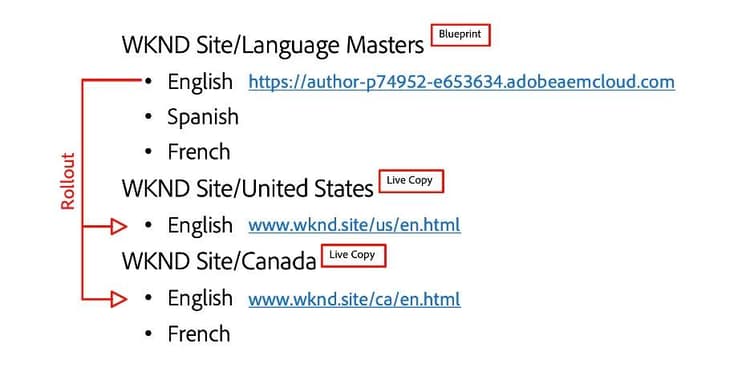
WKND structure rules:
- The source of WKND content is the English Language Master (LM)
- The English LM is translated in other LMs
- LMs are not published
- LMs are Blueprints
- Blueprints are rolled out to Live Copies
- Live Copies are country sites
- Country sites are published to the www.wknd.site
Blueprints and live copies
The Blueprint is the basic structure of the site created as a copy of the existing site.
A Live Copy is basically creating a new site based on the content and structure of an existing site or Blueprint, so that when changes are made in the source site, it is automatically updated here.
Multisite manager
Demo 6.1: roll out featured trips page to live copies
In the next lesson, you'll learn how to roll out all User0XX Trips pages.