Reporting on Programs with Dynamic Content
You’ve created an asset using dynamic content and want to know how it is performing. You have two report options:
- A Segmented Email Performance Report, which is the Email Performance Report you learned about in Module 3 with the Group by Segmentations option added to the Setup tab canvas.
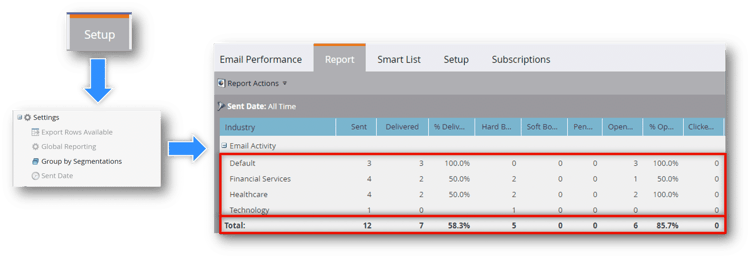
A flow showing how to add a segmentation to an Email Performance report by clicking the Setup tab and dragging the Group by Segmentations setting into the canvas.
- A local Email Link Performance Report, which shows the Clicks, % Clicks and People, % People for each link in the associated email. This will show how many people click on each link in that specific email.
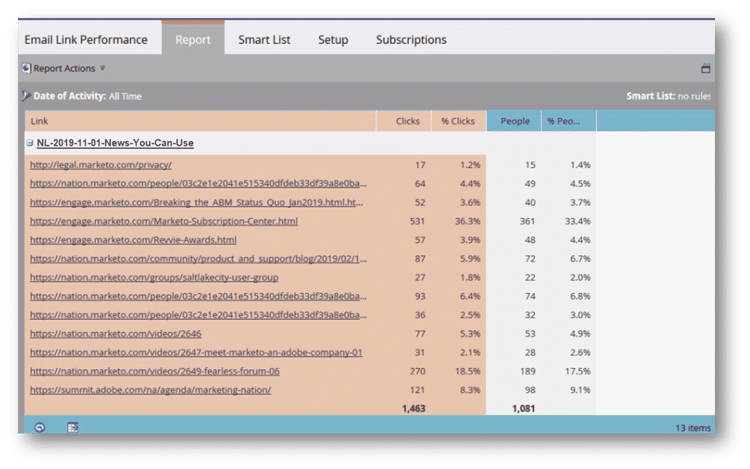
A screenshot of a local Email Link Performance report showing how many clicks each link got, as well as how many unique people clicked each link.
Demonstration: Create a Local Email Link Performance Report.
In this activity, watch an expert create a local Email Link Performance Report for this Email Program.
If you have a Marketo Engage sandbox or safe instance, you can follow along if desired.
In the next step, review the key takeaways for this module.