Programs and channels
Before creating your first Marketo Engage program, take a few minutes to go over some ideas that are critical to understanding Marketo Engage – programs and channels.
Programs
Programs are what Marketo calls a single marketing initiative. A program consists of:
-
Assets: Customizable content that helps you market to your audience.
-
Smart Campaigns: Sets of instructions you provide to Marketo that tell it what to do with those assets.
There are four primary types of programs in Marketo:



Sends an email.
Engagement
Sends out emails over time to accomplish a marketing goal.
Event
Manages online and in-person events.
Default
Flexible program used when the other three categories don’t fit.
Email program
Typical batch email deployments
Use criteria: When you are sending a single email once to a group of people at a specific date and time.
Special features:
-
Can send emails in the recipients’ time zones.
-
Advanced email A/B testing functionality.
-
Can be nested within the Event Program and Default Program.
-
Automatic visual Email Dashboard report.
Engagement program
Executes nurturing strategy
Use criteria: When you want to nurture your audience at a regular interval.
Special features:
-
Can send emails in the recipient’s time zone.
-
Can arrange content based on priority and availability.
-
Easily transition people from one content path to another.
-
Automatic Engagement Dashboard report.
Event program
Manage your in-person and online events
Use criteria: When you are asking people to attend an event at a specific date and time.
Special features:
-
Integrates with a variety of third-party event platforms.
-
Enables users to build the event using a program-level calendar.
-
Can be nested in Default, Event, and Engagement Programs.
Default program
Most flexible program type
Use criteria: When your program does not meet the criteria to be built using an Email, Engagement, or Event Program.
Special features:
-
Can be nested in an Engagement Program.
-
Has a program-level calendar.
Program channels
The program channel is the way you communicate with your audience. It’s the medium or delivery mechanism, like an email or a webinar. Defining the program channel tells Marketo Engage what you want to measure, such as opens for an email or attendance for an event.
You generally want to know two things from any program:
-
Status: To what extent did people interact with your program?
-
Success: How many people did exactly what you wanted them to?
When you select a program channel, Marketo Engage uses pre-configured status and success definitions to help you understand how your program is performing. These are the standard channels for each program type in Marketo Engage.
Click each card to reveal the default program channels for that program type.
- Email send
- Newsletter
Engagement
Engagement
Event
Event
-
Live event
-
Tradeshow
-
Webinar
Default
Default
- Email blast
- List import
- Online advertising
- Operational
- Web content
- Web form
Program channel progression
Let's look at how a program channel's progression is set up in Marketo Engage.
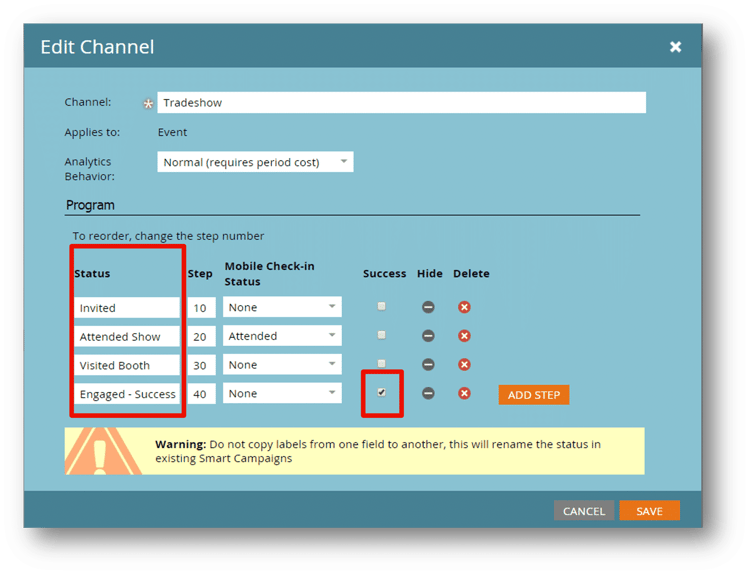
For example, in this Tradeshow Event Program channel, you can see there are four main statuses:
-
Invited
-
Attended Show
-
Visited Booth
-
Engaged - Success
The last step is our success metric.
A member is a person who has any status in a program. A member can only have one status at a time.
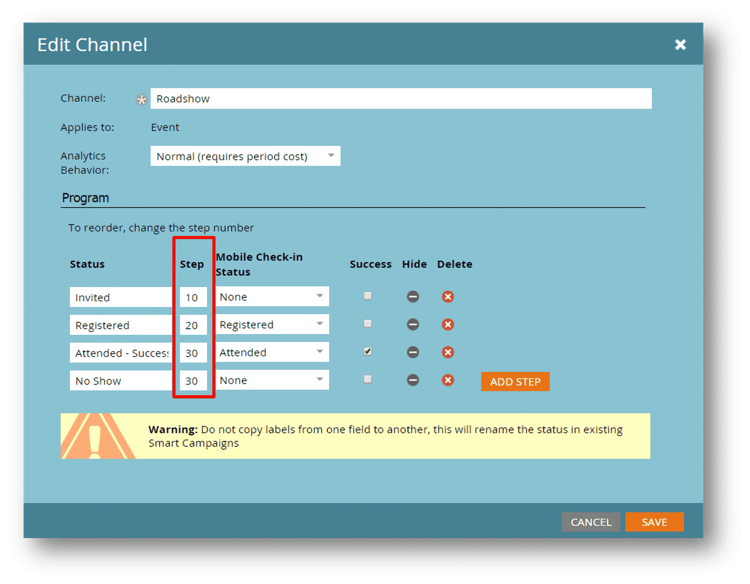
Progression steps define the order in which members of a program will progress through statuses.
Members can stay in the current step or move forward. They cannot move backward to a previous step.
In this example of a Roadshow Event program channel, you can see the following statuses:
-
Invited = 10
-
Registered = 20
-
Attended - Success = 30
-
No Show = 30
Once a member registers, they can either attend the live event or they can no-show. Since either outcome is possible, these statuses have the same value.
Program channel progression examples
Let's look at a couple of examples to show how progression can work in different program types.
Email program using email send channel
Introduction
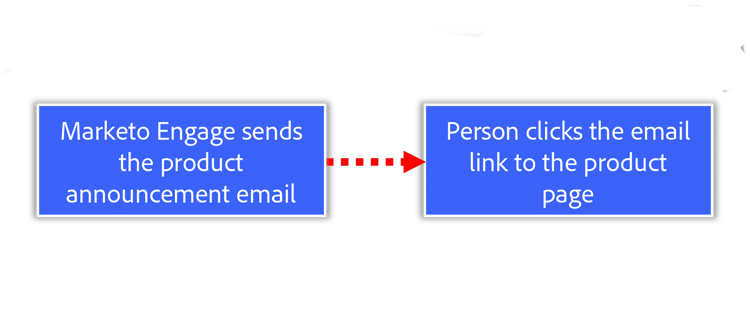
In this email program, the team is sending a product announcement email using the email send program channel. They want a member to click a link in the email to land on the product page.
Step 1: Program channel flow overview
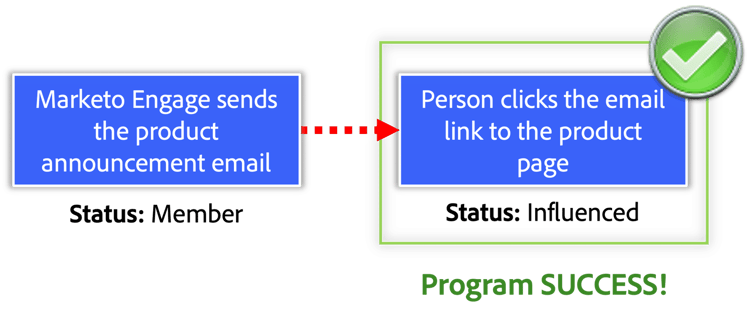
The flow would look something like this:
Marketo Engage sends the product announcement email, and the recipient becomes a Member of this Email Program.
If the recipient clicks the email link to the product page, Marketo Engage changes their status to Influenced. The email achieved the goal, so it’s a success.
Step 2: Program channel setup
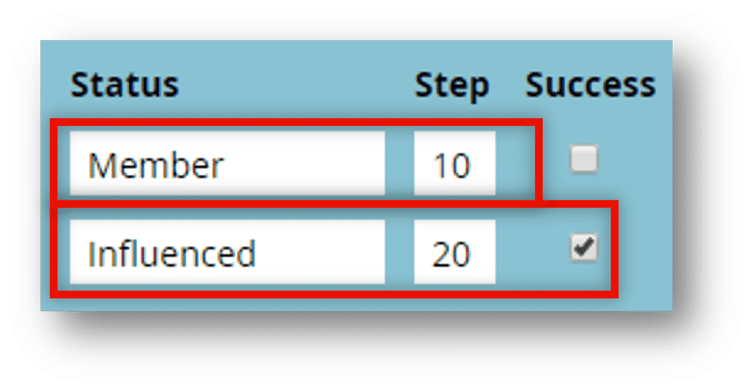
Marketo Engage records this flow through statuses:
Member is the first status, with the lowest number in the Step field.
Influenced is a higher Step value and is flagged as the Success status.
Event program using webinar channel
Introduction
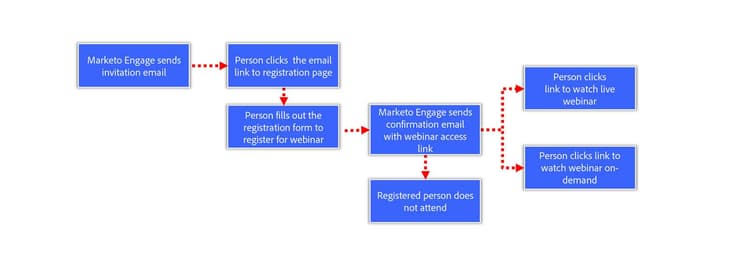
In this event program, the team is hosting a webinar using the Webinar program channel. Their end goal is to have a member either attend the live webinar or watch the recording afterward.
Step 1: Program channel flow overview
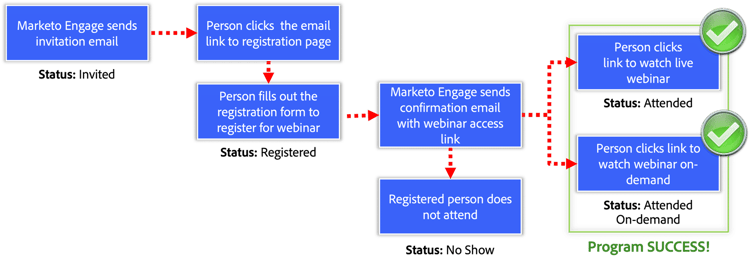
The flow would look something like this:
Marketo Engage sends the invitation email, and the recipient becomes a member of this Event Program with the status of Invited.
If the member clicks the registration link and completes the form to register for the event, their status changes to Registered.
Completing the form triggers Marketo Engage to send a confirmation email with a link to access the webinar.
At this point, there are three options for a member in the program:
- Not attend the session (No Show)
- Attend the live webinar (Attended)
- Watch the recording later (Attended On-demand)
If the member watches the webinar in any form, the program has achieved the goal.
Step 2: Program channel setup
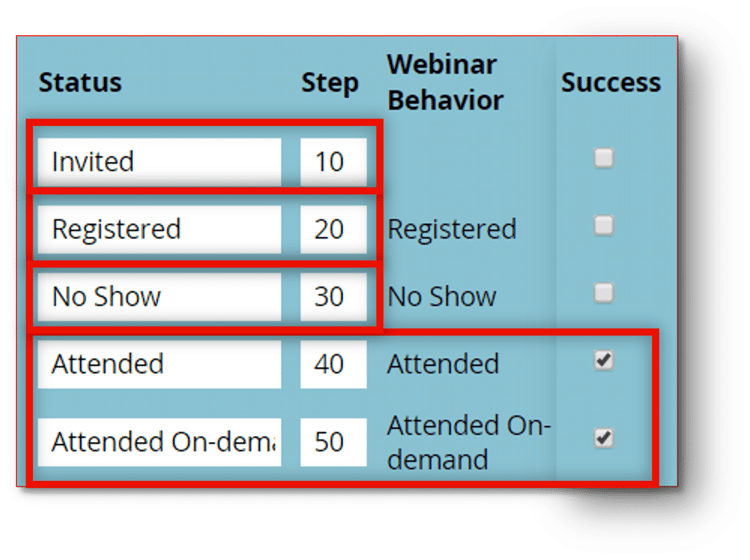
Marketo Engage records this flow through these statuses:
- Invited = 10
- Registered = 20
- No Show = 30
- Attended = 40
- Attended On-demand = 50
Both Attended statuses are flagged as success. We can report on how many members of this program completed each status step and act to improve our results for the next offering.
Now that you know more about programs and channels in Marketo Engage, let’s build your first program.