Create an email program
You have learned about the different program types and channels supported within each type. Now you will build your first program in Marketo Engage – a monthly email newsletter.
Demonstration: create an email program
To create an email program, you need to:
-
Create a campaign folder in Marketo Engage to hold your email program.
-
Create the email program.
-
Create recommended subfolders to organize assets.
Period costs
The first action you take with any Marketo Engage program is to assign a period cost.
A period cost is the amount of money spent on a marketing effort. Period costs help you measure the return on investment (ROI) of your programs. You can add them to a program in the Setup tab.
Programs can have a single month or multiple months of period costs.
All period costs in Marketo Engage are in the currency standard defined by your administrator.
Period costs should include variable costs, such as advertising costs, agency fees, event costs, and collateral fees. They should not include fixed costs like overhead or headcount.
It’s best practice to include a period cost on every program you create in Marketo Engage. Even if there are no variable costs, you should include a period cost of zero dollars, because some of the advanced reporting tools in Marketo Engage rely on period cost to accurately pull data.
Add a period cost
Static lists
Calculating your total sendable audience
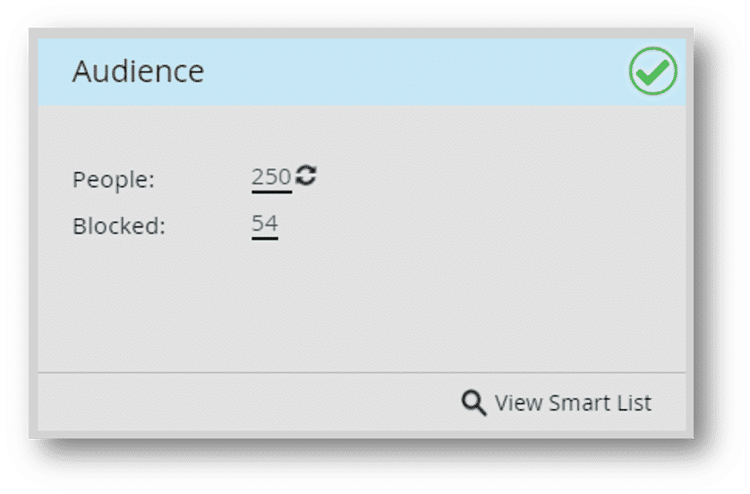
Marketo Engage email programs have an audience tile on the main screen. This has two numbers: People and Blocked.
People represents the total number of people in the program.
Blocked is a subset of those people who cannot be emailed, including:
-
Unsubscribed: Opted out of receiving marketing communications.
-
Email address: the Email Address field is empty, or emails to this address have been returned, and Marketo Engage has marked the email address as invalid.
-
Blocklisted: Your team has decided not to send emails to these people.
-
Marketing Suspended: You are temporarily not marketing to these people.
Your total sendable audience for an email program is the total number of People in the program, minus the number of Blocked people.
Demonstration: define your audience using a list import
Tasks to perform:
-
Import a list.
-
Use a Smart List to add the people to your Email Program.
-
Calculate your audience on the Audience tile.
Next, you will learn about creating email assets in Marketo Engage.