Use tokens to personalize an email
A token is a variable used to populate information in your assets and fields. Tokens allow you to personalize emails and landing pages with values from the database or update information in fields through smart campaigns.
All tokens use the following text format:
{{Token type.Name of Token}}
In this lesson, you’ll learn about three popular types of tokens: lead tokens, company tokens, and system tokens.
Token Types
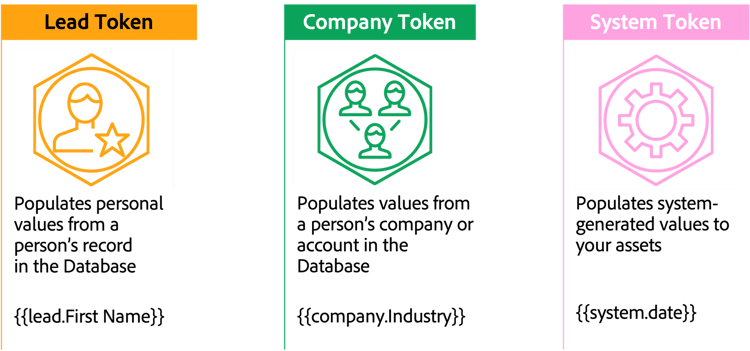
Tokens are available for all person and company fields in the database, including custom fields.

primary
--spectrum-gray-700
000000
white
primary
--spectrum-gray-700
000000
white
A Lead Token pulls a specific value from a person’s field in the Database and inserts it into the designated space in an asset.
How can you use lead Tokens to personalize an email?
Email promotion
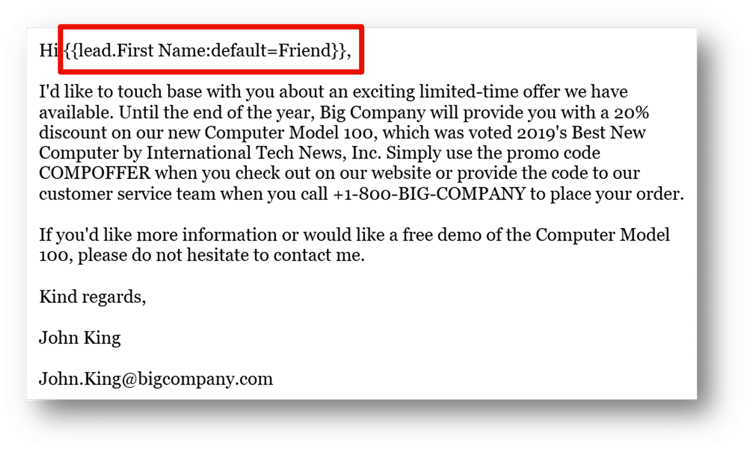
In this example, the Lead Token
{{lead.FirstName:default=Friend}}
will be replaced with the lead's first name when the email is sent out.
Known people
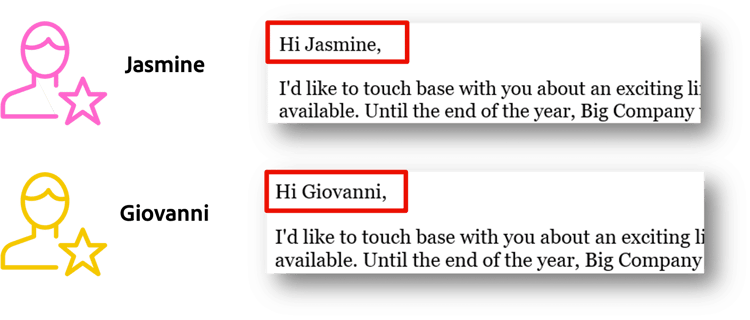
Marketo Engage will replace this Token with the value of the First Name field where that field is populated when sending the email.
Unknown people

Because the Token has specified a default value of “Friend,” a person record that does not have a value in the First Name field will instead be populated as “Friend,” as shown.
Demonstration: create an email using tokens and send a sample to review
You'll learn how to:
-
Create an email, select the email template, and enter an email subject line.
-
Edit the hero module, using system and personalization tokens.
-
Remove unneeded modules and add a preheader.
-
Preview the email, send yourself a sample, and approve the email.
In the next step, you will learn about setting up an email A/B test in Marketo Engage.