Phase 5: project completion

Final steps
For Karen to provide accurate reports, Workfront users need to be consistent in making updates and completing the work they're assigned. She needs to onboard users to best practices for closing out a project.

Close a project
Karen needs to ensure project managers have the information they need captured and recorded with the project before it’s closed out. There are some practical, more technical-based things project managers will want to do in Workfront to help wrap up the project.
- Complete tasks and issues.
- Complete approvals.
- Upload final documents.
- Log and review hours.
- Update and review finances.
- Change the project status.
All these steps are important because they can affect the data available in Workfront, such as:
- Completed project reporting.
- Resource utilization and planning statistics.
- Financial final numbers or estimates.
- Open project reporting.
Change the project status
As tasks in a project are completed, it’s crucial for project managers to update the overall project. One of the final steps for closing out a project in Workfront is changing the status to Complete. Status does two main things in Workfront:
-
Lets everyone know what stage of the project lifecycle the project is in.
-
Tells Workfront when to send out notifications and when not to.
With the Complete status, you’re letting everyone know the project work is complete—the deliverable is done, the outcome achieved, the goal met.
Change the status in:
- The project header.
- The project details.
- A list or report that displays the project status column.
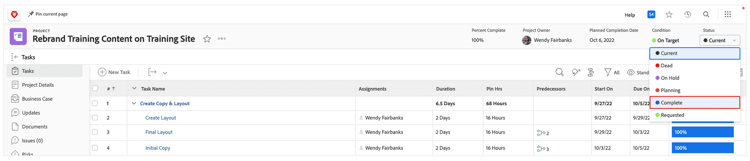
Change the project status from the project header.