Phase 2: approval

Approval process setup
With Adobe Workfront’s approval process feature, Karen can simplify and automate the work review experience, so the work delivered meets the specifications of the request and is completed on time.
Streamline your organization's workflows by creating and applying approval processes to projects, tasks, and issues. These approvals ensure designated approvers review changes before work progresses to the next stage of the project lifecycle.

Approval processes are object-specific and can be created for projects, tasks, and issues—including requests. They can be used at different phases of a project's lifecycle. For example, an approval process could be used on a new request so project managers can review and approve the request before work begins. Another approval could be assigned toward the end of a project for the final review and sign-off before it's marked as complete.
Workfront has two types of approval processes that system administrators can configure:
- Single-use approval
- Global approval
Create a single-use approval process
In this video, you will learn how to create a single-use approval process on an object.
Use global approval processes
In this video, you will learn how to:
-
Use an existing approval process.
-
Edit an existing approval process for a specific project, task, or issue.
Group-specific approvals
Both system and group administrators can create approval processes in Workfront. System administrators can create processes for use throughout Workfront or for only a specific group. Group administrators can create or edit processes for only the groups they manage.
Approval process for all groups
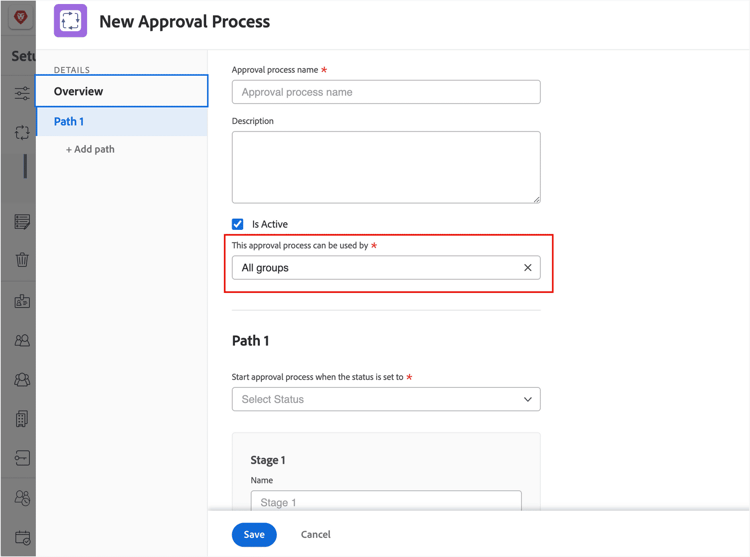
So that an approval process can be used by everyone in Workfront, verify the This approval process can be used by field is set to All groups.
Limit an approval process for a specific group
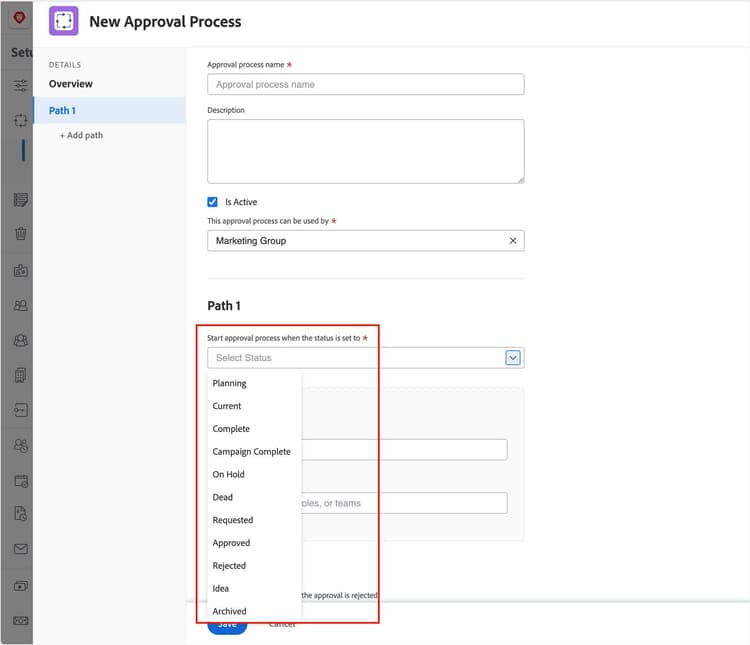
The statuses available in the Start Approval Process when the status is set to section depend on the selection in the “used by” field. With All groups selected, only the system-wide locked statuses are available.
To limit an approval process to a specific group, select the group’s name from the This approval process can be used by field.Note: The All groups option is not available to group administrators.
When a group is selected, only the statuses available for that group appear in the Start Approval Process when the status is set to menu.
Once a request is approved, it’s ready to move to the next phase of the project lifecycle—project creation!
In the step lesson, you'll learn different ways to create a project.