Introduction: project management
In this module, you will:
- Learn how the project lifecycle supports the completion and success of work at your organization.
- Set up approval processes in Adobe Workfront to automate the work review experience before work progresses to the next stage of the project lifecycle.
- Understand how work progresses from the user perspective to know what options there are when it comes to creating projects and managing them in Workfront.
Project lifecycle
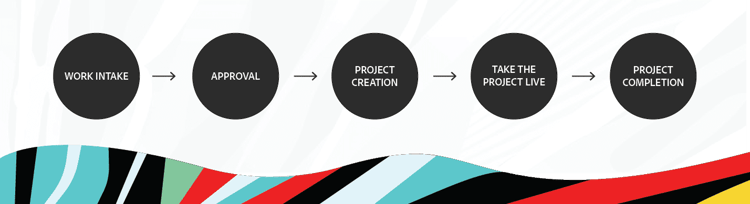
The project lifecycle serves as a guide for users to see how their work progresses from start to finish in Adobe Workfront. Your organization's phases may look a little different than Karen's project lifecycle, but the phases work together to achieve the same end goal—project completion.
Work Intake
At many organizations, the first step in kicking off a new project is making a request in Adobe Workfront. This keeps all information in one place, allowing teams to track the progress on the request and provide additional information when needed.
15
Approval
Requests are routed to a person, job role, or team for consideration. The receiving party is generally whoever is expected to complete the work. Once the request is approved, it can be converted to a project so work can begin.
33
50
Project Creation
The biggest benefit of Workfront is the ability to keep all your work connected. Converting the request directly into a project keeps the request linked to the project. Once the project is completed, the request will be too.
52
50
Take the Project Live
With the project created, now the project manager can build out the task list, establish the project timeline, and make task assignments. When it's time for work to begin, update the project status to Current. This takes the project live and notifies task assignees of the work that needs to be done. Work officially begins to fulfill the original request.
70
50
Project Completion
Monitor project progress through updates, project percent complete, project condition, and the planned completion date. Once all tasks and issues are complete, the project percent complete reaches 100% and the status can be changed to Complete. Because the project and request are linked, this automatically closes out the original request in Workfront.
89
50
Karen mapped out her organization’s workflows but needs to fully understand what's happening behind the scenes in Workfront for each key phase of the project lifecycle. Reviewing what steps take place during each phase helps Karen establish a structure in Workfront so users can successfully manage projects from start to finish.
In the next step, you'll learn about the work intake stage of a project’s lifecycle.