Hinzufügen von Benutzenden zu Adobe Workfront Fusion über die Adobe Admin Console
Sie können einen Benutzer zum Adobe Admin Console hinzufügen und ihn Adobe Workfront Fusion zuweisen, oder einen vorhandenen Benutzer im Adobe Admin Console Workfront Fusion zuweisen.
Ein Video, in dem Workfront Fusion in der Adobe Admin Console beschrieben wird, einschließlich der Vorgehensweise beim Hinzufügen von Benutzern, finden Sie unter Fusion auf Adobe IMS.
Zugriffsanforderungen
| table 0-row-2 1-row-2 2-row-2 3-row-2 4-row-2 layout-auto html-authored no-header | |
|---|---|
| Adobe Workfront-Paket |
Ein beliebiges Adobe Workfront Workflow- und Adobe Workfront Automation and Integration-Paket Workfront Ultimate Workfront Prime- und Select-Pakete bei zusätzlichem Kauf von Workfront Fusion. |
| Adobe Workfront-Lizenzen |
Standard Work oder höher |
| Produkt | Wenn Ihre Organisation über ein Workfront Select- oder Prime-Paket ohne Workfront Automation and Integration verfügt, muss Ihre Organisation Adobe Workfront Fusion erwerben. |
| Konfigurationen der Zugriffsebene |
Sie müssen ein Workfront Fusion-Administrator für Ihr Unternehmen sein. Sie müssen ein Workfront Fusion-Administrator für Ihr Team sein. |
| Konfigurationen der Zugriffsebene | Sie müssen Produktkonfigurations-Administrator von Adobe-Produkten für Ihr Unternehmen sein. |
Weitere Details zu den Informationen in dieser Tabelle finden Sie unter Zugriffsanforderungen in der Dokumentation.
Voraussetzungen
Bevor Sie den Admin Console für Workfront verwenden, sollten Sie eine E-Mail erhalten, in der Sie zur -Konsole eingeladen werden.
-
Wenn Sie Adobe noch nicht kennen und eine E-Mail erhalten haben, in der Sie darauf hingewiesen werden, dass Sie jetzt über Administratorrechte für die Verwaltung Adobe Software und Services für Ihr Unternehmen verfügen, klicken Sie auf die Schaltfläche in der E-Mail, um ein Adobe Konto zu erstellen, und öffnen Sie die Admin Console.
ODER
Wenn Sie bereits über ein Adobe-Konto verfügen, gehen Sie zur Adobe Admin Console Seite.
Hinzufügen eines neuen Benutzers zu Adobe Admin Console und Workfront Fusion
-
Wählen Sie auf Adobe Admin Console Seite die Registerkarte Produkte in der oberen Navigationsleiste und wählen Sie dann die Produktkachel Workfront.
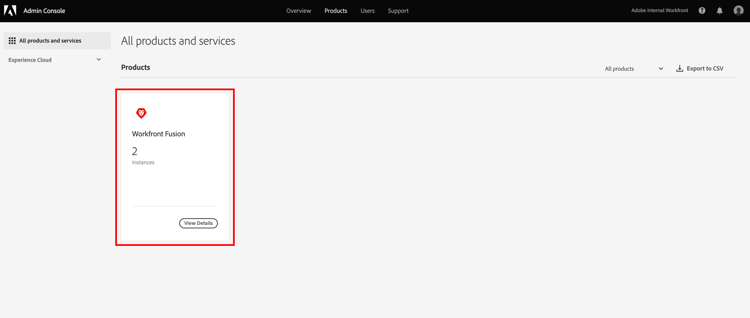
-
Wählen Sie in der angezeigten Liste die Organisation aus, der Sie einen Benutzer hinzufügen möchten.

-
Klicken Sie in der angezeigten Liste bei ausgewählten Registerkarte Produktprofile“ auf den Namen des Links Workfront Produktprofil.
note important IMPORTANT Nehmen Sie keine Änderungen am Produktprofil vor. -
Klicken Sie der „Benutzer“ oberhalb der Liste auf Benutzer hinzufügen.
-
Geben im Feld „Benutzer zu diesem Produktprofil hinzufügen die E-Mail-Adresse oder den Namen eines Benutzers ein, den Sie hinzufügen möchten, und wählen Sie dann den Benutzer in der angezeigten Liste aus.
-
Klicken Sie auf Speichern.
Die Benutzerin bzw. der Benutzer wird in Workfront Fusion erstellt.
-
(Optional) Fahren Sie mit Ändern der Zugriffsebene von Benutzenden in Workfront Fusion fort.
Ändern der Zugriffsebene von Benutzenden in Workfront Fusion
Benutzerrolle in „Admin“ ändern
Die Zuweisung einer Administratorrolle an einen Benutzer muss in der Adobe Admin Console erfolgen.
-
Wählen Sie auf der Seite Produktprofil von Workfront Fusion, auf der Sie den Benutzer hinzugefügt haben, die Registerkarte Administratoren aus.
-
Klicken Sie Admin hinzufügen.
-
Geben im Feld „Produktprofil- hinzufügen“ die E-Mail-Adresse oder den Namen des Benutzers ein, der Administrator werden soll, und wählen Sie dann den Benutzer in der angezeigten Liste aus.
-
Klicken Sie auf Speichern.
Der Benutzer ist jetzt Administrator in Workfront Fusion.
Rolle eines Benutzers in „Mitglied“, „Buchhalter“ oder „App-Entwickler“ ändern
Die Rollen „Mitglied“, „Buchhalter“ und „App-Entwickler“ werden in Workfront Fusion verwaltet.
Anweisungen finden Sie unter Anzeigen oder Bearbeiten von Benutzerrollen.
Zuweisen eines bestehenden Benutzers in der Adobe Admin Console zu Workfront Fusion
Sie können einen vorhandenen Benutzer zu einem Team in Fusion hinzufügen. Dies wird innerhalb von Fusion gehandhabt.
Anweisungen finden Sie unter Hinzufügen eines Benutzers zu einem Team.