Stapelweise Aktualisierung einer Eigenschaft – Beispiel für eine Erweiterung
Diese beispielhafte AEM-Inhaltsfragmentkonsolenerweiterung ist eine Aktionsleistenerweiterung, bei der eine Inhaltsfragment-Eigenschaft stapelweise zu einem gemeinsamen Wert aktualisiert wird.
Der Funktionsfluss der Beispielerweiterung lautet wie folgt:
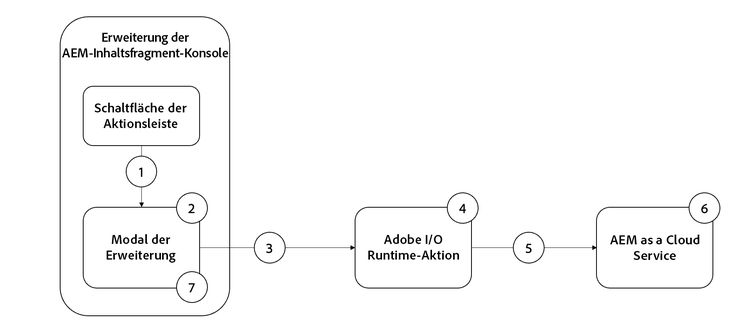
- Wählen Sie Inhaltsfragmente aus und klicken Sie auf die Schaltfläche der Erweiterung in der Aktionsleiste, um das Modal zu öffnen.
- Das Modal zeigt ein benutzerdefiniertes Eingabeformular an, das mit React Spectrum erstellt wurde.
- Beim Übermitteln des Formulars werden die Liste der ausgewählten Inhaltsfragmente und der AEM-Host an die benutzerdefinierte Adobe I/O Runtime-Aktion gesendet.
- Die Adobe I/O Runtime-Aktion validiert die Eingaben und sendet HTTP-PUT-Anfragen an AEM, um die ausgewählten Inhaltsfragmente zu aktualisieren.
- Eine Reihe von HTTP-PUTs für jedes Inhaltsfragment zum Aktualisieren der angegebenen Eigenschaft.
- AEM as a Cloud Service behält die Eigenschaft für Aktualisierungen des Inhaltsfragments bei und gibt Erfolgs- oder Fehlerantworten für die Adobe I/O Runtime-Aktion zurück.
- Das Modal erhält die Antwort von der Adobe I/O Runtime-Aktion und zeigt eine Liste der erfolgreichen Massenaktualisierungen an.
Erweiterungspunkt
Dieses Beispiel erstreckt sich auf den Erweiterungspunkt actionBar, um der Inhaltsfragment-Konsole eine benutzerdefinierte Schaltfläche hinzuzufügen.
Beispielhafte Erweiterung
In diesem Beispiel werden ein vorhandenes Adobe Developer Console-Projekt und die folgenden Optionen beim Initialisieren der App Builder-App über aio app init verwendet.
-
Nach welchen Vorlagen suchen Sie?
All Extension Points -
Wählen Sie die zu installierende(n) Vorlage(n) aus:
@adobe/aem-cf-admin-ui-ext-tpl -
Wie soll Ihre Erweiterung benannt werden?
Bulk property update -
Bitte geben Sie eine kurze Beschreibung Ihrer Erweiterung an:
An example action bar extension that bulk updates a single property one or more content fragments. -
Mit welcher Version möchten Sie beginnen?
0.0.1 -
Was möchten Sie als Nächstes tun?
-
Add a custom button to Action Bar- Geben Sie die Bezeichnung für die Schaltfläche an:
Bulk property update - Müssen Sie ein Modal für die Schaltfläche anzeigen?
y
- Geben Sie die Bezeichnung für die Schaltfläche an:
-
Add server-side handler- Mit Adobe I/O Runtime können Sie bei Bedarf Server-losen Code aufrufen. Wie möchten Sie diese Aktion benennen?
generic
- Mit Adobe I/O Runtime können Sie bei Bedarf Server-losen Code aufrufen. Wie möchten Sie diese Aktion benennen?
-
Die generierte App Builder-Erweiterungs-App wird wie unten beschrieben aktualisiert.
App-Routen app-routes
src/aem-cf-console-admin-1/web-src/src/components/App.js umfasst den React-Router.
Es gibt zwei logische Routengruppen:
-
Die erste Route ordnet Anfragen der Datei
index.htmlzu, die die für die Erweiterungsregistrierung zuständige React-Komponente aufruft.code language-javascript <Route index element={<ExtensionRegistration />} /> -
Die zweite Routengruppe ordnet URLs React-Komponenten zu, die den Inhalt des Modals der Erweiterung rendern. Der Parameter
:selectionsteht für einen durch Trennzeichen getrennten Listen-Inhaltsfragmentpfad.Wenn die Erweiterung über mehrere Schaltflächen zum Aufrufen diskreter Aktionen verfügt, wird jede Erweiterungsregistrierung einer hier definierten Route zugeordnet.
code language-javascript <Route exact path="content-fragment/:selection/bulk-property-update" element={<BulkPropertyUpdateModal />} />
Registrierung der Erweiterung
ExtensionRegistration.js, das der Route index.html zugeordnet ist, ist der Einstiegspunkt für die AEM-Erweiterung und definiert:
- Der Speicherort der Erweiterungsschaltfläche wird innerhalb des AEM-Authoring-Erlebnisses (
actionBaroderheaderMenu) angezeigt - Definition der Erweiterungsschaltfläche in der
getButtons()-Funktion - Klick-Handler für die Schaltfläche in der
onClick()-Funktion
src/aem-cf-console-admin-1/web-src/src/components/ExtensionRegistration.js
import React from "react";
import { generatePath } from "react-router";
import { Text } from "@adobe/react-spectrum";
import { register } from "@adobe/uix-guest";
import { extensionId } from "./Constants";

function ExtensionRegistration() {
  const init = async () => {
    const guestConnection = await register({
      id: extensionId, // Some unique ID for the extension used to facilitate communication between the extension and Content Fragment Console
      methods: {
        // Configure your Action Bar button here
        actionBar: {
          getButtons() {
            return [
              {
                id: "examples.action-bar.bulk-property-update", // Unique ID for the button
                label: "Bulk property update", // Button label
                icon: "OpenIn", // Button icon; get name from: https://spectrum.adobe.com/page/icons/ (Remove spaces, keep uppercase)
                // Click handler for the extension button
                onClick(selections) {
                  // Collect the selected content fragment paths
                  const selectionIds = selections.map(
                    (selection) => selection.id
                  );

                  // Create a URL that maps to the
                  const modalURL =
                    "/index.html#" +
                    generatePath(
                      "/content-fragment/:selection/bulk-property-update",
                      {
                        // Set the :selection React route parameter to an encoded, delimited list of paths of the selected content fragments
                        selection: encodeURIComponent(selectionIds.join("|")),
                      }
                    );

                  // Open the route in the extension modal using the constructed URL
                  guestConnection.host.modal.showUrl({
                    // The modal title
                    title: "Bulk property update",
                    url: modalURL,
                  });
                },
              },
            ];
          },
        },
      },
    });
  };

  init().catch(console.error);

  return <Text>IFrame for integration with Host (AEM)...</Text>;
}

export default ExtensionRegistration;
Modal
Jede Route der Erweiterung, wie in App.js definiert, wird einer React-Komponente zugeordnet, die im Modal der Erweiterung gerendert wird.
In dieser Beispielanwendung gibt es eine modale React-Komponente (BulkPropertyUpdateModal.js) mit drei Status:
- Laden, was bedeutet, dass die Benutzenden warten müssen
- Das Formular für die stapelweise Aktualisierung einer Eigenschaft, in dem die Benutzenden den Eigenschaftsnamen und den zu aktualisierenden Wert angeben können
- Die Antwort des Vorgangs zur stapelweisen Aktualisierung der Eigenschaft mit einer Liste der Inhaltsfragmente, die aktualisiert wurden, und derjenigen, die nicht aktualisiert werden konnten
Wichtig: Jede Interaktion mit AEM über die Erweiterung sollte an eine AppBuilder Adobe I/O Runtime-Aktion delegiert werden, wobei es sich um einen separaten Server-losen Prozess handelt, der in Adobe I/O Runtime abläuft.
Adobe I/O Runtime-Aktionen zur Kommunikation mit AEM dienen dazu, Verbindungsprobleme wegen Cross-Origin Resource Sharing (CORS) zu vermeiden.
Wenn das Formular für die stapelweise Aktualisierung der Eigenschaft gesendet wird, ruft ein benutzerdefinierter onSubmitHandler() die Adobe I/O Runtime-Aktion auf und übergibt den aktuellen AEM-Host (Domain) und das AEM-Zugriffs-Token der Benutzenden, wodurch wiederum die AEM-Inhaltsfragment-API aufgerufen wird, um die Inhaltsfragmente zu aktualisieren.
Wenn die Antwort der Adobe I/O Runtime-Aktion empfangen wird, wird das Modal aktualisiert, um die Ergebnisse des Vorgangs zur stapelweisen Aktualisierung der Eigenschaft anzuzeigen.
src/aem-cf-console-admin-1/web-src/src/components/BulkPropertyUpdateModal.js
import React, { useState, useEffect } from 'react'
import { attach } from "@adobe/uix-guest"
import {
  Flex,
  Form,
  Provider,
  Content,
  defaultTheme,
  ContextualHelp,
  Text,
  TextField,
  ButtonGroup,
  Button,
  Heading,
  ListView,
  Item,
} from '@adobe/react-spectrum'

import Spinner from "./Spinner"

import { useParams } from "react-router-dom"

import allActions from '../config.json'
import actionWebInvoke from '../utils'

import { extensionId } from "./Constants"

export default function BulkPropertyUpdateModal() {
  // Set up state used by the React component
  const [guestConnection, setGuestConnection] = useState()

  const [actionInvokeInProgress, setActionInvokeInProgress] = useState(false);
  const [actionResponse, setActionResponse] = useState();

  const [propertyName, setPropertyName] = useState(null);
  const [propertyValue, setPropertyValue] = useState(null);
  const [validationState, setValidationState] = useState({});

  // Get the selected content fragment paths from the route parameter `:selection`
  let { selection } = useParams();
  let fragmentIds = selection?.split('|') || [];

  console.log('Content Fragment Ids', fragmentIds);

  if (!fragmentIds || fragmentIds.length === 0) {
    console.error("Unable to locate a list of Content Fragments to update.")
    return;
  }

  // Asynchronously attach the extension to AEM, we must wait or the guestConnection to be set before doing anything in the modal
  useEffect(() => {
    (async () => {
       // extensionId is the unique id of this extension (you can make this up as long as its unique) .. in this case its `bulk-property-update` pulled out into Constants.js as it is also referenced in ExtensionRegistration.js
      const guestConnection = await attach({ id: extensionId })
      setGuestConnection(guestConnection);
    })()
  }, [])

  // Determine view to display in the modal
  if (!guestConnection) {
    // If the guestConnection is not initialized, display a loading spinner
    return <Spinner />
  } else if (actionInvokeInProgress) {
    // If the bulk property action has been invoked but not completed, display a loading spinner
    return <Spinner />
  } else if (actionResponse) {
    // If the bulk property action has completed, display the response
    return renderResponse();
  } else {
    // Else display the bulk property update form
    return renderForm();
  }

  /**
   * Renders the Bulk Property Update form.
   * This form has two fields:
   * - Property Name: The name of the Content Fragment property name to update
   * - Property Value: the value the Content Fragment property, specified by the Property Name, will be updated to
   *
   * @returns the Bulk Property Update form
   */
  function renderForm() {
    return (
      // Use React Spectrum components to render the form
      <Provider theme={defaultTheme} colorScheme='light'>
        <Content width="100%">
          <Flex width="100%">
            <Form
              width="100%">
              <TextField label="Property name"
                          isRequired={true}
                          validationState={validationState?.propertyName}
                onChange={setPropertyName}
                contextualHelp={
                  <ContextualHelp>
                    <Heading>Need help?</Heading>
                    <Content>
                      <Text>The <strong>Property name</strong> must be a valid for the Content Fragment model(s) the selected Content Fragments implement.</Text>
                    </Content>
                  </ContextualHelp>
                } />

              <TextField
                label="Property value"
                validationState={validationState?.propertyValue}
                onChange={setPropertyValue} />

              <ButtonGroup align="start" marginTop="size-200">
                <Button variant="cta" onPress={onSubmitHandler}>Update {fragmentIds.length} Content Fragments</Button>
              </ButtonGroup>
            </Form>
          </Flex>

          {/* Render the close button so the user can close the modal */}
          {renderCloseButton()}
        </Content>
      </Provider>
    )
  }
  /**
   * Display the response from the Adobe I/O Runtime action in the modal.
   * This includes:
   * - A list of content fragments that were updated successfully
   * - A list a content fragments that failed to update
   *
   * @returns the response view
   */
  function renderResponse() {
    // Separate the successful and failed content fragments updates
    const successes = actionResponse.filter(item => item.status === 200);
    const failures = actionResponse.filter(item => item.status !== 200);

    return (
      <Provider theme={defaultTheme} colorScheme='light'>
        <Content width="100%">

          <Text>Bulk updated property <strong>{propertyName}</strong> with value <strong>{propertyValue}</strong></Text>

          {/* Render the list of content fragments that were updated successfully */}
          {successes.length > 0 &&
            <><Heading level="4">{successes.length} Content Fragments successfully updated</Heading>
              <ListView
                items={successes}
                selectionMode="none"
                aria-label="Successful updates"
              >
                {(item) => (
                  <Item key={item.fragmentId} textValue={item.fragmentId.split('/').pop()}>
                    {item.fragmentId.split('/').pop()}
                  </Item>
                )}
              </ListView></>}

          {/* Render the list of content fragments that failed to update */}
          {failures.length > 0 &&
            <><Heading level="4">{failures.length} Content Fragments failed to update</Heading><ListView
              items={failures}
              selectionMode="none"
              aria-label="Failed updates"
            >
              {(item) => (
                <Item key={item.fragmentId} textValue={item.fragmentId.split('/').pop()}>
                  {item.fragmentId.split('/').pop()}
                </Item>
              )}
            </ListView></>}

          {/* Render the close button so the user can close the modal */}
          {renderCloseButton()}
        </Content>
      </Provider>);
  }

  /**
   * Provide a close button for the modal, else it cannot be closed (without refreshing the browser window)
   *
   * @returns a button that closes the modal.
   */
   function renderCloseButton() {
    return (
      <Flex width="100%" justifyContent="end" alignItems="center" marginTop="size-400">
        <ButtonGroup align="end">
          <Button variant="primary" onPress={() => guestConnection.host.modal.close()}>Close</Button>
        </ButtonGroup>
      </Flex>
    );
  }

  /**
   * Handle the Bulk Property Update form submission.
   * This function calls the supporting Adobe I/O Runtime action to update the selected Content Fragments, and then returns the response for display in the modal
   * When invoking the Adobe I/O Runtime action, the following parameters are passed as they're used by the action to connect to AEM:
   * - AEM Host to connect to
   * - AEM access token to connect to AEM with
   * - The list of Content Fragment paths to update
   * - The Content Fragment property name to update
   * - The value to update the Content Fragment property to
   *
   * @returns a list of content fragment update successes and failures
   */
  async function onSubmitHandler() {
    // Validate the form input fields
    if (propertyName?.length > 1) {
      setValidationState({propertyName: 'valid', propertyValue: 'valid'});
    } else {
      setValidationState({propertyName: 'invalid', propertyValue: 'valid'});
      return;
    }

    // Mark the extension as invoking the action, so the loading spinner is displayed
    setActionInvokeInProgress(true);

    // Set the HTTP headers to access the Adobe I/O runtime action
    const headers = {
      'Authorization': 'Bearer ' + guestConnection.sharedContext.get('auth').imsToken,
      'x-gw-ims-org-id': guestConnection.sharedContext.get('auth').imsOrg
    };

    console.log('headers', headers);

    // Set the parameters to pass to the Adobe I/O Runtime action
    const params = {
      aemHost: `https://${guestConnection.sharedContext.get('aemHost')}`,

      fragmentIds: fragmentIds,
      propertyName: propertyName,
      propertyValue: propertyValue
    };

    // Invoke the Adobe I/O Runtime action named `generic`. This name defined in the `ext.config.yaml` file.
    const action = 'generic';

    try {
      // Invoke Adobe I/O Runtime action with the configured headers and parameters
      const actionResponse = await actionWebInvoke(allActions[action], headers, params);

      // Set the response from the Adobe I/O Runtime action
      setActionResponse(actionResponse);

      console.log(`Response from ${action}:`, actionResponse)
    } catch (e) {
      // Log and store any errors
      console.error(e)
    }

    // Set the action as no longer being invoked, so the loading spinner is hidden
    setActionInvokeInProgress(false);
  }
}
Adobe I/O Runtime-Aktion
Eine AEM-Erweiterungs-App Builder-App kann 0 oder viele Adobe I/O Runtime-Aktionen definieren oder verwenden.
Adobe Runtime-Aktionen sollten eine verantwortungsvolle Arbeit sein, die die Interaktion mit AEM oder anderen Adobe-Web-Diensten erfordert.
In dieser Beispielanwendung wird die Adobe I/O Runtime-Aktion ausgeführt, die den Standardnamen generic verwendet. Sie ist verantwortlich für:
- das Durchführen einer Reihe von HTTP-Anfragen an die AEM-Inhaltsfragment-API zum Aktualisieren der Inhaltsfragmente
- das Erfassen der Antworten auf diese HTTP-Anfragen, die nach Erfolgen und Fehlschlägen kategorisiert werden
- das Zurückgeben der Liste der Erfolge und Fehlschläge zur Anzeige durch das Modal (
BulkPropertyUpdateModal.js)
src/aem-cf-console-admin-1/actions/generic/index.js
const fetch = require('node-fetch')
const { Core } = require('@adobe/aio-sdk')
const { errorResponse, getBearerToken, stringParameters, checkMissingRequestInputs } = require('../utils')

// main function that will be executed by Adobe I/O Runtime
async function main (params) {
  // create a Logger
  const logger = Core.Logger('main', { level: params.LOG_LEVEL || 'info' })

  try {
    // 'info' is the default level if not set
    logger.info('Calling the main action')

    // log parameters, only if params.LOG_LEVEL === 'debug'
    logger.debug(stringParameters(params))

    // check for missing request input parameters and headers
    const requiredParams = [ 'aemHost', 'fragmentIds', 'propertyName', 'propertyValue' ]
    const requiredHeaders = ['Authorization']
    const errorMessage = checkMissingRequestInputs(params, requiredParams, requiredHeaders)
    if (errorMessage) {
      // return and log client errors
      return errorResponse(400, errorMessage, logger)
    }

    const body = {
      "properties": {
        "elements": {
          [params.propertyName]: {
            "value": params.propertyValue
          }
        }
      }
    };

    // Extract the user Bearer token from the Authorization header used to authenticate the request to AEM
    const accessToken = getBearerToken(params);

    let results = await Promise.all(params.fragmentIds.map(async (fragmentId) => {

      logger.info(`Updating fragment ${fragmentId} with property ${params.propertyName} and value ${params.propertyValue}`);

      const res = await fetch(`${params.aemHost}${fragmentId.replace('/content/dam/', '/api/assets/')}.json`, {
        method: 'put',
        body: JSON.stringify(body),
        headers: {
          'Authorization': `Bearer ${accessToken}`,
          'Content-Type': 'application/json'
        }
      });

      if (res.ok) {
        logger.info(`Successfully updated ${fragmentId}`);
        return { fragmentId, status: res.status, statusText: res.statusText, body: await res.json() };
      } else {
        logger.info(`Failed to update ${fragmentId}`);
        return { fragmentId, status: res.status, statusText: res.statusText, body: await res.text() };
      }
    }));

    const response = {
      statusCode: 200,
      body: results
    };

    logger.info('Adobe I/O Runtime action response', response);

    // Return the response to the A
     return response;

  } catch (error) {
    // log any server errors
    logger.error(error)
    // return with 500
    return errorResponse(500, 'server error', logger)
  }
}

exports.main = main